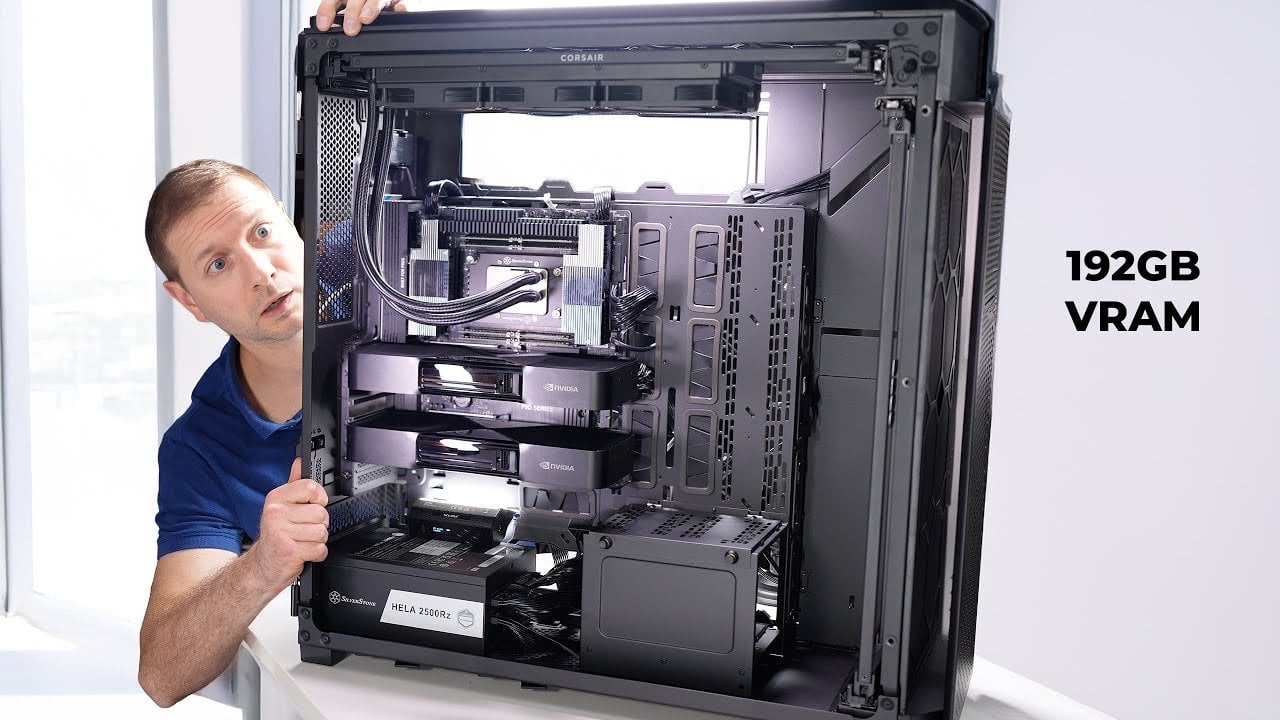
Run Massive 235B AI Models Locally on This Monster of a PC System
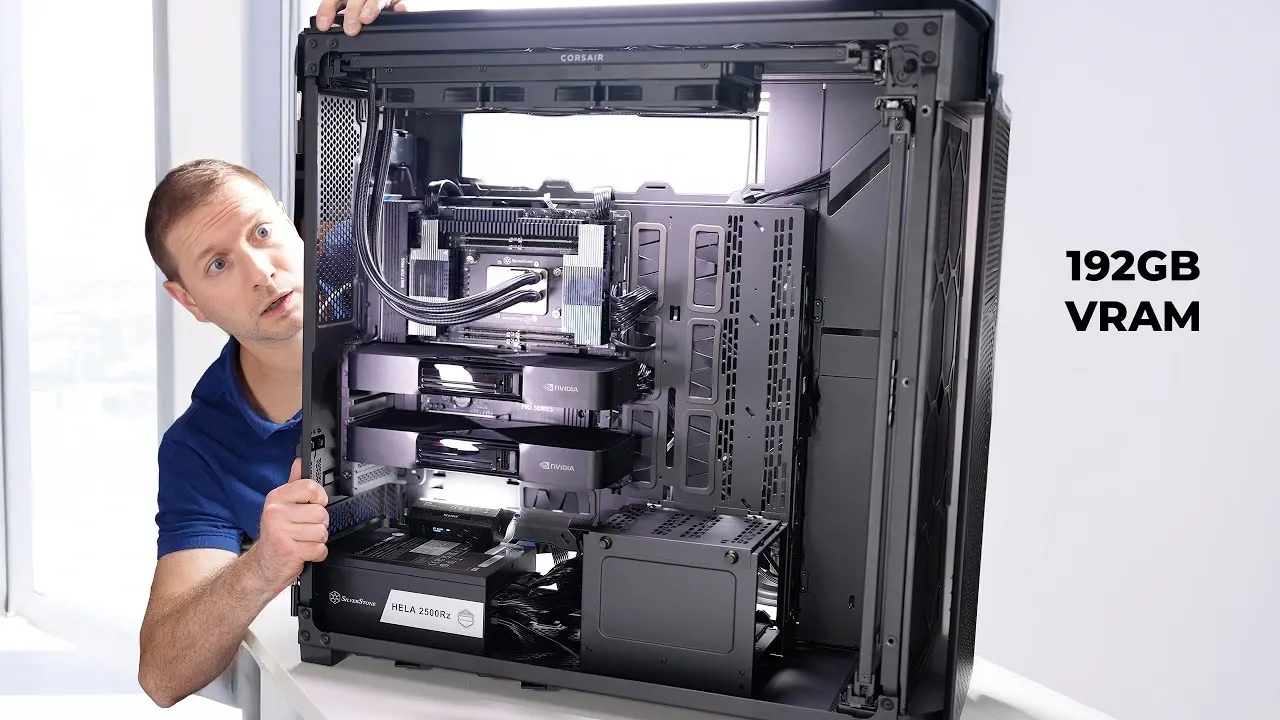
What if you could harness the raw power of a machine so advanced, it could process a 235-billion-parameter large language model with ease? Imagine a workstation so robust it consumes 2500 watts of energy, delivering unparalleled performance that obliterates the limits of consumer-grade hardware. This isn’t just a computer, it’s a technological juggernaut, built to dominate the most demanding AI workloads. In this deep dive, we’ll explore the creation of a high-performance AI workstation built by Alex Ziskind that doesn’t just meet expectations, it destroys them. From its innovative Threadripper CPU to dual RTX Pro 6000 GPUs, this build is a masterclass in engineering ambition.
But what does it take to construct such a beast? Beyond the jaw-dropping specs, there’s an intricate dance of power management, cooling systems, and workspace integration that ensures this machine can handle the heat, literally and figuratively. You’ll uncover the secrets behind its modular airflow design, the challenges of managing a 2500W power supply, and the real-world performance benchmarks that prove its dominance. Whether you’re an AI researcher, a hardware enthusiast, or simply curious about what’s possible when you push technology to its limits, this journey promises to inspire and inform. Because sometimes, the only way forward is to build something that destroys everything in its path.
Building a 2500W AI Workstation
TL;DR Key Takeaways :
- The AI workstation is built with innovative hardware, including a Threadripper 9970X CPU, dual RTX Pro 6000 GPUs, a TRX motherboard, and a 2500W power supply, making sure exceptional performance for running a 235-billion-parameter large language model (LLM).
- Effective cooling and thermal management are achieved using Noctua fans and a modular airflow system, prioritizing stability and efficiency without unnecessary features like RGB lighting.
- Power management solutions include dual power supply units (PSUs) and an uninterruptible power supply (UPS) to handle the high energy demands and ensure reliability during critical tasks.
- Performance testing demonstrated a token generation speed of 68 tokens per second, showcasing the system’s ability to handle demanding AI workloads far beyond consumer-grade hardware capabilities.
- The build emphasizes workspace integration, practical design, and future upgrade potential, balancing high performance with usability and scalability for AI research and development professionals.
The Foundation of High-Performance Computing
The backbone of any AI workstation lies in its hardware, and for a system designed to handle a 235-billion-parameter LLM, only the most advanced components will suffice. At the heart of this build is the Threadripper 9970X CPU, a processor engineered for extreme multitasking and computational intensity. Its architecture supports the simultaneous execution of numerous threads, making it ideal for AI workloads.
Complementing the CPU is the TRX motherboard, which ensures seamless communication between the processor, memory, and other components. This motherboard is specifically designed to handle the high data throughput required by large-scale AI models, making sure stability and efficiency during intensive operations.
For graphical processing, the workstation employs dual RTX Pro 6000 GPUs, which are optimized for AI and machine learning tasks. These GPUs deliver the raw computational power necessary for training and running large models, offering unparalleled performance compared to consumer-grade alternatives. To support these power-hungry components, the system is equipped with a 2500W power supply, which provides a stable and reliable energy source. All of these components are housed in a full-tower case, offering ample space for airflow, cable management, and future upgrades.
Cooling and Thermal Management: Making sure Stability Under Load
High-performance hardware generates significant heat, making effective cooling a critical aspect of the build. This workstation employs Noctua fans, renowned for their durability and quiet operation. These fans are strategically placed within the spacious full-tower case to create a modular airflow system, making sure that heat is efficiently dissipated even during prolonged periods of heavy use.
Unlike many consumer-grade systems, this build avoids the inclusion of RGB lighting, opting instead for a clean and professional aesthetic. This design choice not only reduces unnecessary power consumption but also minimizes distractions, creating a more focused and efficient workspace. The emphasis on thermal management ensures that the system remains stable and performs optimally, even under the most demanding conditions.
Alex Ziskind Builds a Powerful PC to Run Massive AI Models Locally
Learn more about local AI by reading our previous articles, guides and features :
- How to Set Up a Local AI Assistant Using Cursor AI (No Code
- Best GPUs for Local AI, VRAM Needs and Price Tiers Explained
- Local AI Setup Guide for Apple Silicon : Get a Big Boosts for Speed
- How the NVIDIA DGX Spark Redefines Local AI Computing Power
- VSCode Ollama Guide: Add Llama 3.1 Chat for Local AI Coding
- How to build a high-performance AI server locally
- Build a Local Qwen3-VL AI Security System with Drones & Phones
- How OpenAI GPT-OSS Are Making Local AI Accessible to All
- Why Local AI Processing is the Future of Robotics
- How to Set Up a Local AI System Offline Using n8n
Power Management: Meeting the Demands of a 2500W System
A workstation with a 2500W power supply presents unique challenges in power management. Standard electrical outlets are often insufficient to support such high energy demands, necessitating specialized solutions. This build incorporates dual power supply units (PSUs), which distribute the electrical load more effectively and enhance overall system reliability.
To further safeguard the system, an uninterruptible power supply (UPS) is included. This device protects the workstation from power fluctuations and outages, making sure uninterrupted operation during critical tasks. Together, these power management solutions provide the stability and reliability required for high-performance computing, allowing the system to operate at peak efficiency without compromising safety.
Performance Testing: Real-World Results
The workstation was subjected to rigorous performance testing using a 235-billion-parameter LLM. During these tests, the system achieved a token generation speed of 68 tokens per second, a benchmark that highlights its exceptional processing power and memory optimization. This level of performance far exceeds what is achievable with consumer-grade GPUs, underscoring the value of investing in professional-grade hardware for demanding AI workloads.
Workspace Integration: Practical Design and Organization
Integrating a high-performance workstation into a workspace requires careful planning to ensure functionality and efficiency. The full-tower case, while necessary for housing the advanced components, occupies a significant amount of physical space. Proper cable management is essential to maintain an organized and clutter-free environment, while adequate ventilation ensures that the system operates efficiently without overheating.
These considerations are not merely aesthetic but practical, as they contribute to the overall usability and reliability of the workstation. By addressing these factors, the build achieves a balance between performance and workspace integration, making it a practical solution for professionals in AI research and development.
Cost and Investment: Evaluating the Financial Commitment
Building a high-performance AI workstation represents a substantial financial investment. The Threadripper CPU, dual RTX Pro 6000 GPUs, and 2500W power supply are premium components that come with a high price tag. Additional expenses, such as the dual PSUs and UPS, further increase the overall cost of the build.
However, for professionals working in AI research or development, the benefits of such a system often outweigh the costs. The ability to handle large-scale models and demanding workloads translates to increased productivity and efficiency, making the investment worthwhile for those who require innovative performance.
Future Upgrades: Preparing for Tomorrow’s Challenges
While the current build is optimized for running large-scale LLMs, there is always room for improvement. Potential upgrades include:
- Adding additional GPUs to further enhance computational power and scalability.
- Implementing advanced cooling solutions, such as liquid cooling systems, to improve thermal management.
- Exploring more energy-efficient power management systems to reduce operational costs and environmental impact.
By staying proactive with upgrades and optimizations, the workstation can remain at the forefront of AI performance, making sure its relevance and utility in an ever-evolving field.
Setting a New Standard for AI Workstations
Building a 2500W AI workstation is a complex endeavor that requires meticulous planning and a deep understanding of high-performance computing. From selecting the right hardware to addressing power and cooling challenges, every aspect of the build is designed to meet the demands of running a 235-billion-parameter LLM. The result is a machine that not only delivers exceptional performance but also sets a new benchmark for what is possible in AI research and development. For professionals in the field, this workstation represents a powerful tool that combines innovative technology with thoughtful design, allowing new advancements in artificial intelligence.
Media Credit: Alex Ziskind
Filed Under: AI, Guides, Hardware
Latest Geeky Gadgets Deals
Disclosure: Some of our articles include affiliate links. If you buy something through one of these links, Geeky Gadgets may earn an affiliate commission. Learn about our Disclosure Policy.