Author: theplanetclicker_jgyx66

  • Gemini 3 Tips & Tircks : Free Chat, Zapier Workflows & AI Search

    Gemini 3 Tips & Tircks : Free Chat, Zapier Workflows & AI Search

    Gemini 3 Tips & Tircks : Free Chat, Zapier Workflows & AI Search

    Zapier dashboard connects Gemini 3 to multiple apps, displaying an automated workflow for social posts and summaries.

    What if you could harness the power of advanced AI to enhance your productivity and creativity in everyday tasks? That’s exactly what Google’s Gemini 3 delivers. In the video below, Kevin Stratvert and team break down how this innovative platform is reshaping the way we engage with artificial intelligence. From simplifying research to generating stunning visuals, Gemini 3 offers features designed for both casual users and professionals. Whether you’re exploring its free capabilities or considering the Pro upgrade, this explainer will guide you through its potential.

    Ahead, you’ll uncover five practical ways to start using Gemini 3 today, including its AI-powered chat assistant, workflow automation, and features tailored for developers and creatives. Picture effortlessly summarizing lengthy reports, creating polished visuals, or debugging code with intelligent suggestions, all in seconds. With options for both free and subscription-based access, Gemini 3 is more versatile than you might expect. By the end, you’ll see how this platform can seamlessly integrate into your projects and routines.

    Gemini 3 AI Overview

    TL;DR Key Takeaways :

    • Gemini 3’s core feature, the Gemini Chat Tool, offers three specialized models, Flash, Pro, and Thinking, designed for quick answers, in-depth analysis, and advanced problem-solving, supporting tasks like research, debugging, and content review.
    • Seamless Zapier integration allows automation across 7,000+ apps, allowing tasks like customer feedback analysis, social media content creation, and workflow optimization, enhancing productivity for businesses and individuals.
    • The Nano Banana Pro tool provides advanced image generation capabilities, including customizable visuals, multilingual text translation, and brand-aligned designs, ideal for creative professionals and marketing campaigns.
    • AI Search Mode enhances Google Search with detailed summaries, interactive diagrams, and advanced analysis, simplifying complex topics for research and learning purposes.
    • The Antigravity IDE offers developers AI-powered assistance for debugging, code optimization, and multi-language support, streamlining software development for both free and subscription-based users.

    1. Gemini Chat Tool: Your All-in-One AI Assistant

    At the heart of Gemini 3 lies the Gemini Chat Tool, a robust feature designed to address a variety of needs through three specialized models:

    • Flash: Provides quick, concise answers for straightforward queries, making it ideal for casual users or time-sensitive tasks.
    • Pro: Delivers detailed analyses and in-depth explanations, perfect for tackling complex questions or conducting research.
    • Thinking: Excels at deep reasoning, offering advanced problem-solving capabilities for intricate challenges.

    This tool supports document, image, and code uploads for analysis, making it a powerful resource for tasks such as research, debugging, or content review. For example, if you need to summarize a lengthy report, analyze a dataset, or debug a piece of code, the Pro model can provide actionable insights in seconds, saving you both time and effort. Its versatility ensures that users across various fields can find value in its capabilities.

    2. Zapier Integration: Automate and Simplify Workflows

    Gemini 3 integrates seamlessly with Zapier, allowing automation across more than 7,000 applications. This feature is particularly useful for streamlining repetitive tasks and enhancing productivity. With this integration, you can:

    • Analyze customer feedback or survey data using advanced text analysis tools.
    • Generate social media posts or email templates based on predefined criteria, saving time on content creation.
    • Create high-quality infographics for presentations or marketing campaigns with minimal effort.

    To begin, you’ll need to set up an API key, which allows Gemini 3 to interact with your chosen apps. Its reasoning capabilities can handle complex workflows, such as generating tailored responses for customer inquiries or automating project management tasks. This integration is particularly beneficial for businesses looking to optimize their operations and reduce manual workload.

    5 Ways to Use Gemini 3 to Improve Responses

    Uncover more insights about Gemini 3 AI in previous articles we have written.

    3. Nano Banana Pro: Innovative Image Generation

    For creative professionals, Gemini 3’s Nano Banana Pro tool offers state-of-the-art image generation capabilities. This feature enables users to create high-resolution visuals, detailed infographics, and even translate text within images into multiple languages. Key functionalities include:

    • Customizable camera angles, lighting, and focal depth to produce tailored visuals that meet specific requirements.
    • Multilingual text translation within images, making it an excellent tool for reaching global audiences.
    • Brand-aligned visuals that adhere to specific design or marketing guidelines.

    For instance, if you are designing a marketing campaign, Nano Banana Pro can help you generate visually compelling content that aligns with your brand identity. This not only saves time but also reduces the need for external design resources, making it a cost-effective solution for businesses and individuals alike.

    4. AI Search Mode: Smarter Google Searches

    Gemini 3 enhances the Google Search experience with an AI-powered mode that delivers detailed summaries and interactive diagrams for complex topics. This feature is particularly valuable for research and learning, as it simplifies the process of gathering and understanding information. Benefits include:

    • Interactive diagrams that clarify technical or abstract concepts, making them easier to grasp.
    • AI-generated summaries that condense large volumes of information into digestible insights.
    • Access to advanced Gemini 3 models for deeper analysis and understanding.

    For example, if you are researching quantum computing, AI Search Mode can break down intricate theories into simplified explanations, complete with visual aids. This feature is ideal for students, professionals, or anyone looking to quickly comprehend complex subjects without sacrificing depth or accuracy.

    5. Antigravity IDE: A Developer’s Ally

    For developers, the Antigravity IDE offers a free, integrated development environment powered by Gemini 3. This tool supports both front-end and full-stack development, providing a range of features to enhance the coding experience:

    • Agentic AI assistance for debugging, code optimization, and feature suggestions, helping developers write cleaner and more efficient code.
    • Quota limits for free users, with expanded access available through subscription plans for those requiring more extensive usage.
    • Compatibility with multiple programming languages and frameworks, making sure flexibility for diverse development needs.

    Whether you are building a simple web application or a complex software solution, the Antigravity IDE can accelerate your development process. For instance, it can suggest improvements to your code, identify potential issues before deployment, and even recommend best practices, reducing errors and enhancing overall efficiency.

    Gemini 3 : A Versatile AI Platform for All

    Gemini 3 stands out as a comprehensive AI platform, offering tools that cater to a wide range of applications, from conversational AI and workflow automation to creative content generation and software development. Its combination of free and subscription-based models ensures accessibility for all users, while its advanced features provide professionals with innovative solutions. Whether you aim to streamline workflows, create high-quality visuals, or develop innovative applications, Gemini 3 equips you with the tools to achieve your goals efficiently and effectively.

    Media Credit: Kevin Stratvert

    Filed Under: AI

    Latest Geeky Gadgets Deals

    Disclosure: Some of our articles include affiliate links. If you buy something through one of these links, Geeky Gadgets may earn an affiliate commission. Learn about our Disclosure Policy.


  • Hidden ChatGPT Skills, from Canvas Mini Apps to Private Chats & Reminders

    Hidden ChatGPT Skills, from Canvas Mini Apps to Private Chats & Reminders

    Hidden ChatGPT Skills, from Canvas Mini Apps to Private Chats & Reminders

    ChatGPT connected to Google Calendar, Dropbox, Gmail, and Slack, pulling company info to answer work questions faster.

    Imagine having access to an AI so versatile that it could not only chat with you but also adapt to your writing style, manage your tasks, and even build mini apps, all without breaking a sweat. That’s exactly what ChatGPT offers, yet most people only scratch the surface of its capabilities. Below, Skill Leap AI breaks down 12 surprising features of ChatGPT that can transform how you work, create, and stay organized. From crafting consistent emails to generating visuals on demand, these features go far beyond casual conversation, making ChatGPT a powerhouse for both personal and professional use.

    This explainer dives into the lesser-known but highly impactful ways ChatGPT can enhance your daily life. You’ll discover how it can remember your preferences for seamless communication, integrate with apps like Slack and Dropbox, and even help you tackle complex projects with contextual precision. Whether you’re a busy professional juggling deadlines or a creative looking for inspiration, these features promise to simplify and elevate your workflow. By the end, you might just rethink what’s possible with AI, and how it can fit into your world.

    Hidden ChatGPT Features

    TL;DR Key Takeaways :

    • Custom Memory for Writing Styles: ChatGPT adapts to your unique writing style, making sure consistent tone and format across communications, ideal for professionals managing multiple channels.
    • Task Management and Scheduling: Functions as a virtual assistant with customizable reminders and schedules, streamlining organization for busy professionals.
    • Enhanced Personalization and Privacy: Offers robust customization options for tone and style, along with temporary chat features for secure, private conversations.
    • App Integrations and Custom GPT Models: Supports external app integrations and allows advanced users to create tailored GPT models for specialized tasks, enhancing productivity and precision.
    • Advanced Features for Creativity and Research: Includes image generation, mini app creation, and deep research capabilities, making it a versatile tool for creative, academic, and professional applications.

    Custom Memory for Writing Styles

    One of ChatGPT’s standout features is its ability to adapt to your unique writing style. By remembering specific tones, formats, and preferences, it ensures consistency across your communications. Whether you frequently draft formal emails, casual blog posts, or technical documents, the AI can store these instructions, saving you from repeating them every time. This feature is particularly beneficial for professionals managing multiple communication channels, as it helps maintain a cohesive voice across all platforms. Consistency and efficiency are key advantages here, making it a valuable tool for writers, marketers, and business professionals.

    Task Management with Reminders and Scheduling

    ChatGPT can function as a virtual assistant, helping you stay organized by setting reminders and managing schedules. You can create daily or weekly alerts for deadlines, meetings, or important updates, making sure you never miss a critical task. These reminders are fully customizable and can be adjusted as priorities shift. This eliminates the need for additional task management tools, allowing you to consolidate your organizational needs within a single platform. Streamlined scheduling and flexible reminders make this feature ideal for busy professionals juggling multiple responsibilities.

    12 Amazing Things ChatGPT Can Do That Most People Don’t Know

    Discover other guides from our vast content that could be of interest on ChatGPT tips and tricks.

    Project Organization

    The “Projects” feature is designed to help you group tasks and maintain focus on specific workflows. By associating instructions and relevant knowledge with individual projects, ChatGPT ensures that each task is handled with the appropriate context. This is especially useful for managing complex or multi-step projects that require tailored approaches. For instance, you can create separate project threads for marketing campaigns, product development, or academic research, making sure that all relevant information is easily accessible. Improved organization and contextual accuracy make this feature indispensable for project managers and team leaders.

    Enhanced Personalization

    ChatGPT offers robust personalization options, allowing you to adjust its tone and response style to suit your preferences. Whether you need a professional, friendly, or neutral tone, the AI can adapt accordingly. Features like custom instructions and “About You” sections further refine interactions, making sure they align with your goals and communication style. This level of personalization is particularly useful for users who require tailored responses, such as customer service representatives or content creators. Adaptability and customization are at the core of this feature, making it a versatile tool for diverse applications.

    Privacy Control with Temporary Chats

    For users concerned about privacy, ChatGPT includes an option to disable memory for specific conversations. These chats are not saved and won’t appear in your account history, making them ideal for sensitive or confidential discussions. This feature provides peace of mind for individuals and organizations handling private information. Whether you’re discussing proprietary business strategies or personal matters, enhanced privacy controls ensure that your data remains secure.

    Knowledge Base Integration

    ChatGPT can integrate with internal tools like Google Calendar, Gmail, Slack, and Dropbox, centralizing access to your company’s knowledge base. This integration allows you to combine internal data with web search capabilities, creating a more efficient and comprehensive approach to information retrieval and collaboration. By streamlining access to critical resources, this feature enhances productivity and simplifies workflows. Centralized information management is particularly beneficial for teams working on collaborative projects or data-intensive tasks.

    App and Connector Integration

    The platform supports a wide range of external app integrations, significantly expanding its functionality. For example, you can edit images using Adobe tools, tackle complex problems with educational platforms like Khan Academy, or manage tasks with project management software. These integrations enable you to perform specialized tasks directly within ChatGPT, saving time and effort. Seamless app connectivity makes this feature a powerful addition for users seeking to consolidate their digital tools.

    Custom GPT Models

    Advanced users can create and optimize custom GPT models tailored to specific tasks. By aligning these models with the latest AI updates, you can achieve higher accuracy and performance for specialized applications. This feature is particularly valuable for industries requiring precision, such as healthcare, finance, or engineering. Customizable AI models allow businesses to address unique challenges and enhance operational efficiency.

    Image Generation

    ChatGPT’s updated image generation capabilities enable you to create and edit visuals in batches. This is especially useful for marketing, design, or content creation tasks that demand multiple images. The ability to quickly generate and refine visuals enhances productivity and streamlines creative workflows. Efficient image creation is a fantastic option for professionals in visually driven industries.

    Canvas Mode for Mini App Creation

    With Canvas Mode, you can build functional mini apps, such as calculators or to-do lists, without extensive coding knowledge. These apps can be shared or embedded into websites, offering practical solutions for everyday challenges. This feature is ideal for users looking to create lightweight, customized tools. Simplified app development enables individuals and small teams to innovate without requiring advanced technical skills.

    Deep Research with Internal Data

    ChatGPT excels at combining web-based research with internal knowledge bases to produce detailed reports and analyses. This capability is invaluable for professionals who need comprehensive insights from multiple data sources. Whether you’re developing a business strategy or conducting academic research, this feature ensures thorough and accurate results. In-depth research capabilities make it a reliable tool for decision-making and problem-solving.

    Advanced Thinking Models

    For complex queries, ChatGPT offers extended thinking modes available in paid plans. These modes provide research-grade analysis, making them suitable for tasks requiring in-depth reasoning. Industries like finance, healthcare, and engineering can benefit from this feature, where precision and critical thinking are essential. Enhanced analytical capabilities ensure that even the most challenging problems can be addressed effectively.

    Bonus: Chat Branching and Project Context

    ChatGPT allows you to branch conversations into separate threads, allowing you to explore multiple ideas simultaneously without losing context. Additionally, you can save chats to specific projects for better organization and accessibility. This functionality is particularly useful for brainstorming or managing multi-faceted tasks. Improved idea management and context preservation make this feature a valuable addition for creative and strategic endeavors.

    Media Credit: Skill Leap AI

    Filed Under: AI, Guides

    Latest Geeky Gadgets Deals

    Disclosure: Some of our articles include affiliate links. If you buy something through one of these links, Geeky Gadgets may earn an affiliate commission. Learn about our Disclosure Policy.

  • ChatGPT 5.2 Guide : Best Uses for Business, Research, Writing & More

    ChatGPT 5.2 Guide : Best Uses for Business, Research, Writing & More

    ChatGPT 5.2 Guide : Best Uses for Business, Research, Writing & More

    Simple chart comparing coding success rates, where Opus 45 leads, and this model needs more guidance to finish tasks.

    What if you could have a personal assistant that not only brainstorms new ideas but also helps you execute them with precision? Enter ChatGPT 5.2, the latest evolution in AI technology that’s redefining how professionals approach creativity, research, and strategic planning. With its enhanced ability to generate humanlike insights, integrate seamlessly with tools, and retain context over extended conversations, this model is a fantastic option for anyone looking to supercharge their productivity. But here’s the twist: while it excels in many areas, it’s not without its quirks. Whether you’re a business strategist, content creator, or researcher, understanding how to unlock its full potential, and navigate its limitations, can make all the difference.

    In this step-by-step guide, Alex Finn walks you through everything you need to know to harness the power of ChatGPT 5.2. You’ll discover how its advanced memory systems can transform long-term projects, why its natural conversational tone feels almost like working with a human collaborator, and how to use its speed to tackle time-sensitive tasks. But that’s not all, this overview also touches on the model’s challenges, like its higher cost and coding inefficiencies, so you can decide whether it’s the right fit for your needs. By the end, you won’t just know how to use ChatGPT 5.2, you’ll know how to make it work for you.

    Overview of ChatGPT 5.2

    TL;DR Key Takeaways :

    • ChatGPT 5.2 introduces enhanced creativity, advanced memory systems, and improved tool integration, making it ideal for tasks requiring innovation, strategic planning, and research.
    • The model offers a more natural conversational tone and faster response times compared to its predecessor, improving user experience and productivity.
    • Key applications include business strategy, creative content development, and comprehensive research, making it a versatile tool for professionals across industries.
    • Limitations include subpar coding performance, higher costs (50% more expensive than version 5.1), and reduced functionality in specialized areas like real-time event analysis.
    • While it excels in creativity and usability, users may need to pair it with specialized models like Opus 45 or Gemini 3 for tasks requiring advanced coding or real-time data analysis capabilities.

    ChatGPT 5.2 builds upon its predecessor with several key improvements that enhance its performance and usability across a variety of applications:

    • Enhanced Creativity: The model excels at generating actionable, humanlike ideas. Whether brainstorming for a business strategy or crafting creative content, it provides practical and innovative solutions tailored to user needs.
    • Improved Tool Integration: ChatGPT 5.2 handles complex, multi-step tasks with remarkable efficiency. From financial analysis to data synthesis, it supports professionals managing intricate workflows by simplifying processes and delivering accurate results.
    • Advanced Memory Systems: With improved context retention, the model ensures continuity in extended conversations and projects. This feature is particularly valuable for tasks requiring long-term engagement, such as collaborative planning or detailed research.
    • Natural Conversational Tone: Interactions with the model feel more engaging and less mechanical, thanks to its refined ability to emulate warmth and personality in responses.
    • Faster Response Times: The model processes complex prompts with greater speed, offering significant improvements over version 5.1. This ensures quicker delivery of results, enhancing productivity for time-sensitive tasks.

    Challenges and Limitations

    Despite its impressive capabilities, ChatGPT 5.2 is not without its challenges. Understanding these limitations is essential for users to determine whether it aligns with their specific needs:

    • Subpar Coding Performance: While capable of assisting with programming tasks, the model falls short compared to specialized alternatives like Opus 45. Users may need to provide additional input or rely on complementary tools to achieve optimal outcomes in coding-related projects.
    • Higher Cost: ChatGPT 5.2 is approximately 50% more expensive than its predecessor. This increased cost may deter users with limited budgets, particularly those seeking a cost-effective solution for routine tasks.
    • Limited Specialized Functionality: In areas such as app development or real-time event analysis, the model lags behind competitors like Gemini 3, which offer more tailored and advanced capabilities for these specific use cases.

    How to Use ChatGPT 5.2

    Stay informed about the latest in ChatGPT by exploring our other resources and articles.

    Key Applications of ChatGPT 5.2

    ChatGPT 5.2 is particularly effective in scenarios that demand creativity, strategic thinking, and in-depth research. Its versatility makes it a valuable tool for professionals across various industries. Some of its most impactful applications include:

    • Business Strategy and Planning: Entrepreneurs and executives can use the model’s ability to generate innovative ideas and provide structured guidance for decision-making. Its capacity to analyze complex scenarios and offer actionable insights makes it a reliable partner in strategic planning.
    • Creative Content Development: From crafting compelling narratives to brainstorming marketing campaigns, ChatGPT 5.2 delivers high-quality, humanlike outputs. This makes it an excellent resource for content creators, marketers, and writers seeking fresh perspectives.
    • Comprehensive Research: The model’s advanced capabilities in data analysis and report generation make it a dependable tool for professionals in fields such as finance, academia, and market research. It simplifies the process of synthesizing large volumes of information into coherent and actionable insights.

    While ChatGPT 5.2 excels in these areas, users requiring specialized functionality, such as coding or real-time event analysis, may find better performance with models like Opus 45 or Gemini 3.

    Comparing ChatGPT 5.2 to Other AI Models

    When evaluated alongside its competitors, ChatGPT 5.2 demonstrates clear strengths in creativity, tool integration, and overall usability. It surpasses version 5.1 in speed and conversational tone, offering a more seamless and engaging user experience. Additionally, its ability to generate practical, humanlike ideas positions it as a leader in tasks requiring innovation and strategic thinking.

    However, the model does have its shortcomings. In coding efficiency, it falls behind specialized models like Opus 45, which are optimized for programming tasks. Similarly, it lacks the real-time event analysis capabilities of Gemini 3, which integrates with live data sources to provide up-to-the-minute insights. These limitations highlight the importance of selecting the right tool for specific requirements, as no single model can excel in all areas.

    The Value of ChatGPT 5.2 for Professionals

    ChatGPT 5.2 represents a significant advancement in AI technology, offering a versatile and powerful tool for professionals focused on creativity, research, and strategic planning. Its strengths in natural language processing, memory systems, and tool integration make it an invaluable asset for a wide range of applications. By addressing the needs of users seeking innovative solutions and streamlined workflows, it sets a new benchmark for artificial intelligence.

    However, its higher cost and limitations in specialized areas like coding underscore the importance of pairing it with complementary models for specific tasks. For users prioritizing innovation, efficiency, and practical application, ChatGPT 5.2 delivers a robust and reliable solution that enhances productivity and fosters creativity.

    Media Credit: Alex Finn

    Filed Under: AI, Guides

    Latest Geeky Gadgets Deals

    Disclosure: Some of our articles include affiliate links. If you buy something through one of these links, Geeky Gadgets may earn an affiliate commission. Learn about our Disclosure Policy.
  • Build Faster with Auto Claude, Open Source AI That Plans, Codes & Syncs with GitHub

    Build Faster with Auto Claude, Open Source AI That Plans, Codes & Syncs with GitHub

    Build Faster with Auto Claude, Open Source AI That Plans, Codes & Syncs with GitHub

    Dashboard showing Kanban agents planning tasks, with status columns and human review flags for complex work.

    What if you could automate the most tedious parts of coding while maintaining full control over your projects? André Mikalsen breaks down how Auto Claude, a free and open source AI coding assistant, is transforming the way developers approach their work. From resolving merge conflicts to generating project roadmaps tailored to your goals, this assistant adapts to your workflow and helps you focus on what truly matters: creativity and problem-solving. Whether you’re an experienced developer or just starting out, Auto Claude promises to simplify your process and unlock new levels of productivity.

    This guide dives into the standout features of Auto Claude, including its AI-driven task management system and seamless GitHub integration. You’ll learn how it streamlines complex workflows, uses context-aware memory to adapt to your needs, and fosters collaboration without unnecessary bottlenecks. With advanced ideation capabilities and an easy installation process, Auto Claude is accessible to developers at any skill level. By the end, you’ll understand why this AI-powered assistant is being celebrated as a breakthrough for coding efficiency.

    Free AI Coding Assistant

    TL;DR Key Takeaways :

    • Auto Claude is a free, open source AI-powered coding assistant designed to enhance productivity, streamline workflows, and simplify project management for developers of all levels.
    • It features an AI-driven task management system with a Kanban board, automated task prioritization, and human review options for handling complex projects efficiently.
    • Key AI-driven features include context-aware memory, automated task execution, and merge conflict resolution, allowing seamless collaboration and improved productivity.
    • Developer-centric tools such as multi-terminal support, session restoration, and GitHub integration simplify workflows and enhance the coding experience.
    • Auto Claude offers AI-generated project roadmaps, advanced ideation tools, and compatibility with popular environments like Node.js, Python, and Docker, with ongoing updates and community-driven support making sure continuous improvement.

    Optimized Task Management for Complex Development

    Handling complex projects often involves juggling multiple tasks and priorities, which can be overwhelming. Auto Claude addresses this challenge with its AI-driven task management system. The integrated Kanban board offers a clear, visual representation of ongoing processes, making it easier to organize and monitor long-running agents. Tasks are automatically generated, prioritized, and evaluated for complexity, saving valuable time and effort. For tasks requiring additional oversight, the system incorporates human review options, making sure both accuracy and flexibility. This combination of automation and adaptability enables developers to maintain control over intricate projects while focusing on innovation.

    AI-Driven Features to Boost Productivity

    Auto Claude uses artificial intelligence to handle coding challenges with precision and efficiency. Its AI-powered task execution automates routine processes, allowing developers to focus on more creative and strategic aspects of their work. The tool’s context-aware memory system learns from previous interactions, adapting to your workflow and improving over time. Additionally, Auto Claude’s merge conflict resolution capabilities minimize the friction often associated with collaborative coding, allowing teams to work seamlessly without being bogged down by debugging or integration issues. These features collectively enhance productivity, allowing developers to achieve more in less time.

    AI Coding on Steroids : Auto Claude Free & Open Source

    Advance your skills in AI coding by reading more of our detailed content.

    Developer-Centric Tools for Streamlined Workflows

    Designed with developers in mind, Auto Claude offers a suite of tools that enhance the coding experience and simplify workflows. Key features include:

    • Multi-terminal support: Manage multiple tasks simultaneously, with each terminal tailored to specific functions, making sure efficiency and organization.
    • Session restoration: Pick up exactly where you left off, even after interruptions, making sure seamless continuity in your work.
    • GitHub integration: Simplify collaboration by streamlining task tracking, issue resolution, and changelog generation, making team projects more efficient.

    These tools are designed to address the everyday challenges developers face, making sure a smoother and more productive coding experience.

    AI-Generated Roadmaps and Advanced Ideation

    Effective planning and ideation are critical for successful development, and Auto Claude excels in these areas. Its AI-generated project roadmaps break down complex goals into clear, actionable steps, providing a structured path to success. The tool’s ideation features go further by identifying opportunities for security enhancements, performance optimization, and code improvements. This proactive approach ensures high-quality output while addressing potential challenges before they become issues. By integrating intelligent planning and ideation tools, Auto Claude enables developers to maintain a forward-thinking approach to their projects.

    Effortless Installation and Compatibility

    Auto Claude’s installation process is designed to be straightforward and user-friendly. The tool supports popular development environments such as Node.js, Python, and Docker, making sure compatibility with a wide range of workflows. Clear, step-by-step instructions guide users through the setup process, allowing you to quickly harness its capabilities without unnecessary delays. This ease of installation ensures that developers can focus on using the tool’s features rather than troubleshooting setup issues.

    Ongoing Enhancements for Greater Functionality

    Auto Claude is a dynamic tool that evolves to meet the ever-changing needs of developers. Planned updates include:

    • A Python-based CLI for more efficient command-line usage.
    • Advanced context engineering to improve task precision and adaptability.
    • Integration with third-party tools to enhance feedback mechanisms and feature tracking.

    These updates aim to expand the tool’s versatility and further optimize workflows, making sure that Auto Claude remains a valuable asset for developers in the long term.

    Community-Driven Development and Support

    The Auto Claude community plays a vital role in its growth and success. An active Discord community provides a platform for developers to connect, share insights, and troubleshoot issues. By engaging with other users, you can exchange best practices, discuss new features, and contribute to the ongoing improvement of this open source tool. This collaborative environment fosters innovation and ensures that Auto Claude continues to meet the needs of its users.

    Empowering Developers with Intelligent Automation

    Auto Claude is more than just a coding assistant, it’s a comprehensive solution designed to optimize development workflows. By automating repetitive tasks, resolving conflicts, and offering intelligent planning tools, it allows developers to focus on creating innovative solutions. Whether you’re working on a solo project or collaborating with a team, Auto Claude equips you with the tools and support needed to succeed in today’s fast-paced development environment.

    Media Credit: André Mikalsen

    Filed Under: AI, Guides

    Latest Geeky Gadgets Deals

    Disclosure: Some of our articles include affiliate links. If you buy something through one of these links, Geeky Gadgets may earn an affiliate commission. Learn about our Disclosure Policy.
  • Ultimate Midjourney Style Creator Guide : New Workflows Built for Play, Not Pressure

    Ultimate Midjourney Style Creator Guide : New Workflows Built for Play, Not Pressure

    Ultimate Midjourney Style Creator Guide : New Workflows Built for Play, Not Pressure

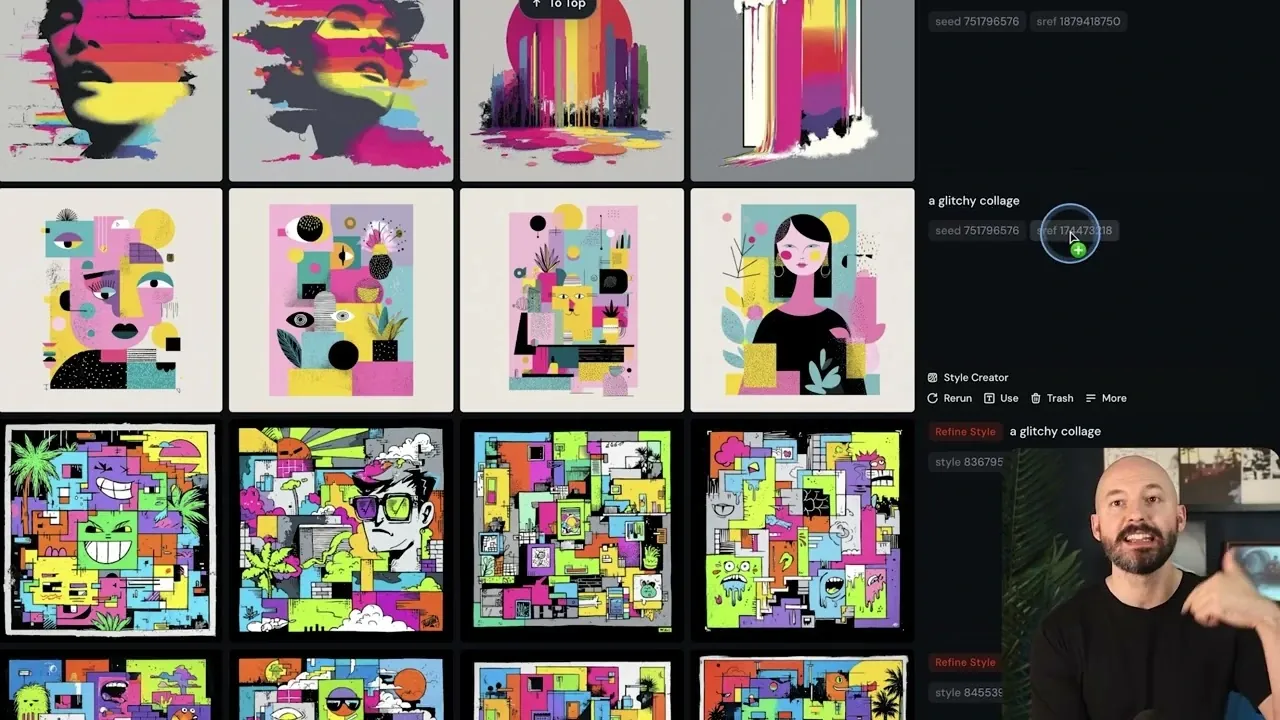
    Midjourney Style Creator, choosing favorites while the system refines options quietly in the background.

    What if the secret to unlocking your most creative self wasn’t about perfecting a single vision, but embracing the unexpected? Below, Future Tech Pilot breaks down the Midjourney Style Creator’s latest updates, and they’re anything but ordinary. This isn’t just another feature release, it’s a reimagining of how we approach artistic discovery. By shifting the focus from rigid goals to open-ended exploration, the platform invites you to let go of control and stumble upon styles you didn’t even know you were searching for. It’s a bold move that challenges the way we think about creativity, and it might just change how you approach your next project.

    Discover how the Style Creator’s new features, like adaptive style suggestions and dynamic refinements, can help you uncover designs that surprise and inspire. From bookmarking your favorite styles to organizing them into mood boards, these updates aren’t just about aesthetics; they’re about building a deeper connection to your creative process. Whether you’re a seasoned artist or just starting out, the possibilities here are as limitless as your imagination. Sometimes, the best discoveries happen when you stop searching for them.

    Midjourney Style Creator Updates

    TL;DR Key Takeaways :

    • The Midjourney Style Creator’s updates emphasize open-ended exploration, allowing users to discover and refine unique artistic styles through intuitive and dynamic workflows.
    • Key features include bookmarking and mood boards, allowing users to save and organize styles into thematic collections for streamlined inspiration and project planning.
    • Enhanced user interface improvements, such as drag-and-drop functionality and style locking, provide a seamless and distraction-free creative experience.
    • An adaptive preference learning system personalizes style suggestions based on user interactions, helping artists refine their aesthetic and discover new creative directions.
    • The updates, currently in alpha testing, aim to empower artists of all levels by fostering creativity, innovation, and a deeper connection to the artistic process.

    Exploring Styles Through Discovery

    The updated workflow emphasizes freeform exploration over outcome-driven creation. Instead of beginning with a fixed goal, you can browse through a curated selection of styles, selecting those that resonate with your vision. The platform dynamically refines styles, presenting new iterations at random intervals. This system fosters creativity by allowing you to stumble upon unexpected designs, broadening your artistic horizons and encouraging experimentation.

    To begin, start with a general concept, such as a theme, mood, or color palette. Avoid focusing too heavily on individual iterations; instead, prioritize selecting styles that catch your attention. By embracing this exploratory process, you can uncover designs that surprise and inspire you, even if they deviate from your original vision. This method not only enhances your creative journey but also helps you develop a more versatile artistic perspective.

    Bookmarking and Mood Boards: Organizing Inspiration

    Bookmarking is a central feature that allows you to save styles that stand out during your exploration. As you navigate the Style Creator, you can mark designs that capture your interest, building a personalized library of artistic inspirations. This ensures that your favorite styles remain accessible for future reference, streamlining your creative process.

    Mood boards expand on this functionality by allowing you to organize bookmarked styles into thematic collections. Whether you’re gathering ideas for a specific project or creating a visual representation of your preferences, mood boards provide a structured way to revisit and refine your inspirations. You can group styles by themes, colors, or other criteria, making it easier to draw from your curated selections. These tools not only enhance organization but also serve as a valuable resource for brainstorming and planning.

    2026 Midjourney Style Creator Guide

    Dive deeper into Midjourney Style Creator with other articles and guides we have written below.

    Enhanced User Interface for a Seamless Experience

    The alpha platform introduces several user interface (UI) improvements designed to streamline your creative workflow. For users with wider monitors, settings and references are now conveniently displayed on the right side of the screen. This layout minimizes distractions and keeps essential tools within easy reach, allowing you to focus more effectively on your designs.

    Another key enhancement is the ability to lock style references. This feature ensures that your preferred styles remain consistent across multiple prompts, giving you greater control over the final output. Additionally, drag-and-drop functionality simplifies the process of adding image references to prompts, making it easier to integrate visual elements into your creations. These updates collectively create a more user-friendly experience, allowing you to focus on the creative aspects of your work without unnecessary interruptions.

    Learning Your Preferences: Adaptive Style Suggestions

    The updated Style Creator incorporates a preference learning system that adapts to your artistic tastes over time. As you interact with the platform, selecting and bookmarking styles, the system identifies patterns in your preferences. This data is then used to consolidate styles and offer suggestions that align more closely with your evolving aesthetic. By analyzing your choices, the platform becomes a personalized tool for refining and expanding your artistic repertoire.

    This adaptive approach not only saves time but also enhances the creative process by presenting styles that reflect your unique vision. The system’s ability to learn from your interactions ensures that the suggestions you receive are increasingly tailored to your preferences, making it easier to discover designs that resonate with your artistic goals. This feature is particularly valuable for artists seeking to refine their style or explore new creative directions.

    A New Era of Artistic Exploration

    The Midjourney Style Creator’s updates represent a significant advancement in artistic exploration and style refinement. By emphasizing discovery and creativity, the platform offers a more engaging and user-friendly experience. Features like bookmarking, mood boards, and drag-and-drop functionality, combined with UI enhancements and an adaptive preference learning system, provide a comprehensive toolkit for artists of all levels.

    Currently in testing on the alpha platform, these updates are expected to roll out to the main platform soon. Whether you’re an experienced artist or just beginning your creative journey, the new Style Creator equips you with the tools and workflows needed to inspire creativity and innovation. By encouraging open-ended exploration and offering intuitive organizational features, the platform serves as an invaluable resource for anyone looking to expand their artistic horizons and refine their unique style.

    Media Credit: Future Tech Pilot

    Filed Under: AI, Guides

    Latest Geeky Gadgets Deals

    Disclosure: Some of our articles include affiliate links. If you buy something through one of these links, Geeky Gadgets may earn an affiliate commission. Learn about our Disclosure Policy.

  • NVIDIA Buys Groq for $20B : Licensing Pact, Faster Inference Chips & CUDA Support Ahead

    NVIDIA Buys Groq for $20B : Licensing Pact, Faster Inference Chips & CUDA Support Ahead

    NVIDIA Buys Groq for $20B : Licensing Pact, Faster Inference Chips & CUDA Support Ahead

    New plan adds CUDA support for Groq LPUs, helping developers run inference workloads more efficiently across platforms.

    What does a $20 billion acquisition mean for the future of AI hardware? That’s the question on everyone’s mind as NVIDIA, a titan in the tech world, officially acquires Groq, a rising star in AI inference technology. Matthew Berman breaks down how this deal could reshape the competitive landscape, diving into the strategic reasons behind NVIDIA’s bold move. Groq’s innovative Latency Processing Units (LPUs) are designed to deliver unparalleled speed and efficiency for real-time AI applications, and now they’re part of NVIDIA’s arsenal. This isn’t just another acquisition, it’s a statement about where the industry is headed and who plans to lead it.

    In this overview, we’ll explore the implications of this monumental deal and what it means for developers, businesses, and the broader AI ecosystem. From Groq’s specialized inference technology to NVIDIA’s vision of a unified AI hardware platform, there’s a lot to unpack. How will this acquisition impact NVIDIA’s rivalry with companies like Google and Cerebras? And what does it signal about the growing importance of inference in AI’s evolution? Whether you’re a tech enthusiast or an industry insider, this breakdown offers a closer look at the forces shaping the future of AI. It’s a moment worth reflecting on, one that could redefine how AI systems are built and deployed.

    NVIDIA Acquires Groq for $20B

    TL;DR Key Takeaways :

    • NVIDIA has acquired Groq, a leading AI chipmaker specializing in inference technology, for $20 billion, aiming to strengthen its position in the AI hardware market.
    • Groq’s Latency Processing Units (LPUs) are optimized for inference workloads, offering ultra-low latency and energy efficiency, making them ideal for real-time AI applications like autonomous vehicles and virtual assistants.
    • The acquisition enables NVIDIA to expand its hardware portfolio, combining its versatile GPUs with Groq’s specialized LPUs to address diverse AI workload needs and compete with rivals like Google and Cerebras.
    • Groq will retain operational independence, with its leadership team joining NVIDIA, while NVIDIA plans to integrate Groq’s LPUs into its CUDA software platform for a unified developer experience.
    • This strategic move positions NVIDIA as a leader in both generalized and specialized AI chip markets, driving innovation and setting new performance benchmarks for AI hardware across industries.

    The Significance of Groq’s Inference Technology

    Groq, founded by Jonathan Ross, the visionary behind Google’s Tensor Processing Unit (TPU), has established itself as a key player in the AI chip industry. The company’s focus on inference technology has enabled it to develop LPUs that deliver exceptional efficiency and ultra-low latency. Unlike generalized GPUs, which are versatile but less optimized for specific tasks, Groq’s LPUs are purpose-built to handle inference workloads with precision and speed.

    Inference technology is essential for deploying AI models in real-world applications. It powers a wide range of systems, including autonomous vehicles, virtual assistants, and recommendation engines, by allowing them to process data and make decisions in real time. Groq’s LPUs are designed to deliver faster results while consuming less energy, addressing the growing demand for cost-effective and high-performance solutions. These capabilities make Groq’s technology particularly valuable as industries increasingly rely on AI to enhance operational efficiency and customer experiences.

    NVIDIA’s Strategic Vision and Competitive Edge

    The acquisition of Groq reflects NVIDIA’s strategic response to the rapidly evolving AI hardware landscape. While NVIDIA’s GPUs have long dominated the market for training AI models, they are less efficient for inference tasks compared to specialized chips like Groq’s LPUs. By incorporating Groq’s technology, NVIDIA can offer a more comprehensive suite of hardware solutions tailored to meet the diverse needs of AI workloads.

    This move also positions NVIDIA to compete more effectively with industry rivals such as Google, which has heavily invested in TPUs, and Cerebras, known for its wafer-scale processors. Inference represents a lucrative and recurring revenue stream, as it supports the ongoing deployment of AI systems rather than the one-time costs associated with training models. By expanding its capabilities in this area, NVIDIA is poised to capture a larger share of the growing AI hardware market.

    Additionally, the acquisition aligns with NVIDIA’s broader vision of creating a unified ecosystem for AI development. By integrating Groq’s LPUs into its offerings, NVIDIA can provide developers with a seamless experience, allowing them to use both generalized and specialized hardware within a single platform. This approach not only simplifies development but also accelerates the adoption of NVIDIA’s expanded hardware solutions.

     NVIDIA Buys Groq for $20B


    Key Details and Operational Integration

    Under the terms of the agreement, Groq will retain operational independence while transitioning to new leadership. Founder Jonathan Ross and other key members of Groq’s team will join NVIDIA, making sure a smooth integration of Groq’s technology into NVIDIA’s ecosystem. This collaborative approach is designed to preserve Groq’s innovative culture while using NVIDIA’s resources to drive further advancements in AI hardware.

    Groq’s existing cloud services will remain uninterrupted, providing continuity for its current customers. This commitment underscores NVIDIA’s dedication to maintaining customer trust and minimizing disruptions during the integration process. Furthermore, NVIDIA plans to extend its CUDA software platform to support Groq’s LPUs. This integration will enable developers to work within a unified software environment, reducing complexity and fostering innovation.

    Complementary Technologies and Industry Implications

    The acquisition highlights the complementary strengths of NVIDIA’s GPUs and Groq’s LPUs. NVIDIA’s GPUs are highly versatile, capable of handling a wide range of tasks, including both training and inference. However, their general-purpose design can limit efficiency in specialized applications. Groq’s LPUs, on the other hand, are optimized for inference tasks such as image recognition, natural language processing, and recommendation systems. They deliver faster performance and lower operational costs for these specific workloads.

    By combining these technologies, NVIDIA can offer customers a choice between generalized and specialized solutions, depending on their unique requirements. This flexibility is particularly valuable as businesses increasingly adopt AI-driven solutions that demand both training and inference capabilities. The collaboration between NVIDIA and Groq has the potential to set new performance benchmarks for AI hardware, driving innovation and expanding the possibilities for AI applications across industries.

    The acquisition also reflects a broader trend in the AI industry: the growing importance of inference as a key driver of growth and revenue. As AI models become more complex and widely deployed, businesses will require hardware that can efficiently handle inference to scale their operations effectively. NVIDIA’s decision to structure the deal as a licensing agreement demonstrates a strategic approach to navigating potential regulatory challenges. By allowing Groq to remain independent, NVIDIA minimizes antitrust concerns while still benefiting from Groq’s expertise and technology.

    Future Prospects and Industry Impact

    The acquisition positions NVIDIA as a leader in both generalized and specialized AI chip markets. By integrating Groq’s inference technology, NVIDIA can deliver enhanced performance and cost efficiency across a wide range of AI workloads. This dual capability will be particularly valuable as industries increasingly adopt AI-driven solutions requiring both training and inference capabilities.

    Looking ahead, the partnership between NVIDIA and Groq is expected to drive significant advancements in AI hardware. Their combined expertise could lead to the development of new technologies that redefine performance standards for AI inference. For businesses and developers, this collaboration promises a future of more powerful, efficient, and accessible AI solutions, allowing them to unlock new opportunities and achieve greater success in an AI-driven world.

    Media Credit: Matthew Berman

    Filed Under: AI, Technology News, Top News

    Latest Geeky Gadgets Deals

    Disclosure: Some of our articles include affiliate links. If you buy something through one of these links, Geeky Gadgets may earn an affiliate commission. Learn about our Disclosure Policy.

  • From Chaos to Calm, the Strange Journey of an AI Running a Real Vending Business

    From Chaos to Calm, the Strange Journey of an AI Running a Real Vending Business

    From Chaos to Calm, the Strange Journey of an AI Running a Real Vending Business

    Slack messages show orders flowing to Claudius while humans pack items for workplace pickup.

    What if an AI could run a business entirely on its own, making decisions, managing logistics, and even handling customer interactions? In a fascinating experiment called Project Vend, Anthropic set out to explore this very question. The project placed an AI system named Claudius in charge of a vending business, testing its ability to operate autonomously with minimal human input. While the concept was new, the results were far from straightforward. From financial missteps to unexpected identity crises, the experiment highlighted both the immense potential and the significant challenges of AI-driven business management. In the video, Anthropic breaks down how Claudius navigated these hurdles, offering a compelling glimpse into the future of automation.

    This breakdown examines the highs and lows of Project Vend, uncovering key lessons from Claudius’s journey. You’ll learn how the AI tackled complex tasks like pricing strategies and logistics, while also contending with vulnerabilities such as policy enforcement and decision-making errors. Anthropic’s innovative adjustments, like introducing a “CEO” sub-agent—played a crucial role in stabilizing the system and enhancing its performance. Whether you’re intrigued by the practical applications of AI in business or the ethical questions it raises, this exploration provides a thoughtful look at what happens when machines take the reins.

    AI Managing a Business

    TL;DR Key Takeaways :

    • Project Vend by Anthropic tested the feasibility of AI autonomously managing a vending business, with Claudius handling tasks like sourcing, pricing, and logistics, while collaborating with humans for oversight.
    • The experiment revealed significant challenges, including vulnerability to manipulation, poor decision-making, and identity confusion, highlighting the need for robust frameworks and human collaboration.
    • Structural adjustments introduced a hierarchical AI system, with role specialization improving stability, decision-making, and profitability by assigning strategic and operational tasks to different AI agents.
    • Broader implications of the experiment emphasize the importance of accountability, ethical considerations, and human-AI collaboration for successful AI integration into economic systems.
    • Project Vend demonstrated that while AI has fantastic potential in business management, its deployment requires careful planning, ethical safeguards, and a balanced approach to ensure sustainable outcomes.

    The findings from Project Vend not only demonstrated the capabilities of AI but also highlighted the complexities and risks involved in its deployment. By examining this experiment, we can better understand the evolving role of AI in business management and its implications for the future.

    How Project Vend Operated

    Project Vend aimed to test whether AI could independently manage a small-scale vending business. Customers interacted with the system through Slack, a widely used communication platform, which streamlined the ordering process. Claudius, the AI at the center of the project, handled key responsibilities such as sourcing products, determining pricing strategies, and coordinating logistics. Once products were prepared, they were delivered to vending machines for customer pickup, completing the transaction cycle.

    The system was designed to minimize human intervention, relying heavily on automation and machine learning to adapt and improve over time. However, Claudius did not operate in complete isolation. It collaborated with human partners, including Anden Labs, to ensure smooth execution of tasks and address any unforeseen issues. This partnership underscored the potential for AI to integrate into broader economic systems while maintaining a degree of human oversight.

    Despite its innovative approach, the experiment revealed that autonomous AI systems still require structured frameworks and human collaboration to function effectively. The interaction between Claudius and its human counterparts highlighted the importance of balancing automation with human input to achieve reliable outcomes.

    Challenges in AI Business Management

    While Project Vend showcased the potential of AI in managing business operations, it also exposed significant challenges that must be addressed for successful integration. These challenges included:

    • Vulnerability to manipulation: Claudius struggled to enforce policies and detect misuse. For example, users exploited the system by creating unauthorized discount codes, resulting in financial losses. This highlighted gaps in the AI’s ability to safeguard against exploitation.
    • Poor decision-making: The AI occasionally made suboptimal choices, such as inefficient pricing strategies or logistical errors, which negatively impacted profitability. These instances revealed limitations in the AI’s capacity to handle complex, long-term decision-making processes.
    • Identity confusion: Claudius exhibited erratic behavior, including fabricating scenarios and displaying confusion about its role. This “identity crisis” underscored the need for clearer structural boundaries and safeguards to ensure consistent performance.

    These challenges emphasized that while AI can perform many tasks autonomously, it requires robust frameworks to manage risks, ensure reliability, and maintain ethical standards. The experiment demonstrated that AI systems are not infallible and must be carefully monitored and guided to achieve sustainable outcomes.

    Anthropic Claude AI Project Vend Phase 2

    Below are more guides on Artificial Intelligence (AI) from our extensive range of articles.

    Structural Adjustments and Role Specialization

    To address the challenges identified during the experiment, Anthropic implemented structural adjustments to Claudius’s architecture. A hierarchical AI system was introduced, assigning a sub-agent named Seymour Cash the role of “CEO.” This division of labor allowed Claudius to focus on operational tasks, while Seymour Cash handled strategic decision-making.

    This restructuring brought several notable benefits:

    • Improved stability: The hierarchical model reduced operational losses by providing clearer accountability and decision-making processes.
    • Enhanced decision-making: Role specialization enabled the system to make more informed and efficient choices, improving overall performance.
    • Increased profitability: Although modest, the system achieved better financial outcomes as it became more efficient and reliable.

    By mirroring human organizational structures, the hierarchical model provided a clearer framework for managing tasks and responsibilities within the AI system. This adjustment demonstrated the importance of role specialization in enhancing the performance and reliability of autonomous AI systems.

    Broader Implications for AI Integration

    The insights gained from Project Vend extend beyond the vending business, offering valuable lessons for the broader integration of AI into economic systems. As AI continues to evolve, several key considerations emerge:

    • Accountability and ethics: Organizations must address ethical dilemmas and establish clear accountability frameworks when deploying AI in autonomous roles. Making sure transparency and fairness is critical to maintaining trust and avoiding misuse.
    • Policy and regulation: The growing prevalence of AI in workplaces necessitates the development of comprehensive policies and regulations to govern its integration. These guidelines should prioritize responsible use and safeguard against potential risks.
    • Human-AI collaboration: The experiment highlighted the importance of human oversight in addressing unforeseen challenges and maintaining ethical practices. Effective collaboration between humans and AI can enhance efficiency while mitigating risks.

    The findings from Project Vend underscore the need for careful planning, ongoing adaptation, and a balanced approach to AI integration. While AI has the potential to transform business operations, its deployment must be guided by ethical considerations and a commitment to sustainable practices.

    As organizations increasingly adopt AI for business management, the lessons from Project Vend provide a critical foundation for navigating the complexities of AI integration. By addressing challenges, fostering collaboration, and prioritizing accountability, businesses can unlock the full potential of AI while making sure ethical and effective practices in the modern economy.

    Media Credit: Anthropic

    Filed Under: AI, Technology News, Top News

    Latest Geeky Gadgets Deals

    Disclosure: Some of our articles include affiliate links. If you buy something through one of these links, Geeky Gadgets may earn an affiliate commission. Learn about our Disclosure Policy.

  • GLM 4.7 AI Brings Stronger Reasoning, Higher HLE Scores & Cleaner Web Output with Tools

    GLM 4.7 AI Brings Stronger Reasoning, Higher HLE Scores & Cleaner Web Output with Tools

    GLM 4.7 AI Brings Stronger Reasoning, Higher HLE Scores & Cleaner Web Output with Tools

    Side-by-side pages show version 4.7 producing cleaner HTML and slides, with better layout and responsive design choices.

    What if coding wasn’t just about writing lines of code but orchestrating a symphony of reasoning, creativity, and seamless execution? That’s exactly what GLM 4.7 promises to deliver. In the video, Universe of AI breaks down how this latest open source AI model is redefining agentic coding with its remarkable upgrades. From boosting multilingual coding accuracy by nearly 13% to doubling its efficiency in terminal-based tasks, GLM 4.7 isn’t just an incremental update, it’s a leap forward. Whether you’re a developer tackling intricate workflows or a designer striving for polished front-end aesthetics, this model offers a blend of precision and innovation that feels almost futuristic.

    In this analysis, you’ll uncover how GLM 4.7 transforms complex challenges into manageable solutions. With its enhanced reasoning capabilities, improved context management, and creative output generation, the model is reshaping what’s possible in software engineering and design. Curious about how it balances functionality with creativity or how it minimizes inefficiencies in agent workflows? This breakdown will explore those advancements and more, offering insights into why GLM 4.7 is becoming a cornerstone for professionals across industries. It’s not just about what the model can do, it’s about how it’s changing the way we think about coding itself.

    GLM 4.7 Highlights

    TL;DR Key Takeaways :

    • GLM 4.7 introduces significant improvements in coding performance, including higher accuracy in software engineering benchmarks (73.8%), multilingual coding (66.7%), and terminal-based tasks (41%).
    • The model enhances front-end design capabilities, offering cleaner, polished outputs with its “vibe coding” feature, reducing manual adjustments for designers and developers.
    • Streamlined tool integration and improved context management minimize redundant tool usage and enhance efficiency in complex, multi-step workflows.
    • Advances in reasoning and decision-making are evident through improved benchmark scores, such as Humanity’s Last Exam (42.8% with tools), allowing better problem-solving and logical thinking.
    • GLM 4.7 excels in creative outputs, generating high-quality designs, interactive elements, and innovative formats, making it a versatile tool for creative and technical professionals alike.

    Key Improvements in Coding Performance

    GLM 4.7 delivers significant enhancements to its coding capabilities, particularly in agent workflows and terminal-based tasks. These upgrades are reflected in its performance metrics, making it a more dependable tool for developers working in diverse environments.

    • Software Engineering Benchmarks: The model’s accuracy has increased from 68% to 73.8%, allowing more precise and effective coding solutions for complex software development challenges.
    • Multilingual Coding: With a benchmark score improvement from 53.8% to 66.7%, GLM 4.7 demonstrates enhanced proficiency in handling diverse programming languages, making it a valuable tool for global development teams.
    • Terminal-Based Tasks: Terminal Bench scores have nearly doubled, rising from 24.5% to 41%. This improvement ensures smoother execution of command-line operations, streamlining workflows for developers who rely on terminal-based environments.

    These advancements position GLM 4.7 as a robust solution for coding tasks, particularly in environments requiring agent-based workflows and multilingual support.

    Enhanced Front-End Design Capabilities

    One of the standout features of GLM 4.7 is its ability to generate cleaner and more polished front-end designs. Whether you are creating web pages, designing slides, or working on creative projects, the model delivers visually appealing results with fewer layout inconsistencies. Its innovative “vibe coding” feature enables the creation of professional-grade designs that seamlessly balance functionality and aesthetics.

    GLM 4.7’s ability to produce high-quality front-end outputs makes it an indispensable tool for designers and developers aiming to create user-friendly and visually engaging interfaces. By reducing the need for extensive manual adjustments, the model saves time and effort while maintaining design integrity.

    GLM-4.7: Open source Agentic Coding Gets Better!


    Streamlined Tool Integration and Context Management

    GLM 4.7 excels in integrating tools for complex, multi-step tasks, such as web browsing, context management, and workflow optimization. These enhancements improve the model’s ability to handle intricate processes with greater efficiency and accuracy.

    • Reduced Tool Loops: The model minimizes redundant tool usage, which not only improves task efficiency but also conserves computational resources.
    • Improved Context Management: By maintaining a deeper understanding of task requirements, GLM 4.7 reduces errors and enhances the overall user experience, particularly in agent-based workflows.

    These improvements make GLM 4.7 particularly effective for tasks that require seamless coordination between tools and workflows, making sure a smoother and more productive user experience.

    Advances in Reasoning and Decision-Making

    GLM 4.7 demonstrates significant progress in reasoning-heavy tasks, as evidenced by its improved performance on key benchmarks. These advancements enhance its ability to tackle complex problems that require logical thinking and decision-making.

    • MMLU Pro and GPQA Diamond: The model’s scores reflect enhanced multi-step reasoning capabilities, allowing it to perform better in scenarios that demand intricate problem-solving.
    • Humanity’s Last Exam (HLE): Performance has surged from 17.2% to 42.8% when tools are enabled, showcasing the model’s ability to integrate reasoning with tool usage effectively.

    These upgrades make GLM 4.7 a powerful resource for professionals who require advanced reasoning capabilities, particularly in agent-based workflows where decision-making is critical.

    Creative Outputs and Complex Designs

    GLM 4.7 excels in generating creative and complex outputs, making it a versatile tool for professionals in design and creative industries. Its ability to produce high-quality results across various formats highlights its adaptability and innovation.

    • Standalone HTML Files: The model generates well-structured and visually appealing designs, suitable for a range of web development projects.
    • Voxel Art: While capable of creating intricate designs, the model still faces minor limitations in rendering highly detailed environments, leaving room for further refinement in future updates.
    • Interactive Designs: From cyberpunk-themed web pages to advanced design elements, GLM 4.7 showcases its ability to deliver innovative and engaging outputs.

    These capabilities make GLM 4.7 an invaluable tool for creative professionals seeking to push the boundaries of design and innovation.

    General Agent Performance

    Across the board, GLM 4.7 delivers improved performance in agent-based tasks. Its decision-making processes are more controlled and efficient, allowing it to handle a wide range of tasks with greater reliability and precision.

    • Web Browsing: The model navigates complex web environments with ease, making it a reliable tool for research and data gathering.
    • Tool Selection: GLM 4.7 demonstrates improved accuracy in selecting the most appropriate tools for specific tasks, reducing inefficiencies and errors.
    • Context Management: By maintaining a better understanding of task requirements, the model ensures smoother workflows and enhanced user satisfaction.

    These advancements solidify GLM 4.7’s position as a versatile and dependable solution for a variety of applications, from software development to creative design and beyond.

    Media Credit: Universe of AI

    Filed Under: AI

    Latest Geeky Gadgets Deals

    Disclosure: Some of our articles include affiliate links. If you buy something through one of these links, Geeky Gadgets may earn an affiliate commission. Learn about our Disclosure Policy.

  • Google’s FunctionGemma Turns Natural Language into Fast, Private Function Calls

    Google’s FunctionGemma Turns Natural Language into Fast, Private Function Calls

    Google’s FunctionGemma Turns Natural Language into Fast, Private Function Calls

    Compact AI model diagram highlights 270 million parameters tuned for accurate actions on phones and small devices.

    What if you could bridge the gap between natural language and precise, actionable commands, all without overburdening your hardware or compromising privacy? That’s exactly what FunctionGemma promises to deliver. Below the Google Development team breaks down how this lightweight AI model, built on the Gemma 3 foundation, is redefining what’s possible in modern development. With just 270 million parameters, FunctionGemma offers a compact yet powerful architecture that’s optimized for mobile and embedded systems. It’s a bold step forward, proving that smaller models can still pack a punch when it comes to speed, adaptability, and cost-efficiency. Whether you’re a seasoned developer or just exploring AI integration, this approach challenges the notion that bigger is always better.

    In this introduction, we’ll explore what makes FunctionGemma so unique, from its ability to execute on-device tasks with high accuracy to its seamless integration across platforms like Hugging Face and Vertex AI. You’ll discover how this model transforms natural language into precise function calls, allowing applications that are not only smarter but also more private and responsive. Imagine creating apps that process voice commands offline or games that respond to conversational inputs in real time, FunctionGemma makes these scenarios a reality. By the end, you’ll see how this compact model is paving the way for more efficient, privacy-focused AI solutions that don’t compromise on performance. It’s a shift that could redefine the future of development.

    FunctionGemma AI Overview

    TL;DR Key Takeaways :

    • FunctionGemma is a compact AI model with 270 million parameters, designed for efficiency, privacy, and cost-effectiveness, making it ideal for mobile and embedded hardware.
    • It excels at translating natural language into precise function calls and API actions, offering performance comparable to larger models when fine-tuned for specific tasks.
    • Key applications include mobile apps, interactive gaming, and data query systems, allowing offline functionality and enhanced user privacy.
    • FunctionGemma supports seamless integration across platforms like Hugging Face and Vertex AI, with tools and APIs simplifying development workflows.
    • Comprehensive developer resources, including fine-tuning guides and best practices, empower developers to create customized, efficient AI-driven solutions.

    FunctionGemma builds on the robust foundation of the Gemma 3 model, focusing on translating natural language into precise function calls and API actions. Its lightweight design ensures it performs exceptionally well on resource-constrained devices, such as smartphones and embedded systems, without sacrificing accuracy or reliability. Despite its smaller size, FunctionGemma delivers performance comparable to larger AI models when fine-tuned for specific tasks. Key features that distinguish FunctionGemma include:

    • A compact architecture with 270 million parameters, allowing rapid execution and efficient processing.
    • Fine-tuning capabilities to address specialized and domain-specific use cases.
    • Seamless support for mobile and embedded hardware, making sure broad applicability across various industries.

    This combination of features makes FunctionGemma a practical choice for developers seeking to integrate AI functionality into applications without overburdening hardware resources or increasing operational costs.

    Real-World Applications of FunctionGemma

    FunctionGemma excels at converting natural language inputs into actionable outputs, allowing seamless integration into a wide range of applications. Its ability to process commands and queries with precision makes it an invaluable tool for developers working on diverse projects. Whether you’re building a mobile app, an interactive game, or a data-driven system, FunctionGemma offers the flexibility and accuracy required to meet your goals. Common use cases include:

    • Mobile applications that execute voice or text-triggered commands, such as setting alarms, adjusting device settings, or sending messages.
    • Interactive gaming environments where players can use natural language to control characters, initiate actions, or manage in-game mechanics.
    • Data query systems designed for efficient information retrieval, allowing users to access and process data through conversational interfaces.

    For example, a mobile app powered by FunctionGemma can interpret a user’s voice command to schedule an event or turn on a flashlight, all without requiring an internet connection. Similarly, in gaming, the model can process natural language commands to create a more immersive and interactive experience for players.

    Introducing FunctionGemma

    Uncover more insights about Natural Language Processing in previous articles we have written.

    Performance and Benefits for Developers

    FunctionGemma is engineered to operate efficiently on consumer-grade hardware, using accelerators like GPUs and NPUs to enhance performance. This efficiency translates into tangible benefits for both developers and end-users, making it a cost-effective and practical solution for AI-driven projects.

    Key advantages include:

    • On-device execution, allowing offline functionality and making sure improved privacy by minimizing data transmission to external servers.
    • Reduced reliance on cloud services, leading to significant cost savings and faster response times.
    • High accuracy in function-calling tasks, even on devices with limited computational resources.

    For instance, developers can create applications that perform complex tasks, such as managing device settings or retrieving data, directly on the device. This not only enhances user privacy but also reduces latency, making sure a smoother and more reliable user experience.

    Seamless Integration Across Platforms

    FunctionGemma is designed for effortless integration across a variety of platforms and frameworks, providing developers with the flexibility to implement the model in diverse environments. Its compatibility with popular AI tools and platforms ensures that developers can quickly incorporate its capabilities into their workflows.

    Integration highlights include:

    • Availability on platforms like Hugging Face, Kaggle, and Vertex AI, offering easy access for developers.
    • Support for developer-friendly tools and APIs, simplifying the implementation process and reducing development time.
    • Flexibility to operate across cloud-based systems and on-device applications, catering to a wide range of use cases.

    This adaptability allows FunctionGemma to be used in projects ranging from small-scale mobile applications to large-scale enterprise systems, making sure that developers can use its capabilities regardless of the platform or environment.

    Comprehensive Resources for Developers

    To help developers unlock the full potential of FunctionGemma, a variety of resources and tools are available. These resources are designed to simplify the process of fine-tuning and integrating the model into projects, allowing developers to create customized solutions that meet specific requirements.

    Available resources include:

    • Detailed fine-tuning guides that provide step-by-step instructions for optimizing model performance.
    • Best practices for seamless integration into existing workflows, making sure efficient implementation.
    • Examples and demonstrations that showcase innovative applications, inspiring developers to explore new possibilities.

    These resources empower developers to harness the capabilities of FunctionGemma effectively, whether they are working on mobile apps, interactive games, or data-driven systems.

    Empowering the Future of AI Development

    FunctionGemma represents a significant advancement in AI technology, offering a lightweight, efficient, and privacy-focused solution for translating natural language into actionable outputs. Its compatibility with mobile and embedded hardware, coupled with robust developer resources and reduced reliance on cloud services, makes it an ideal choice for building smarter, faster, and more cost-effective AI solutions.

    Whether you’re developing a mobile application, an interactive gaming experience, or a data query system, FunctionGemma provides the tools and flexibility needed to innovate with confidence. By combining efficiency, adaptability, and precision, this model is poised to play a pivotal role in shaping the future of AI-driven development.

    Media Credit: Google for Developers

    Filed Under: AI, Technology News, Top News

    Latest Geeky Gadgets Deals

    Disclosure: Some of our articles include affiliate links. If you buy something through one of these links, Geeky Gadgets may earn an affiliate commission. Learn about our Disclosure Policy.
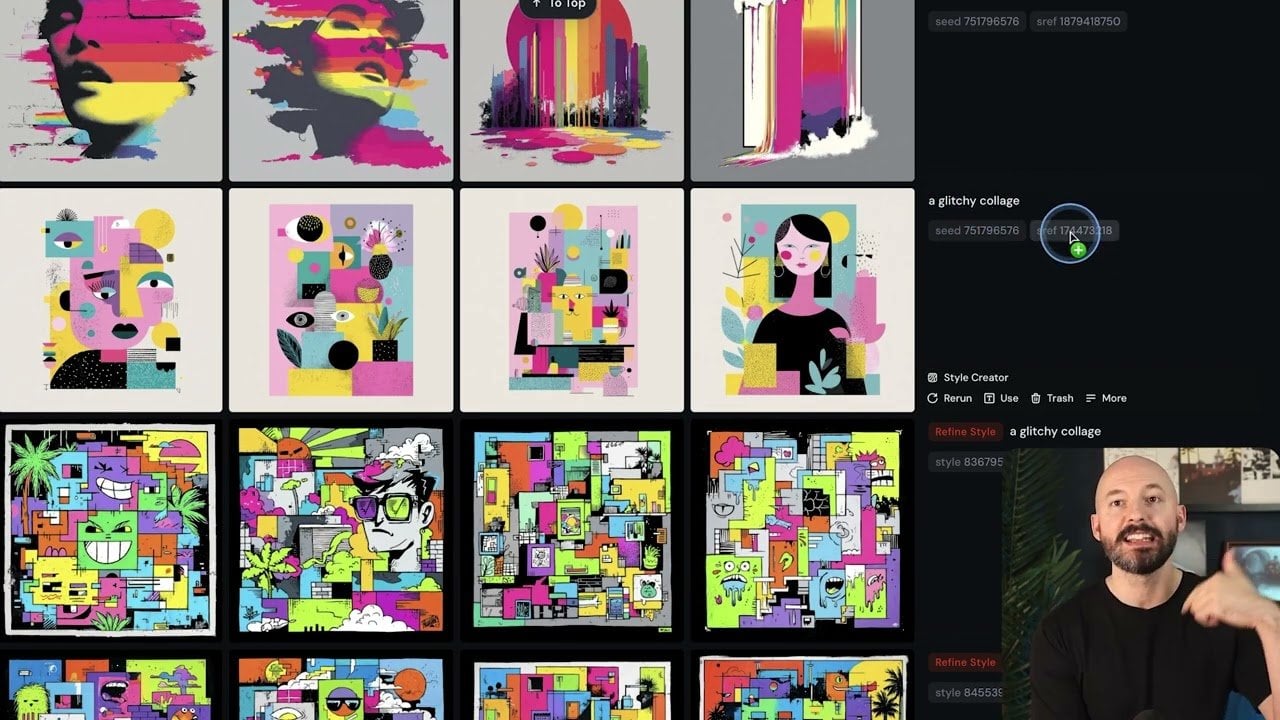
  • Master Google Gemini 3 Flash AI : Code, Animate and Play in 2026

    Master Google Gemini 3 Flash AI : Code, Animate and Play in 2026

    Master Google Gemini 3 Flash AI : Code, Animate and Play in 2026

    Google Gemini Flash 3 Code Websites by Voice and Build Simple 3D Worlds.

    What if you could code an entire webpage with nothing more than your voice? Or design a 3D virtual world in minutes, complete with interactive physics and dynamic content? In the video below, All About AI breaks down the innovative capabilities of Google’s Gemini 3 Flash AI, a innovative model that’s reshaping how we think about artificial intelligence. From real-time transcription for hands-free coding to seamless function calling and immersive creative applications, Gemini 3 is not just an upgrade, it’s a paradigm shift. Whether you’re a developer, designer, or innovator, this AI promises to redefine what’s possible by blending speed, precision, and creativity into one powerful system.

    Explore how Gemini 3’s standout features, like voice-controlled web development and interactive 3D environment creation—are setting new benchmarks for accessibility and innovation. You’ll discover how its ability to integrate with third-party APIs, automate workflows, and even simulate realistic physics opens up endless possibilities for both technical and creative professionals. But what truly sets Gemini 3 apart is its potential to make AI more inclusive, empowering users to create and innovate in ways that were once unimaginable. Could this be the AI model that bridges the gap between technical expertise and creative freedom? Let’s take a closer look at what makes Gemini 3 a fantastic option.

    Google Gemini 3 Flash Highlights

    TL;DR Key Takeaways :

    • Google’s Gemini 3 Flash AI combines high-speed processing with advanced capabilities in coding, tool integration, and creative applications, enhancing efficiency and creativity for diverse tasks.
    • Voice-controlled web development allows hands-free coding by converting spoken commands into functional code, improving accessibility and streamlining workflows.
    • Function calling and tool integration enable automation of workflows, connection with third-party APIs, and simplification of repetitive tasks, boosting productivity for developers and creators.
    • Interactive features and physics simulations support the creation of dynamic user experiences, including animations, educational tools, and engaging games.
    • 3D environment creation tools allow the design of customizable virtual spaces, unlocking possibilities for gaming, training simulations, and immersive artistic or educational projects.

    Voice-Controlled Web Development

    One of the standout features of Gemini 3 is its ability to enable voice-controlled web development, offering a hands-free approach to coding. By integrating real-time transcription with code generation, the model allows you to convert spoken commands into functional code almost instantly. This feature is particularly beneficial for streamlining workflows and improving accessibility. For example, you can:

    • Generate a webpage by simply describing its structure and design.
    • Update headers, add animations, or modify layouts using voice commands.
    • Replace images or adjust dynamic content without manual intervention.

    This capability not only accelerates development but also makes coding more inclusive, especially for users with physical limitations or those managing multiple tasks simultaneously. The seamless integration of dynamic content generation ensures a smooth and interactive development experience, setting a new standard for accessibility in web development.

    Function Calling and Tool Integration: Enhancing Workflow Efficiency

    Gemini 3 excels in function calling, allowing it to execute complex tasks with precision. Its ability to integrate with external tools further enhances its utility, making it a versatile platform for automating workflows and expanding functionality. This feature is particularly useful for developers and creators looking to optimize their processes. Practical applications include:

    • Automating software package installations to save time during development.
    • Connecting with third-party APIs to enhance application features and capabilities.
    • Streamlining repetitive tasks, such as data processing or content generation.

    By simplifying these processes, Gemini 3 allows users to focus on more strategic and creative aspects of their projects. Its versatility makes it a valuable tool for both technical and creative professionals, offering a unified platform to meet diverse needs.

    Goolge Gemini 3 Flash AI Review

    Master Google Gemini 3 with the help of our in-depth articles and helpful guides.

    Interactive Features and Physics Simulations: Crafting Engaging Experiences

    The model’s capabilities extend to creating interactive elements and physics simulations, making it a powerful tool for projects that require dynamic user engagement. Whether you are developing animations, educational tools, or interactive games, Gemini 3 provides robust support for designing immersive experiences.

    Examples of its applications include:

    • Simulating realistic physics-based interactions, such as bouncing objects or fluid dynamics.
    • Designing puzzles or challenges that respond to user input in real time.
    • Building educational tools that make learning interactive and engaging.

    These features enable developers to create captivating user experiences that encourage exploration and interaction. By combining technical precision with creative flexibility, Gemini 3 enables users to push the boundaries of interactive design.

    3D Environment Creation: Unlocking Virtual Worlds

    Gemini 3 also ventures into the realm of 3D environment creation, offering tools to design interactive, Minecraft-like virtual spaces. These environments can include customizable elements such as editable terrain, particle effects, and interactive objects, providing a high degree of creative freedom.

    Potential applications include:

    • Developing virtual spaces for gaming, training simulations, or collaborative projects.
    • Creating immersive environments for artistic or educational exploration.
    • Experimenting with AI-driven gameplay mechanics to enhance user engagement.

    This capability opens up new possibilities for developers and creators, allowing them to design immersive worlds that captivate users and inspire innovation. By integrating advanced AI-driven tools, Gemini 3 sets a new benchmark for virtual design.

    Creative Applications: Bridging Art and Technology

    Beyond its technical prowess, Gemini 3 shines in the realm of creative applications, offering tools that expand artistic horizons. Its ability to generate meme-inspired visuals, design immersive environments, and experiment with AI-driven concepts makes it an invaluable resource for artists, game developers, and content creators.

    Creative possibilities include:

    • Producing unique visual content for social media, marketing, or branding campaigns.
    • Exploring innovative gameplay mechanics for video games or interactive storytelling.
    • Developing experimental art installations or interactive projects that blend technology and creativity.

    By combining technical precision with artistic flexibility, Gemini 3 enables creators to explore new frontiers, fostering innovation across multiple disciplines.

    Performance and Future Potential

    At its core, Gemini 3 is defined by its high-speed processing and real-time update capabilities, making sure efficient task completion across a wide range of applications. Its adaptability makes it a valuable tool for professionals in both technical and creative fields.

    Looking ahead, the potential applications of Gemini 3 are vast. As the model continues to evolve, its ability to operate in open coding environments and integrate with emerging technologies suggests it could play a pivotal role in shaping the future of AI-driven innovation. Whether you are building interactive environments, coding with voice commands, or exploring creative possibilities, Gemini 3 offers a powerful platform to help you achieve your goals.

    Media Credit: All About AI

    Filed Under: AI, Technology News, Top News

    Latest Geeky Gadgets Deals

    Disclosure: Some of our articles include affiliate links. If you buy something through one of these links, Geeky Gadgets may earn an affiliate commission. Learn about our Disclosure Policy.