Author: theplanetclicker_jgyx66

  • Step-by-Step ChatGPT Skills : Structure Prompts, Set Roles, Refine Tone, Save Time in 2026
    Step-by-Step ChatGPT Skills : Structure Prompts, Set Roles, Refine Tone, Save Time in 2026

    Step-by-Step ChatGPT Skills : Structure Prompts, Set Roles, Refine Tone, Save Time in 2026

    Example of assigning roles like project manager or HR to guide ChatGPT toward more professional, targeted answers.

    What if you could transform ChatGPT from a simple chatbot into your most powerful productivity ally? As of 2025, this AI tool has evolved far beyond casual conversations, becoming a cornerstone for professionals and creatives alike. Yet, despite its growing capabilities, many users barely scratch the surface of what it can do. Imagine being able to draft polished reports in minutes, generate tailored insights on demand, or even automate repetitive tasks, all with just a few well-crafted prompts. The truth is, mastering ChatGPT isn’t about knowing how to use it, it’s about knowing how to use it well. And that’s where this learning tool comes in, guiding you step-by-step from beginner to ChatGPT pro.

    In this guide, Simon Sez IT takes you through the strategies and techniques that separate casual users of ChatGPT from true experts. You’ll uncover the art of prompt structuring, learn to wield role-based instructions for precision, and discover how to customize tone and style to suit any audience. But that’s just the beginning. Whether you’re a business professional looking to streamline workflows or a creative seeking new ways to enhance your craft, this resource will show you how to unlock ChatGPT’s full potential. By the end, you’ll not only understand the how but also the why behind advanced ChatGPT techniques, empowering you to use this tool with confidence and creativity. What could you achieve if you truly mastered the art of AI-driven communication? Let’s explore the possibilities.

    Becoming a ChatGPT Expert

    TL;DR Key Takeaways :

    • Mastering prompt structuring is key to achieving accurate and relevant outputs by defining tasks explicitly, providing context, and specifying tone, style, and format.
    • Role-based prompting enhances precision by assigning specific roles (e.g., “data analyst”) and combining them with audience-focused instructions for domain-specific insights.
    • Customizing tone and style ensures outputs align with different audiences and communication goals, such as formal reports or casual emails.
    • Iterative refinement allows for improved outputs by providing feedback, asking follow-up questions, and refining responses until they meet expectations.
    • ChatGPT streamlines business and finance tasks, including drafting briefs, summarizing notes, creating templates, analyzing budgets, and generating forecasts, while emphasizing data security.

    Mastering the Art of Prompt Structuring

    The foundation of effective ChatGPT usage lies in crafting clear and precise prompts. A well-structured prompt ensures that the AI understands your requirements, resulting in accurate and relevant outputs. To achieve this, focus on defining the task explicitly and providing the necessary context. For instance, if you’re drafting a project proposal, include details such as the purpose, target audience, and preferred format. Additionally, specifying instructions on tone, style, or length can further refine the response.

    • Define the task explicitly to eliminate ambiguity and guide the AI effectively.
    • Provide context, such as the audience, purpose, or desired outcome, to ensure relevance.
    • Specify tone, style, and format to tailor the response to your specific needs.

    By mastering prompt structuring, you can significantly improve the quality and precision of ChatGPT’s outputs, making it a more reliable tool for your tasks.

    Using Role-Based Prompting for Precision

    Role-based prompting is a powerful technique that enhances the specificity and relevance of ChatGPT’s responses. By assigning roles such as “data analyst,” “HR specialist,” or “project manager,” you provide a framework that guides the AI to deliver domain-specific insights. Combining roles with audience-focused instructions ensures that the output aligns with your objectives and meets professional standards.

    • Assign roles like “financial advisor” or “technical writer” to receive specialized outputs.
    • Combine roles with audience-specific instructions to ensure targeted and relevant results.
    • Use role-based prompts to draft professional documents, such as reports, presentations, or proposals.

    This approach allows you to tap into ChatGPT’s versatility, making it a valuable asset for tasks that require domain expertise and precision.

    How to Go From Beginner to ChatGPT Pro in 2026

    Gain further expertise in ChatGPT by checking out these recommendations.

    Customizing Tone and Style

    Adapting the tone and style of ChatGPT’s outputs is essential for addressing different audiences effectively. Whether you need a formal report, a casual email, or a persuasive pitch, you can instruct the AI to adjust its tone accordingly. For example, you might request a concise summary for executives or a detailed explanation for team members. This flexibility ensures that the output aligns with the communication style required for each situation.

    • Specify the tone, such as formal, conversational, or persuasive, to suit the intended audience.
    • Request structured outputs, like bullet points or numbered lists, for improved clarity and readability.
    • Adjust the length of responses to match the level of detail required for the task.

    By mastering tone and style customization, you can ensure that ChatGPT’s outputs resonate with your audience and meet your communication goals.

    Refining Outputs Through Iteration

    Interacting with ChatGPT should be viewed as a collaborative process. If the initial response doesn’t meet your expectations, you can refine it by providing additional feedback. For example, if a summary lacks depth, you can ask for more detail or specify key points to include. This iterative refinement process allows you to achieve greater accuracy and relevance over time.

    • Provide feedback to guide the AI in improving and refining its responses.
    • Ask follow-up questions to clarify or expand on the outputs as needed.
    • Iterate until the final result aligns with your expectations and requirements.

    Through iterative refinement, you can unlock the full potential of ChatGPT, making sure that its outputs consistently meet your standards.

    Practical Applications for Business

    ChatGPT offers a wide range of applications for business tasks, making it a valuable tool for saving time and improving efficiency. From drafting project briefs to summarizing meeting notes, its capabilities can streamline workflows and enhance communication. For example, you can use it to create reusable templates for reports or identify potential project risks.

    • Draft project briefs, timelines, and stakeholder updates with ease.
    • Summarize meeting notes and progress reports to keep teams informed.
    • Create templates for reports, agendas, and presentations to standardize workflows.
    • Identify and mitigate project risks through structured analyses and insights.

    By integrating ChatGPT into your business processes, you can enhance productivity and focus on strategic priorities.

    Finance-Specific Use Cases

    In the financial sector, ChatGPT can simplify complex tasks such as budget analysis and forecasting. By categorizing expenses or generating professional invoice reminders, it helps maintain accuracy and professionalism. Additionally, it can explain financial concepts in accessible language, making it easier to communicate with non-experts.

    • Summarize budgets and analyze financial data efficiently to support decision-making.
    • Generate forecasts and categorize expenses with precision for better financial planning.
    • Draft professional invoice reminders with customizable tone and style.
    • Explain financial concepts in clear, straightforward terms to improve understanding.

    By using ChatGPT for finance-specific tasks, you can enhance accuracy and streamline communication within your organization.

    Maximizing Efficiency with ChatGPT

    To unlock the full potential of ChatGPT, focus on using structured prompts and automating repetitive tasks. For example, you can use it to prepare meeting agendas, draft reports, or create templates, saving valuable time. However, it is essential to prioritize data security by avoiding the inclusion of sensitive or confidential information in your prompts.

    • Use structured prompts to save time and reduce the need for revisions.
    • Automate repetitive tasks, such as report generation and meeting preparation, to increase efficiency.
    • Ensure data security by avoiding the inclusion of sensitive or confidential information in prompts.

    By focusing on these strategies, you can maximize the efficiency and effectiveness of ChatGPT in your daily tasks.

    Media Credit: Simon Sez IT

    Filed Under: AI, Guides

    Latest Geeky Gadgets Deals

    Disclosure: Some of our articles include affiliate links. If you buy something through one of these links, Geeky Gadgets may earn an affiliate commission. Learn about our Disclosure Policy.
  • Run Massive 235B AI Models Locally on This Monster of a PC System

    Run Massive 235B AI Models Locally on This Monster of a PC System

    Run Massive 235B AI Models Locally on This Monster of a PC System

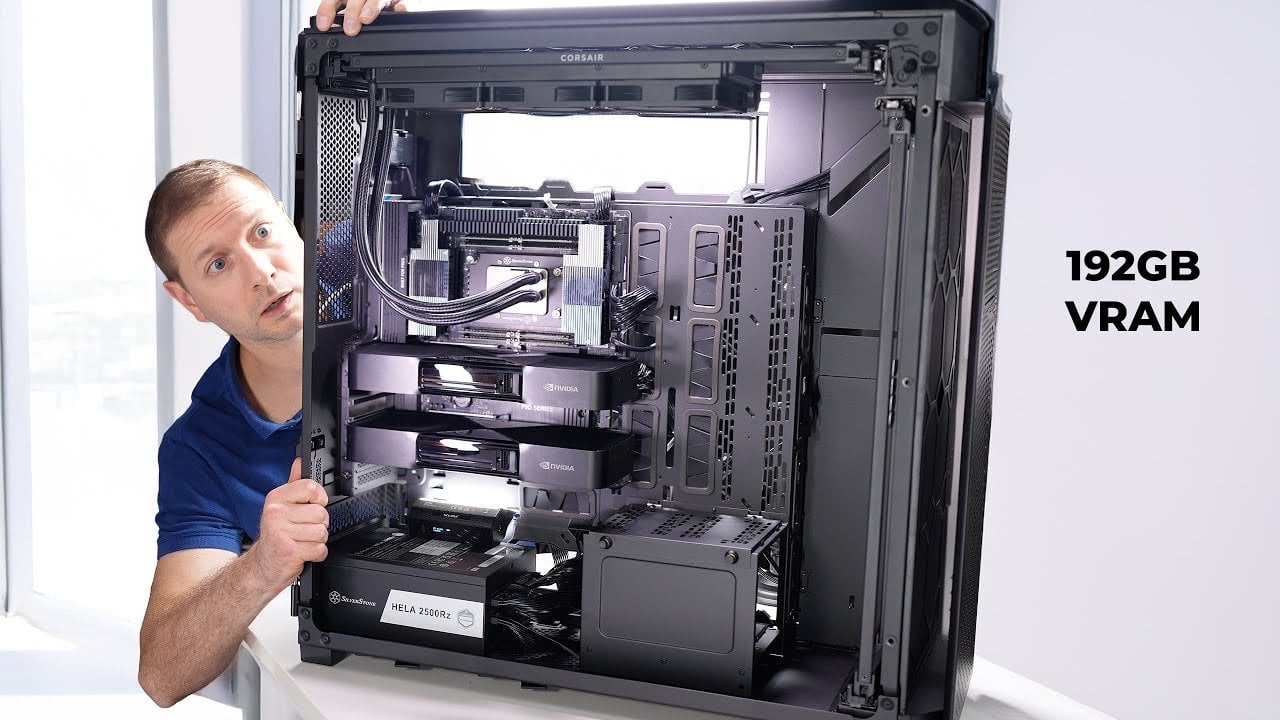
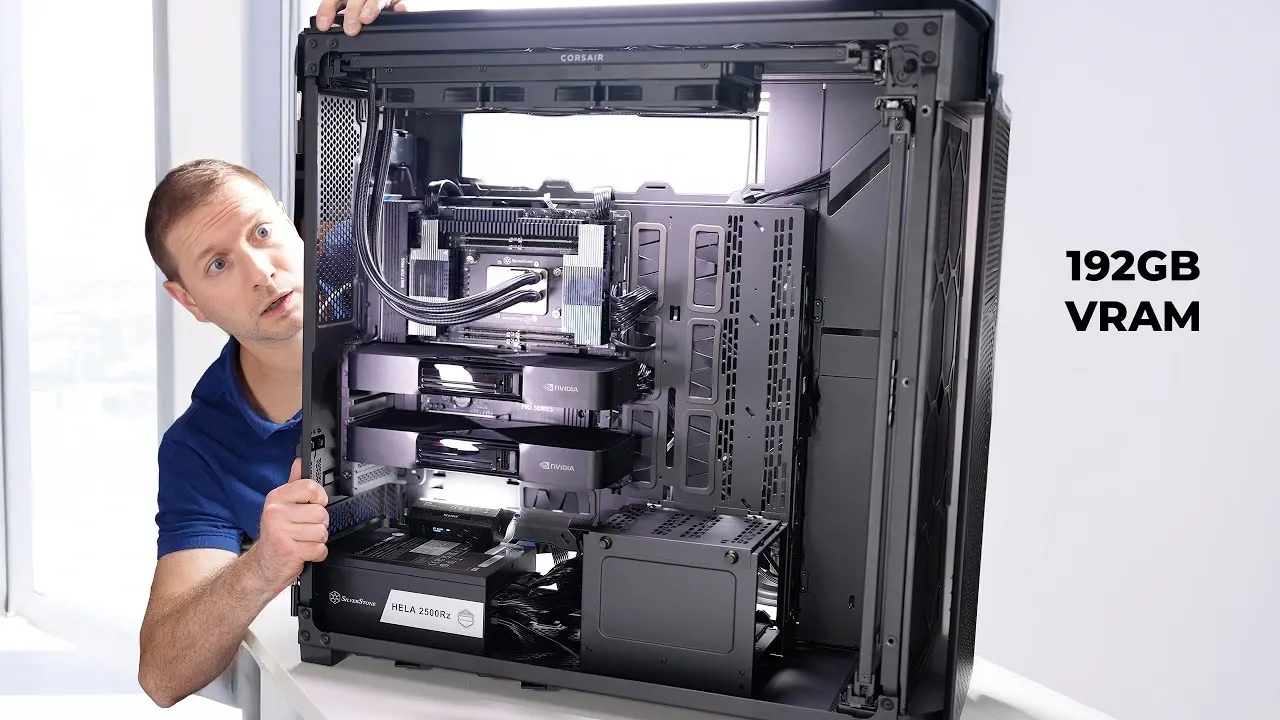
    Wide view of a Threadripper 9970X workstation with two RTX 6000 cards installed and tidy cable routing

    What if you could harness the raw power of a machine so advanced, it could process a 235-billion-parameter large language model with ease? Imagine a workstation so robust it consumes 2500 watts of energy, delivering unparalleled performance that obliterates the limits of consumer-grade hardware. This isn’t just a computer, it’s a technological juggernaut, built to dominate the most demanding AI workloads. In this deep dive, we’ll explore the creation of a high-performance AI workstation built by Alex Ziskind that doesn’t just meet expectations, it destroys them. From its innovative Threadripper CPU to dual RTX Pro 6000 GPUs, this build is a masterclass in engineering ambition.

    But what does it take to construct such a beast? Beyond the jaw-dropping specs, there’s an intricate dance of power management, cooling systems, and workspace integration that ensures this machine can handle the heat, literally and figuratively. You’ll uncover the secrets behind its modular airflow design, the challenges of managing a 2500W power supply, and the real-world performance benchmarks that prove its dominance. Whether you’re an AI researcher, a hardware enthusiast, or simply curious about what’s possible when you push technology to its limits, this journey promises to inspire and inform. Because sometimes, the only way forward is to build something that destroys everything in its path.

    Building a 2500W AI Workstation

    TL;DR Key Takeaways :

    • The AI workstation is built with innovative hardware, including a Threadripper 9970X CPU, dual RTX Pro 6000 GPUs, a TRX motherboard, and a 2500W power supply, making sure exceptional performance for running a 235-billion-parameter large language model (LLM).
    • Effective cooling and thermal management are achieved using Noctua fans and a modular airflow system, prioritizing stability and efficiency without unnecessary features like RGB lighting.
    • Power management solutions include dual power supply units (PSUs) and an uninterruptible power supply (UPS) to handle the high energy demands and ensure reliability during critical tasks.
    • Performance testing demonstrated a token generation speed of 68 tokens per second, showcasing the system’s ability to handle demanding AI workloads far beyond consumer-grade hardware capabilities.
    • The build emphasizes workspace integration, practical design, and future upgrade potential, balancing high performance with usability and scalability for AI research and development professionals.

    The Foundation of High-Performance Computing

    The backbone of any AI workstation lies in its hardware, and for a system designed to handle a 235-billion-parameter LLM, only the most advanced components will suffice. At the heart of this build is the Threadripper 9970X CPU, a processor engineered for extreme multitasking and computational intensity. Its architecture supports the simultaneous execution of numerous threads, making it ideal for AI workloads.

    Complementing the CPU is the TRX motherboard, which ensures seamless communication between the processor, memory, and other components. This motherboard is specifically designed to handle the high data throughput required by large-scale AI models, making sure stability and efficiency during intensive operations.

    For graphical processing, the workstation employs dual RTX Pro 6000 GPUs, which are optimized for AI and machine learning tasks. These GPUs deliver the raw computational power necessary for training and running large models, offering unparalleled performance compared to consumer-grade alternatives. To support these power-hungry components, the system is equipped with a 2500W power supply, which provides a stable and reliable energy source. All of these components are housed in a full-tower case, offering ample space for airflow, cable management, and future upgrades.

    Cooling and Thermal Management: Making sure Stability Under Load

    High-performance hardware generates significant heat, making effective cooling a critical aspect of the build. This workstation employs Noctua fans, renowned for their durability and quiet operation. These fans are strategically placed within the spacious full-tower case to create a modular airflow system, making sure that heat is efficiently dissipated even during prolonged periods of heavy use.

    Unlike many consumer-grade systems, this build avoids the inclusion of RGB lighting, opting instead for a clean and professional aesthetic. This design choice not only reduces unnecessary power consumption but also minimizes distractions, creating a more focused and efficient workspace. The emphasis on thermal management ensures that the system remains stable and performs optimally, even under the most demanding conditions.

    Alex Ziskind Builds a Powerful PC to Run Massive AI Models Locally

    Learn more about local AI by reading our previous articles, guides and features :

    Power Management: Meeting the Demands of a 2500W System

    A workstation with a 2500W power supply presents unique challenges in power management. Standard electrical outlets are often insufficient to support such high energy demands, necessitating specialized solutions. This build incorporates dual power supply units (PSUs), which distribute the electrical load more effectively and enhance overall system reliability.

    To further safeguard the system, an uninterruptible power supply (UPS) is included. This device protects the workstation from power fluctuations and outages, making sure uninterrupted operation during critical tasks. Together, these power management solutions provide the stability and reliability required for high-performance computing, allowing the system to operate at peak efficiency without compromising safety.

    Performance Testing: Real-World Results

    The workstation was subjected to rigorous performance testing using a 235-billion-parameter LLM. During these tests, the system achieved a token generation speed of 68 tokens per second, a benchmark that highlights its exceptional processing power and memory optimization. This level of performance far exceeds what is achievable with consumer-grade GPUs, underscoring the value of investing in professional-grade hardware for demanding AI workloads.

    Workspace Integration: Practical Design and Organization

    Integrating a high-performance workstation into a workspace requires careful planning to ensure functionality and efficiency. The full-tower case, while necessary for housing the advanced components, occupies a significant amount of physical space. Proper cable management is essential to maintain an organized and clutter-free environment, while adequate ventilation ensures that the system operates efficiently without overheating.

    These considerations are not merely aesthetic but practical, as they contribute to the overall usability and reliability of the workstation. By addressing these factors, the build achieves a balance between performance and workspace integration, making it a practical solution for professionals in AI research and development.

    Cost and Investment: Evaluating the Financial Commitment

    Building a high-performance AI workstation represents a substantial financial investment. The Threadripper CPU, dual RTX Pro 6000 GPUs, and 2500W power supply are premium components that come with a high price tag. Additional expenses, such as the dual PSUs and UPS, further increase the overall cost of the build.

    However, for professionals working in AI research or development, the benefits of such a system often outweigh the costs. The ability to handle large-scale models and demanding workloads translates to increased productivity and efficiency, making the investment worthwhile for those who require innovative performance.

    Future Upgrades: Preparing for Tomorrow’s Challenges

    While the current build is optimized for running large-scale LLMs, there is always room for improvement. Potential upgrades include:

    • Adding additional GPUs to further enhance computational power and scalability.
    • Implementing advanced cooling solutions, such as liquid cooling systems, to improve thermal management.
    • Exploring more energy-efficient power management systems to reduce operational costs and environmental impact.

    By staying proactive with upgrades and optimizations, the workstation can remain at the forefront of AI performance, making sure its relevance and utility in an ever-evolving field.

    Setting a New Standard for AI Workstations

    Building a 2500W AI workstation is a complex endeavor that requires meticulous planning and a deep understanding of high-performance computing. From selecting the right hardware to addressing power and cooling challenges, every aspect of the build is designed to meet the demands of running a 235-billion-parameter LLM. The result is a machine that not only delivers exceptional performance but also sets a new benchmark for what is possible in AI research and development. For professionals in the field, this workstation represents a powerful tool that combines innovative technology with thoughtful design, allowing new advancements in artificial intelligence.

    Media Credit: Alex Ziskind

    Filed Under: AI, Guides, Hardware

    Latest Geeky Gadgets Deals

    Disclosure: Some of our articles include affiliate links. If you buy something through one of these links, Geeky Gadgets may earn an affiliate commission. Learn about our Disclosure Policy.

  • 7 Awesome Google Antigravity Features That Give Vibe Coders An Edge

    7 Awesome Google Antigravity Features That Give Vibe Coders An Edge

    7 Awesome Google Antigravity Features That Give Vibe Coders An Edge

    Inline comments and frequent checkpoints in Antigravity let developers refine outputs without restarting long runs.

    What if you could code faster, smarter, and with less effort, while your competitors struggled to keep up? Enter Antigravity, Google’s new AI-powered coding tool that’s rewriting the rules of software development. With features that seem almost otherworldly, this tool doesn’t just assist developers, it gives them an unfair advantage. Imagine orchestrating a fleet of AI agents to debug, refactor, and optimize your code while you focus on the big picture. Antigravity isn’t just a tool; it’s a paradigm shift, empowering developers to tackle complex projects with unprecedented efficiency and precision. If you’re still relying on traditional workflows, you might be missing out on the future of coding.

    In this guide, Sean Kochel takes you through seven standout features that make Antigravity a fantastic option for modern developers. From real-time feedback loops that keep projects on track to customizable workflows tailored to your unique needs, these innovations are designed to amplify your productivity and creativity. But it’s not just about speed, it’s about control, transparency, and using AI to handle the grunt work so you can focus on what truly matters. Whether you’re curious about how browser automation can streamline UI testing or how agent management simplifies complex tasks, this journey will reveal why Antigravity is more than just a tool, it’s a competitive edge. Let’s explore what happens when coding meets innovation at its peak.

    Google Antigravity Overview

    TL;DR Key Takeaways :

    • Antigravity simplifies software development with an orchestration-first approach, allowing efficient management of multiple AI agents and automation of repetitive tasks.
    • The tool’s asynchronous feedback system allows real-time course corrections, making sure projects stay aligned with goals in dynamic workflows.
    • Artifact generation provides comprehensive documentation, promoting transparency, accountability, and ease of debugging for long-term projects.
    • Browser automation streamlines UI testing by allowing agents to self-grade performance, saving time and making sure consistent quality across projects.
    • Customizable workflows and model optimization features allow tailored solutions and smarter recommendations, enhancing efficiency and performance for diverse development needs.

    Agent Management: Streamlined Oversight for Complex Projects

    Antigravity’s agent management system is the foundation of its functionality, offering a centralized dashboard to oversee and interact with multiple AI agents simultaneously. This feature allows you to delegate tasks such as debugging, test case generation, or code refactoring while maintaining real-time visibility into their progress. By eliminating bottlenecks and making sure seamless coordination, this system enhances productivity and simplifies the management of multifaceted projects. Whether you’re handling a small team of agents or orchestrating a large-scale development effort, this feature ensures that every aspect of your project remains under control.

    Asynchronous Feedback: Real-Time Course Corrections

    The asynchronous feedback system is designed to keep your projects on track without unnecessary interruptions. Inline commenting and frequent checkpoints allow you to provide guidance to agents as they work. For example, if an agent’s implementation deviates from the intended direction, you can intervene immediately without restarting the entire process. This iterative feedback mechanism is particularly valuable in agile development environments, where adaptability and speed are critical. By allowing real-time course corrections, Antigravity ensures that your projects remain aligned with your goals, even in dynamic and fast-paced workflows.

    Google Antigravity for Devs, with Agent Control & Workflows

    Here are additional guides from our expansive article library that you may find useful on Google Antigravity.

    Artifact Generation: Comprehensive Documentation for Transparency

    Transparency is a cornerstone of Antigravity, and its artifact generation feature reinforces this principle. The tool automatically creates detailed logs, implementation plans, and step-by-step walkthroughs for every task. These artifacts provide you with a clear view of the development process and serve as essential resources for debugging, auditing, and future iterations. By documenting every step, Antigravity promotes accountability and continuous improvement. This feature is particularly beneficial for teams working on long-term projects, as it ensures that knowledge is preserved and easily accessible for future reference.

    Browser Automation: Efficient UI Testing

    For developers focused on user interface (UI) components, Antigravity’s browser automation capabilities are a significant time-saver. Optimized for Chrome, this feature enables agents to self-grade their performance on UI tasks, providing actionable insights into design and functionality. Whether you’re testing form validations, page responsiveness, or cross-browser compatibility, browser automation streamlines the process and ensures consistent quality across your projects. By automating repetitive UI testing tasks, you can focus on refining the user experience and addressing higher-priority issues.

    Custom Workflows: Tailored Solutions for Unique Needs

    Recognizing that every project has unique requirements, Antigravity offers customizable workflows to adapt to your specific needs. You can design, modify, and reuse workflows to automate deployment pipelines, standardize code reviews, or streamline other repetitive tasks. This flexibility allows you to focus on higher-value activities while maintaining consistency and efficiency across projects. By tailoring workflows to your development processes, Antigravity enables you to achieve better results with less effort, making it an indispensable tool for teams of all sizes.

    Model Optimization: Smarter Recommendations for Better Performance

    Antigravity’s model optimization feature provides intelligent recommendations to help you achieve optimal results. By analyzing task complexity and tool compatibility, the system suggests the most suitable models for your needs. For instance, it might recommend Gemini 3.0 for natural language processing tasks or Sonnet 4.5 for advanced computational operations. These insights enable you to maximize performance while minimizing resource usage, making sure that your projects run smoothly and efficiently. This feature is particularly valuable for developers working on resource-intensive applications, as it helps balance performance and cost-effectiveness.

    Review Policies: Balancing Control and Autonomy

    With adjustable review policies, Antigravity allows you to strike the perfect balance between agent autonomy and human oversight. You can configure settings to determine how much independence agents have during development. For example, you might allow agents to handle routine coding tasks autonomously while reserving manual approval for significant architectural decisions. This flexibility ensures high-quality outputs without compromising control or accountability. By tailoring review policies to your team’s workflow, you can maintain a consistent standard of quality while empowering agents to work efficiently.

    Redefining AI-Driven Development

    Antigravity is setting a new standard for AI-driven software development by combining advanced orchestration capabilities with human-in-the-loop processes. Its features, ranging from centralized agent management and asynchronous feedback to artifact generation and browser automation, are designed to enhance efficiency, transparency, and quality. Whether you’re managing complex workflows, automating routine tasks, or optimizing performance, Antigravity equips you with the tools to stay ahead in an increasingly competitive field. By prioritizing innovation and adaptability, this tool is poised to become an indispensable resource for developers aiming to push the boundaries of what’s possible in coding.

    Media Credit: Sean Kochel

    Filed Under: AI, Guides

    Latest Geeky Gadgets Deals

    Disclosure: Some of our articles include affiliate links. If you buy something through one of these links, Geeky Gadgets may earn an affiliate commission. Learn about our Disclosure Policy.

  • Watch Gemini 3 Pro & Claude 4.5 Combine to Ship Polished Apps : Dual AI Workflow

    Watch Gemini 3 Pro & Claude 4.5 Combine to Ship Polished Apps : Dual AI Workflow

    Watch Gemini 3 Pro & Claude 4.5 Combine to Ship Polished Apps : Dual AI Workflow

    Benchmark callout for Claude Opus 4.5, 80.9 percent on Swaybench, used for deep research and planning.

    What if you could design stunning websites and powerful apps in just minutes, without compromising on quality or creativity? It may sound like a bold claim, but the pairing of Gemini 3 Pro and Claude Opus 4.5 is making this a reality for developers everywhere. These two innovative AI models, seamlessly integrated through the Abacus AI platform, are rewriting the rules of web and app development. Imagine a workflow where front-end designs are polished to perfection while back-end systems are optimized for scalability, all with minimal effort. This isn’t just a step forward; it’s a leap into a future where automation and precision redefine what’s possible.

    In this overview, World of AI takes you through how this dual-engine system is transforming the development process from start to finish. From Gemini’s ability to handle complex, multimodal tasks with ease to Claude’s mastery of back-end architecture, you’ll discover how these tools complement each other to deliver unparalleled results. Whether you’re a seasoned developer or just starting out, the integration of these AI models offers a streamlined, intuitive approach that prioritizes both creativity and efficiency. By the end, you might just find yourself rethinking what’s achievable in the world of digital design.

    AI Models Transforming Development

    TL;DR Key Takeaways :

    • The collaboration between Gemini 3 Pro and Claude Opus 4.5, assistd by the Abacus AI desktop agent, transforms web and app development with faster, smarter, and more efficient workflows.
    • Gemini 3 Pro excels in front-end development, offering support for large-scale projects, multimodal task handling, and streamlined prototyping for polished, high-quality designs.
    • Claude Opus 4.5 specializes in back-end development, focusing on system planning, scalability, performance optimization, and advanced research capabilities.
    • The Abacus AI platform integrates front-end and back-end workflows, automates repetitive tasks, and supports iterative development, enhancing efficiency and innovation.
    • The subscription-based model at $10/month per user provides access to advanced AI tools, regular updates, and features like chat LM and deep agent for enhanced collaboration and automation.

    Gemini 3 Pro: Elevating Front-End Development

    Gemini 3.0 Pro is a robust solution for front-end development, designed to produce clean, efficient, and visually appealing code. With its ability to process a 1-million-token context, it seamlessly handles large and complex codebases, making it particularly effective for intricate reasoning and multimodal tasks. Whether you are prototyping a new interface or refining an existing design, Gemini ensures that your projects maintain a polished, professional aesthetic. Its focus on precision and efficiency makes it an indispensable tool for developers aiming to deliver high-quality front-end solutions.

    Key benefits of Gemini 3.0 Pro include:

    • Support for large-scale projects with extensive codebases
    • Enhanced multimodal task handling for diverse development needs
    • Streamlined prototyping and design refinement

    By using these capabilities, Gemini enables developers to achieve excellence in front-end development with minimal effort.

    Claude Opus 4.5: Mastering Back-End Development

    While Gemini excels in front-end tasks, Claude Opus 4.5 is tailored for back-end architecture and system planning. This model specializes in deep research, task decomposition, and document analysis, making sure that your applications are not only functional but also scalable and optimized for performance. With an impressive 80.9% score on the Swaybench benchmark, Claude demonstrates its ability to manage the structural and operational aspects of software development with exceptional reliability.

    Claude Opus 4.5 offers:

    • Comprehensive back-end system planning
    • Scalability and performance optimization
    • Advanced research and task management capabilities

    This focus on back-end excellence ensures that your applications are built on a solid foundation, capable of meeting both current and future demands.

    Combining Gemini 3.0 Pro & Claude Opus Designer

    Here are additional guides from our expansive article library that you may find useful on Gemini 3.

    Abacus AI: Uniting Front-End and Back-End Development

    The Abacus AI desktop agent serves as the critical link between Gemini 3.0 Pro and Claude Opus 4.5, allowing seamless collaboration between the two models. This platform provides a suite of tools, including a command-line interface (CLI), a code editor, and a desktop listener, all designed to streamline your development process. By automating workflows and supporting iterative development, Abacus AI ensures that your projects benefit from continuous refinement and improvement.

    Features of Abacus AI include:

    • Integration of front-end and back-end development workflows
    • Automation tools for enhanced efficiency
    • Customizable configurations to suit project-specific needs

    This integration allows developers to focus on innovation and creativity while the platform handles routine and repetitive tasks.

    AI Code Surgeon App: A Practical Example

    One standout application of this dual-engine system is the AI Code Surgeon App, which showcases the combined capabilities of Gemini and Claude. This app is equipped with advanced features designed to address real-world coding challenges, including:

    • Code repair and refactoring for cleaner, more efficient code
    • Security enhancements to protect against vulnerabilities
    • Performance optimization for faster, more reliable applications

    Additionally, the app includes interactive tools such as consultation mode for expert guidance, blueprint visualization for strategic planning, and emergency mode for addressing critical issues. These features highlight the system’s ability to provide comprehensive solutions for maintaining and improving codebases, making it an invaluable resource for developers.

    Optimized Workflow for Maximum Efficiency

    The workflow begins with you defining rule sets within the Abacus AI platform, assigning specific roles to each model. Claude Opus 4.5 takes charge of planning and architectural tasks, while Gemini 3.0 Pro focuses on front-end development and code generation. This clear division of responsibilities ensures that each model operates within its area of expertise, delivering optimal results.

    Key workflow steps include:

    • Defining project-specific rule sets and configurations
    • Assigning tasks to the appropriate AI model
    • Iterative development for continuous improvement

    This structured approach enhances flexibility and adaptability, allowing you to tailor the system to meet the unique requirements of your projects.

    Subscription Details and Accessibility

    Access to the Abacus AI platform is available through a subscription priced at $10 per month per user. This subscription includes additional tools such as chat LM and deep agent, which further enhance task automation and collaboration. Regular updates and new features ensure that your development tools remain innovative, providing consistent value and keeping you ahead in the competitive landscape of web and app development.

    Subscription benefits include:

    • Access to advanced AI models and tools
    • Regular updates to maintain technological relevance
    • Affordable pricing for individual and team use

    This cost-effective solution ensures that developers and businesses alike can use the power of AI to achieve their goals efficiently and effectively.

    Media Credit: WorldofAI

    Filed Under: AI, Top News

    Latest Geeky Gadgets Deals

    Disclosure: Some of our articles include affiliate links. If you buy something through one of these links, Geeky Gadgets may earn an affiliate commission. Learn about our Disclosure Policy.

  • Neo AI Web Browser Can Do Anything : Easily Automate Your Life Today

    Neo AI Web Browser Can Do Anything : Easily Automate Your Life Today

    Neo AI Web Browser Can Do Anything : Easily Automate Your Life Today

    Screenshot of Neo’s home screen showing privacy controls and Norton security alerts for risky sites.

    Imagine a web browser that doesn’t just help you surf the internet but actively works to simplify your life, protect your privacy, and supercharge your productivity. Bold claim? Perhaps. But that’s exactly what Neo, the AI-powered browser by Norton, promises to deliver. In a world where traditional browsers often feel bloated with ads, trackers, and inefficiencies, Neo emerges as a potential fantastic option. With its innovative AI tools, local data storage for enhanced privacy, and seamless integration of productivity features, Neo challenges the status quo. Could this be the browser that finally dethrones Chrome and redefines how we interact with the web?

    In this overview, World of AI explore how Neo’s AI-driven capabilities are reshaping the browsing experience. From its ability to summarize content and improve writing in real time to its focus on safeguarding your data with local storage, Neo offers a glimpse into the future of online interactions. But is it truly the “Chrome killer” it claims to be? Along the way, we’ll uncover its standout features, discuss its potential impact on your daily workflows, and consider whether it lives up to the hype. Whether you’re a multitasker, a privacy advocate, or simply someone seeking a more intuitive browsing experience, Neo might just surprise you.

    Neo AI Browser Overview

    TL;DR Key Takeaways :

    • Neo is an AI-driven web browser by Norton that prioritizes privacy and security through local data storage, giving users full control over their digital footprint while safeguarding against online threats.
    • The browser integrates AI-powered tools like inline text summaries, grammar assistance, contextual insights, and advanced features such as image generation and document processing to enhance productivity.
    • Neo includes a built-in ad blocker for distraction-free browsing, faster page loading, and an optimized online experience.
    • Smart tab management and personalized browsing features, such as automatic tab categorization and long-term memory, streamline multitasking and adapt to user habits.
    • Customization options and seamless integration with external applications make Neo a versatile and efficient solution for both personal and professional use.

    Privacy and Security: Empowering Users with Control

    Neo places a strong emphasis on protecting your privacy and making sure your online security. Unlike many browsers that rely on cloud storage, Neo keeps all your data, including browsing history, chats, and personal information, securely stored on your device. This local storage approach gives you the ability to decide what Neo retains, syncs, or deletes, offering unparalleled control over your digital information.

    On the security front, Neo uses Norton’s renowned protection technologies to safeguard you from online threats. It actively blocks phishing attempts, malicious websites, and other cyber risks, making sure a safe and secure browsing experience. By combining robust privacy measures with advanced security features, Neo provides a reliable solution for users who value their online safety and data integrity.

    AI-Powered Tools: Enhancing Productivity and Simplifying Tasks

    Neo’s suite of AI-powered tools is designed to streamline your daily activities and boost productivity. These features include:

    • Inline Summaries: Highlight any text to receive instant explanations or concise summaries, saving time and effort during research or reading.
    • Grammar and Writing Assistance: Effortlessly improve the clarity and accuracy of your writing with real-time grammar correction and suggestions.
    • Contextual Insights: Access relevant insights or recommendations based on the content you’re working on, helping you make informed decisions quickly.

    Additionally, Neo offers advanced capabilities such as AI-powered image generation and document processing. Whether you’re drafting an email, editing a report, or creating visual content, these tools simplify complex workflows, allowing you to focus on high-priority tasks. By integrating these features directly into the browser, Neo eliminates the need for additional software, making it a comprehensive productivity solution.

    Neo AI Browser a Chrome Killer?

    Here are additional guides from our expansive article library that you may find useful on AI browsers.

    Ad-Free Browsing and Optimized Performance

    Neo enhances your browsing experience by incorporating a built-in ad blocker. This feature eliminates intrusive advertisements that can disrupt your focus, creating a distraction-free environment for work or leisure. Beyond improving concentration, the ad blocker also accelerates page loading times, making sure a smoother and more efficient online experience. By reducing unnecessary clutter, Neo allows you to navigate the web seamlessly and without interruptions.

    Smart Tab Management and Personalized Browsing

    Managing multiple tabs is effortless with Neo’s intelligent tab organization system. Tabs are automatically categorized based on their content, making it easy to locate and switch between open pages. This feature is particularly useful for users who frequently multitask or conduct research across multiple websites.

    Neo also personalizes your browsing experience by remembering your preferences, frequently visited sites, and ongoing tasks. Its long-term memory feature ensures that your workflow remains uninterrupted, even after closing and reopening the browser. This tailored approach adapts to your habits, creating a browsing environment that feels intuitive and efficient.

    Customization and Seamless Integration

    Neo offers extensive customization options to suit your unique needs. You can personalize the browser’s appearance with themes, adjust settings to optimize performance, and create shortcuts for quick access to your favorite tools and websites. These customization features allow you to design a browsing experience that aligns with your workflow and preferences.

    The browser also integrates seamlessly with external applications, allowing you to manage notifications, access productivity tools, and interact with other software without leaving the Neo interface. This level of integration makes Neo a versatile solution for both personal and professional use, making sure that all your essential tools are easily accessible in one place.

    Efficiency Tools for Modern Workflows

    Efficiency is at the core of Neo’s design. Its AI chat feature provides instant answers to your questions and assists with web searches, reducing the time spent navigating between pages. Inline tools, such as text highlighting for summaries or explanations, further streamline your workflow by eliminating the need for additional applications. Whether you’re drafting documents, conducting research, or managing tasks, Neo’s all-in-one functionality simplifies your daily activities and enhances productivity.

    A New Standard for Browsing

    Neo sets a new standard for web browsers by combining advanced AI capabilities with a steadfast commitment to privacy and security. Its local data storage ensures that your information remains under your control, while Norton-powered protection shields you from online threats. With features designed to enhance productivity, streamline workflows, and eliminate distractions, Neo offers a comprehensive solution for modern browsing needs. Whether you’re working, creating, or exploring the web, Neo delivers a personalized, secure, and efficient experience tailored to your lifestyle.

    Media Credit: World of AI

    Filed Under: AI, Guides

    Latest Geeky Gadgets Deals

    Disclosure: Some of our articles include affiliate links. If you buy something through one of these links, Geeky Gadgets may earn an affiliate commission. Learn about our Disclosure Policy.

  • Cursor Version 2 Slashes Task Time with Multiple AI Agents in the IDE

    Cursor Version 2 Slashes Task Time with Multiple AI Agents in the IDE

    Cursor Version 2 Slashes Task Time with Multiple AI Agents in the IDE

    Dashboard view of Cursor version 2 showing multiple agents running tasks in parallel inside a clean IDE layout.

    What if the tools you rely on daily suddenly felt outdated, obsolete, even? That’s the bold claim many developers are making about Visual Studio Code in light of the release of Cursor 2, a new update that’s redefining the software development landscape. By integrating multi-agent systems, a revamped AI engine, and a built-in browser, Cursor v2 doesn’t just tweak the development process, it transforms it. Imagine delegating tedious coding tasks to AI agents while you focus on strategy, or cutting task times from minutes to mere seconds. This isn’t just an upgrade; it’s a paradigm shift that challenges the status quo of coding environments.

    In this overview, Better Stack explore how Cursor 2 is reshaping the role of developers, turning them into orchestrators of AI-driven workflows. You’ll uncover the key features that make this tool a potential fantastic option, from its Composer Model’s precision and speed to the efficiency of its multi-agent system. But it’s not all smooth sailing, adopting Cursor v2 requires a willingness to embrace new workflows and rethink how you approach development. Is this the future of coding, or just another overhyped tool? By the end, you’ll have a clearer sense of whether Cursor v2 is the innovation you’ve been waiting for, or a step too far into the unknown.

    Key Features That Differentiate Cursor 2

    TL;DR Key Takeaways :

    • Cursor v2 introduces the Composer Model, a redesigned AI engine that significantly accelerates coding tasks, reducing completion times from minutes to seconds while enhancing precision.
    • The multi-agent system allows up to eight AI agents to execute tasks simultaneously in isolated environments, improving workflow efficiency and reducing conflicts.
    • An integrated Chrome browser within the IDE streamlines testing, debugging, and data management, eliminating the need for external tools and enhancing workflow cohesion.
    • Cursor v2 optimizes productivity and cost-efficiency by allowing faster task completion, scalable multi-agent workflows, and reduced operational expenses for development teams.
    • Adopting Cursor 2 requires developers to embrace AI-driven workflows, transitioning from manual coding to managing AI agents, which redefines traditional development practices.

    Cursor v2 introduces several standout features that distinguish it from traditional development tools. These innovations include:

    • A redesigned AI engine, known as the Composer Model, which accelerates coding tasks with greater precision.
    • Multi-agent systems that allow simultaneous execution of tasks in isolated environments, making sure efficiency and conflict-free workflows.
    • An integrated browser for testing, debugging, and managing workflows directly within the IDE.
    • Cost-effective scalability for development teams, allowing optimized resource allocation and reduced operational expenses.

    These features collectively aim to enhance your workflow, allowing you to focus on strategic and creative aspects of development rather than repetitive tasks.

    The Composer Model: Accelerating Development with Precision

    At the core of Cursor 2 lies the Composer Model, a revamped AI engine designed to deliver both speed and accuracy. Tasks that previously required over two minutes can now be completed in as little as 28 seconds. This significant improvement not only saves time but also enhances the overall quality of your output. By reducing waiting times, the Composer Model allows you to dedicate more energy to refining your projects. Its efficiency positions it as a competitive alternative to other leading AI tools, offering developers a faster and more reliable coding experience.

    Cursor 2 : The Multi-Agent AI Update

    Below are more guides on AI coding from our extensive range of articles.

    Multi-Agent Systems: Transforming Workflow Management

    Cursor v2’s multi-agent system introduces a new approach to managing complex projects. With the ability to run up to eight agents simultaneously in isolated work environments, this feature enables you to delegate multiple tasks to AI agents. These agents execute their assignments in parallel, making sure that workflows remain efficient and free from conflicts. By using this system, you can oversee intricate projects with greater ease, transitioning from manual coding to orchestrating AI-driven processes. This shift allows you to focus on higher-level decision-making and strategic planning, redefining your role in the development process.

    Integrated Browser: Enhancing Workflow Cohesion

    One of the most practical features of Cursor v2 is its built-in Chrome browser, which provides a unified environment for testing, debugging, and data management. This integration eliminates the need to switch between external tools, allowing you to maintain focus and streamline your development process. Whether you are debugging a web application, running automated tests, or scraping data, the integrated browser ensures that all tasks are performed within a single, cohesive platform. This feature not only saves time but also enhances the overall efficiency of your workflow.

    Maximizing Productivity While Reducing Costs

    Cursor v2 is designed to optimize both productivity and cost-efficiency. The combination of faster task completion and the ability to run multiple agents per developer allows you to achieve more in less time. Additionally, the reduced per-task costs make it an attractive option for teams seeking to scale their operations without exceeding budget constraints. For developers, this means increased output, better resource utilization, and a more streamlined approach to project management.

    Community Insights: Strengths and Areas for Improvement

    Early adopters of Cursor v2 have highlighted several strengths, including the efficiency of the multi-agent system and the speed of the Composer Model. These features have proven particularly valuable in production environments, where handling complex tasks is a priority. However, some users have noted challenges, such as the interface being overwhelming for those accustomed to simpler tools. Occasional AI errors and privacy concerns, such as the need for manual opt-outs, have also been reported. These insights underscore the importance of ongoing refinement to address diverse user needs and ensure a seamless experience.

    Adapting to a New Development Paradigm

    Cursor v2 represents more than just a technological upgrade, it signifies a shift in how software development is approached. As a developer, your role evolves from writing code line by line to managing AI agents, assigning tasks, and verifying outputs. This transition requires a willingness to adapt to AI-driven workflows and develop new skills. Embracing this change is essential for staying competitive in an industry increasingly influenced by artificial intelligence. By adopting Cursor v2, you position yourself at the forefront of this transformation, using AI to enhance your capabilities and redefine your approach to development.

    Challenges and Future Opportunities

    While Cursor v2 offers significant advantages, it is not without its limitations. Usability challenges, occasional inaccuracies, and the learning curve associated with adopting new workflows can pose initial barriers. However, these obstacles are surmountable with continued refinement and user feedback. As the tool evolves, it has the potential to become an indispensable asset for developers, offering a glimpse into the future of coding. By addressing its current limitations, Cursor v2 could further solidify its position as a leading solution in AI-driven software development.

    Media Credit: Better Stack

    Filed Under: AI, Technology News, Top News

    Latest Geeky Gadgets Deals

    Disclosure: Some of our articles include affiliate links. If you buy something through one of these links, Geeky Gadgets may earn an affiliate commission. Learn about our Disclosure Policy.

  • Beginner’s Guide to Gemini 3 Pro, from Setup to Smart Workflows

    Beginner’s Guide to Gemini 3 Pro, from Setup to Smart Workflows

    Beginner’s Guide to Gemini 3 Pro, from Setup to Smart Workflows

    Step-by-step image creation in Nano Banana Pro, with text input, real-time edits, and high resolution output.

    Imagine having a tool that doesn’t just understand your words but also interprets your images, deciphers your data, and even assists with coding, all in one seamless platform. That’s the promise of Google’s Gemini 3.0 Pro, a innovative AI designed to transform how we work, create, and solve problems. Whether you’re a curious beginner or a seasoned professional, the sheer versatility of this multimodal AI can feel both exciting and overwhelming. But here’s the good news: you don’t need to be a tech expert to unlock its potential. In this quick-start guide, AI Master breaks down the essentials, helping you navigate Gemini’s advanced features with confidence and ease.

    By the end of this guide, you’ll discover how Gemini 3.0 Pro can simplify complex workflows, enhance your creativity, and even automate tedious tasks, all while adapting to your unique needs. From multimodal functionality that blends text, images, and video to tools like Nano Banana Pro for stunning visuals, this guide will show you how to harness AI’s full power. Along the way, we’ll explore real-world applications that make Gemini more than just a tool, it’s a partner in productivity and innovation. Ready to rethink what’s possible? Let’s explore how Gemini 3.0 Pro can transform the way you work and create.

    Google Gemini 3.0 Pro Overview

    TL;DR Key Takeaways :

    • Google’s Gemini 3.0 Pro is a multimodal AI platform capable of processing and generating text, images, audio, video, and code, making it highly versatile for diverse applications.
    • Key features include advanced reasoning for solving complex problems, seamless workflow integration, and enhanced multimodal analysis for tasks like data interpretation and reporting.
    • Complementary tools like Nano Banana Pro and VO 3.1 enhance creativity and video production, offering dynamic text rendering, multi-image fusion, and professional-grade video editing capabilities.
    • Notebook LM simplifies research and learning by summarizing documents, converting materials into audio explanations, and organizing information for presentations.
    • Agent Mode automates everyday tasks such as email organization, calendar management, and research compilation, boosting productivity and efficiency for professionals.

    Key Features That Set Gemini 3.0 Pro Apart

    Gemini 3.0 Pro is not just another AI model; it is a versatile tool designed to handle diverse data types and complex tasks. Its multimodal capabilities and advanced reasoning make it a standout choice for users across industries. Here are the key features that distinguish it from its predecessors and competitors:

    • Multimodal Functionality: Processes and interprets a wide range of data types, including text, images, audio, video, PDFs, and code, making it adaptable to various use cases.
    • Advanced Reasoning: Solves multi-step problems with precision, generating structured and actionable outputs tailored to specific needs.
    • Workflow Integration: Seamlessly integrates into existing processes, enhancing productivity and efficiency across different tasks.

    These features make Gemini 3.0 Pro a powerful tool for professionals and beginners alike, allowing them to tackle challenges with greater ease and accuracy.

    Real-World Applications and Benefits

    Gemini 3.0 Pro is designed to simplify complex tasks and enhance productivity in a variety of real-world scenarios. Its capabilities extend beyond basic AI functions, offering practical solutions for diverse needs:

    • Complex Problem Solving: Breaks down intricate problems into manageable steps. For example, it can analyze financial data, generate detailed project plans, or assist in strategic decision-making.
    • Multimodal Analysis: Combines visual and contextual information by interpreting images, dashboards, and documents, making it ideal for presentations, data analysis, and reporting.
    • Enhanced Search Capabilities: Delivers context-aware, visual, and actionable search results, streamlining research and improving decision-making processes.

    By using these features, users can address challenges more effectively, whether in business, education, or creative fields.

    How to Use Gemini 3.0 Pro AI For Beginners

    Explore further guides and articles from our vast library that you may find relevant to your interests in Google Gemini 3.0 Pro.

    Enhancing Creativity with Nano Banana Pro

    Nano Banana Pro, an integrated image generation and editing tool, complements Gemini 3.0 Pro by allowing the creation of high-quality visuals for various purposes. This tool is particularly valuable for professionals in marketing, education, and design. Its standout features include:

    • Dynamic Text Rendering: Incorporates real-time data into visuals, making sure relevance and accuracy.
    • Multi-Image Fusion: Combines elements from multiple images to create cohesive and visually appealing designs.
    • Versatile Applications: Supports branding, advertising, educational content, and more, making it a versatile tool for creative projects.

    With Nano Banana Pro, users can produce visually compelling materials that align with their goals, whether for professional campaigns or personal projects.

    Transforming Video Production with VO 3.1

    VO 3.1 takes video creation to the next level by offering tools for producing professional-grade videos with synchronized audio and seamless transitions. This feature is particularly useful for businesses, educators, and content creators. Key functionalities include:

    • Animation of Static Images: Transforms still visuals into dynamic animations with minimal effort.
    • Seamless Transitions: Ensures smooth scene changes, resulting in polished and engaging videos.
    • Visual Continuity: Maintains consistency across video projects, enhancing the overall quality and coherence of the content.

    These capabilities make VO 3.1 an essential tool for creating promotional videos, tutorials, and other multimedia content.

    Streamlining Research and Learning with Notebook LM

    Notebook LM is an AI-powered research assistant designed to simplify document exploration and summarization. It is an invaluable resource for students, researchers, and professionals who need to process large volumes of information efficiently. Its features include:

    • Document Summarization: Extracts key insights from lengthy reports, articles, or academic papers, saving time and effort.
    • Conversational Podcasts: Converts complex materials into audio explanations that are easy to understand and share.
    • Presentation Preparation: Organizes information into clear and impactful formats, making it easier to communicate ideas effectively.

    By using Notebook LM, users can enhance their research capabilities and improve the quality of their presentations and projects.

    Automating Everyday Tasks with Agent Mode

    Agent Mode improves task automation by integrating with tools like Gmail and Google Calendar. It simplifies repetitive workflows, allowing users to focus on more strategic activities. Practical applications include:

    • Organizing emails and prioritizing responses based on urgency and relevance.
    • Scheduling meetings and managing calendars with precision and efficiency.
    • Compiling research from multiple sources into cohesive project outlines or reports.

    This feature is particularly beneficial for professionals who need to manage multiple tasks and deadlines effectively.

    Collaborative and Educational Possibilities

    Gemini 3.0 Pro is not limited to professional use; it also offers significant benefits in education and creative fields. Its capabilities include:

    • Developing interactive learning tools and simulations for training and educational purposes.
    • Generating visual explanations to simplify complex concepts, making them more accessible to learners.
    • Supporting real-time coding projects for app development, prototyping, and other technical endeavors.

    These features make Gemini 3.0 Pro a valuable resource for educators, students, and creators looking to innovate and inspire.

    Preparing for the Future with AI

    As AI technology continues to evolve, tools like Gemini 3.0 Pro highlight the importance of staying ahead of the curve. By mastering these tools, you can:

    • Enhance your skill set and improve your employability in a competitive job market.
    • Discover new opportunities for innovation and growth in your field.
    • Adapt to the fast-paced demands of modern industries, making sure long-term success.

    Whether you are a beginner or an experienced professional, embracing AI-driven solutions is essential for maintaining a competitive edge in today’s rapidly changing world.

    Media Credit: AI Master

    Filed Under: AI, Guides

    Latest Geeky Gadgets Deals

    Disclosure: Some of our articles include affiliate links. If you buy something through one of these links, Geeky Gadgets may earn an affiliate commission. Learn about our Disclosure Policy.

  • 10x Your Productivity : Use AI to Cut Noise, Refocus Faster & Stretch Work Time

    10x Your Productivity : Use AI to Cut Noise, Refocus Faster & Stretch Work Time

    10x Your Productivity : Use AI to Cut Noise, Refocus Faster & Stretch Work Time

    Screenshot mockup showing AI filters silencing low priority alerts, letting only urgent messages reach the user during work.

    Imagine sitting down to tackle an important project, only to be interrupted by a flood of notifications, emails, and Slack messages. By the time you refocus, another distraction pulls you away. Sound familiar? You’re not alone. Research shows that it takes an average of 23 minutes and 15 seconds to regain focus after an interruption. In a world where constant connectivity is the norm, staying productive feels less like a skill and more like an impossible feat. But what if there were a way to treat focus not as a matter of willpower, but as a system you could optimize? Enter the Focus Framework, a structured approach that redefines how we think about productivity by addressing the root causes of distraction and inefficiency.

    Below Nate B Jones takes you through a methodical way of reclaiming your attention and maximizing your output. By exploring three critical variables, frequency of interruptions, recovery time, and uninterrupted work blocks—you’ll discover how to engineer your workday for sustained focus. Whether you’re an individual aiming to boost your personal efficiency or a team leader striving to create a distraction-free culture, this framework offers actionable strategies to help you thrive. Along the way, we’ll also uncover how artificial intelligence can serve as a powerful ally in reducing disruptions and enhancing deep work. Ready to rethink how you approach productivity? Let’s explore what’s possible when focus becomes a system, not a struggle.

    Optimizing Focus with AI

    TL;DR Key Takeaways :

    • John Duruk’s focus framework treats productivity as an engineering problem, using three measurable variables: frequency of interruptions (lambda), recovery time after interruptions (delta), and uninterrupted work blocks (theta).
    • Reducing interruptions (lambda) and recovery time (delta) while increasing uninterrupted work blocks (theta) can significantly enhance focus and productivity.
    • AI-powered tools can optimize focus by filtering notifications, summarizing tasks, and breaking down complex projects into manageable steps.
    • Practical strategies for individuals include using AI to minimize distractions, quickly regain context, and structure tasks for deep work sessions.
    • Teams can adopt the framework by establishing cultural norms, tracking deep work metrics, and maintaining shared documentation to improve collaboration and efficiency.

    The Core Productivity Framework

    At the heart of Duruk’s focus framework lies a structured approach to understanding and optimizing productivity. The framework revolves around three key variables that directly impact your ability to concentrate and perform deep work:

    • Lambda: This represents the frequency of interruptions you encounter during your workday. High lambda values indicate frequent disruptions, which can significantly hinder productivity.
    • Delta: This measures the time it takes to recover and regain focus after an interruption. A shorter delta allows you to resume tasks more quickly and effectively.
    • Theta: This refers to the duration of uninterrupted work blocks, which are essential for engaging in deep, focused work and achieving meaningful progress.

    By analyzing and adjusting these variables, you can create a work environment that minimizes distractions and maximizes productivity. For example, reducing lambda by silencing non-essential notifications or implementing clear communication protocols can lead to fewer interruptions. Similarly, adopting strategies to shorten delta, such as using tools that help you quickly regain context, can extend theta, allowing longer periods of deep focus.

    How AI Enhances Productivity

    Artificial intelligence has emerged as a fantastic tool for addressing the challenges of focus and productivity. By integrating AI-powered solutions into your workflow, you can effectively optimize the three variables of Duruk’s framework. Here’s how AI can make a difference:

    • Reducing Interruptions: AI-driven tools can filter and prioritize notifications, making sure that only critical alerts demand your attention. For instance, smart email filters or AI-enhanced messaging platforms like Slack can help you focus on high-priority tasks while minimizing distractions.
    • Speeding Up Recovery: After an interruption, AI can assist in quickly restoring your mental context. Tools that provide task summaries, highlight key points in shared documents, or track your workflow can help you seamlessly resume your work.
    • Breaking Down Tasks: AI can decompose complex projects into smaller, manageable tasks. This not only makes it easier to allocate time effectively but also ensures that each task fits within realistic time blocks for deep work.

    By using these AI capabilities, you can reduce lambda and delta while enhancing theta, creating a more productive and focused work environment.

    A Focus Framework to Help Improve Your Productivity

    Unlock more potential in productivity by reading previous articles we have written.

    Practical Strategies for Individuals

    Applying the focus framework at an individual level involves combining intentional work design with the strategic use of AI tools. Here are some practical strategies to help you implement this approach:

    • Use AI-driven tools to minimize interruptions, such as notification filters, smart scheduling assistants, or messaging systems that prioritize urgent communications.
    • Adopt AI solutions that reduce recovery time by summarizing previous work, providing quick access to relevant documents, or offering reminders of key tasks.
    • Break down your workload into smaller, manageable tasks using AI-powered project management tools. This ensures that each task aligns with your available time and energy for deep work.

    These strategies enable you to build a work routine that prioritizes focus, reduces distractions, and enhances your overall productivity. By treating focus as a system to be optimized, you can take control of your workday and achieve more in less time.

    Fostering Focus at the Team Level

    The benefits of Duruk’s framework extend beyond individual productivity, offering valuable insights for teams and organizations. By fostering a culture that values focus and efficiency, teams can improve collaboration and performance. Consider these strategies for implementing the framework at a team level:

    • Establish Cultural Norms: Encourage practices that minimize interruptions, such as setting clear guidelines for meetings and defining communication protocols for tools like Slack or email.
    • Track and Optimize Deep Work: Use AI tools to measure uninterrupted work blocks across the team. This data can help identify patterns and opportunities to improve focus collectively.
    • Implement Context Notes: Develop shared documentation practices that allow team members to quickly regain context after interruptions. For example, maintaining concise task summaries or project updates can streamline workflows.

    By adopting these strategies, teams can create an environment that supports sustained focus, reduces cognitive overload, and enhances overall productivity.

    Designing Your Work for Focus

    Improving productivity begins with recognizing that focus is not a fixed trait but a system that can be optimized. Small, deliberate adjustments to your work design, supported by AI, can lead to significant improvements in focus and output. Structuring your day around dedicated periods of deep work, using AI to manage notifications, and prioritizing task clarity are just a few ways to enhance your productivity.

    By viewing focus as an engineering problem, you gain the ability to control the variables that influence your performance. AI serves as a powerful ally in this process, allowing you to fine-tune your work environment and achieve sustained focus. Whether you are an individual striving for greater efficiency or part of a team seeking to improve collaboration, Duruk’s framework provides a practical and effective path to success.

    Media Credit: AI News & Strategy Daily | Nate B Jones

    Filed Under: AI, Guides

    Latest Geeky Gadgets Deals

    Disclosure: Some of our articles include affiliate links. If you buy something through one of these links, Geeky Gadgets may earn an affiliate commission. Learn about our Disclosure Policy.

  • Federal AI Rules vs State Laws : Who Should Call the Shots & Regulate AI?

    Federal AI Rules vs State Laws : Who Should Call the Shots & Regulate AI?

    Federal AI Rules vs State Laws : Who Should Call the Shots & Regulate AI?

    Diagram comparing one national AI policy against 50 state laws, highlighting cost and time pressures for startups.

    Is the United States finally ready to tackle the growing complexities of artificial intelligence (AI) with a unified approach? As AI technologies continue to reshape industries and daily life, the lack of cohesive federal oversight has left businesses navigating a fragmented web of state-specific regulations. This patchwork not only stifles innovation but also places the nation’s global competitiveness at risk. With countries like China surging ahead in centralized AI development, the stakes for the U.S. couldn’t be higher. The federal government’s recent push toward a comprehensive regulatory framework signals a pivotal moment, one that could determine whether the U.S. leads the global AI race or falls behind. But can policymakers strike the delicate balance between fostering innovation and imposing necessary safeguards?

    This overview Matthew Berman explores the intricate dynamics of federal AI regulation, unpacking the challenges and opportunities it presents. From the burdens faced by startups navigating inconsistent state laws to the broader implications for global leadership, the discussion reveals why a unified framework is more than just a bureaucratic necessity, it’s a strategic imperative. You’ll discover how federal oversight could simplify compliance, protect vulnerable populations, and establish the U.S. as a standard-setter in ethical AI governance. At the same time, the report examines the risks of overregulation and the lessons policymakers can draw from other industries. As the debate unfolds, one question looms large: how can the U.S. craft regulation that ensures both responsible innovation and sustained leadership in an AI-driven world?

    Federal AI Regulation Overview

    TL;DR Key Takeaways :

    • The federal government is working to create a unified regulatory framework for AI to address challenges posed by fragmented state laws, aiming to balance oversight with maintaining U.S. leadership in AI innovation.
    • A federal framework would simplify compliance for businesses, particularly startups, by reducing the complexities and costs of navigating inconsistent state regulations, fostering innovation and growth.
    • Key issues federal regulation could address include child safety, copyright disputes, community impact, censorship, and maintaining U.S. competitiveness in the global AI race.
    • Lessons from other industries, such as the automobile sector, highlight the need for consistent federal standards to manage AI’s global scope and rapid evolution effectively.
    • Federal regulation must carefully balance oversight with avoiding overregulation, making sure that innovation is not stifled while positioning the U.S. as a global leader in ethical and responsible AI governance.

    Why Federal Regulation Matters

    AI technologies inherently operate across state and national borders, making them deeply intertwined with interstate commerce. This reality strengthens the argument for federal oversight, as a unified framework would simplify compliance for businesses operating nationwide. Without such a framework, companies, particularly startups, must navigate a complex and costly patchwork of state-specific regulations, which can stifle growth and innovation.

    State laws, while often well-meaning, risk creating a fragmented regulatory landscape. This fragmentation complicates enforcement and increases operational costs for businesses. For example, California’s unique automobile emissions standards have long posed challenges for automakers. However, unlike cars, AI applications and risks are not confined to state boundaries, further underscoring the need for federal intervention. A cohesive federal approach would provide consistency, reduce inefficiencies, and ensure that AI governance keeps pace with its rapid evolution.

    Impact on Startups and Innovation

    Startups, which form the backbone of AI innovation, are particularly vulnerable to the challenges posed by inconsistent state regulations. Unlike large corporations, smaller companies often lack the resources to manage the legal complexities of operating across multiple jurisdictions. A federal regulatory framework would offer much-needed clarity, significantly reducing compliance costs and allowing startups to focus their resources on innovation rather than legal navigation.

    The stakes are high, as the United States faces increasing competition from countries like China, which have adopted centralized approaches to AI development. A cohesive federal policy would not only foster a more predictable regulatory environment but also help maintain the U.S.’s competitive edge. By addressing key risks while promoting innovation, such a framework could ensure that the U.S. remains a global leader in AI development and deployment. Without these measures, the nation risks falling behind in the global AI race, with significant economic and strategic consequences.

    Is the Government Finally Stepping In?

    Dive deeper into Artificial Intelligence (AI) with other articles and guides we have written below.

    Lessons from Other Industries

    The challenges posed by state-specific regulations are not unique to AI. The automobile industry offers a compelling parallel, particularly with California’s emissions standards. While these regulations have driven environmental progress, they have also created significant compliance challenges for automakers. However, AI differs in its global scope and rapid pace of development, making the need for federal regulation even more pressing.

    AI’s fantastic potential spans industries such as healthcare, finance, and transportation, with risks and benefits that extend far beyond state and even national borders. A federal approach would ensure consistent standards across these sectors, providing a foundation for responsible innovation. Additionally, it would position the U.S. to lead in establishing global norms for AI governance, making sure that ethical and societal considerations are integrated into the technology’s development and deployment.

    Key Issues Federal Regulation Could Address

    A federal regulatory framework would aim to address several critical concerns while respecting the role of state and local authorities in specific areas. Key issues include:

    • Child Safety: Federal laws could establish baseline protections for children online, complementing state-level efforts to safeguard vulnerable populations.
    • Community Impact: Decisions about hosting data centers, which have significant implications for local communities, would remain under local jurisdiction, making sure that federal oversight does not override local interests.
    • Copyright: Federal regulation would extend existing governance to address AI-related copyright disputes, providing clarity in areas such as intellectual property and content creation.
    • Censorship: A unified framework could help reduce partisan disparities in state-level AI regulations, promoting a more balanced approach to issues like content moderation and free speech.
    • Competitiveness: Consistent regulations are essential for maintaining the U.S.’s leadership in AI development, making sure that businesses can innovate without being hindered by regulatory uncertainty.

    By addressing these issues, federal regulation could provide a stable foundation for AI governance, balancing the need for oversight with the imperative to foster innovation.

    Balancing Regulation and Innovation

    While federal regulation offers numerous benefits, it also carries potential risks. Overregulation could lead to “regulatory capture,” where large corporations exert disproportionate influence over policy decisions, sidelining smaller competitors. This dynamic could stifle innovation, reduce market diversity, and ultimately harm consumers.

    The European Union’s stringent regulatory environment serves as a cautionary example. Critics argue that its approach has hindered innovation, particularly in emerging technologies. The U.S. must carefully navigate these challenges, crafting policies that address legitimate concerns without imposing overly restrictive measures. Striking this balance is essential to fostering a competitive and dynamic AI ecosystem that benefits both businesses and society.

    Global Competition and Leadership

    The global race to lead in AI development is intensifying, with countries like China making significant investments in AI research and infrastructure. A streamlined federal regulatory framework would position the U.S. as a leader in setting international standards for AI governance. This leadership is critical not only for maintaining economic competitiveness but also for shaping the ethical and societal implications of AI on a global scale.

    By establishing clear and consistent regulations, the U.S. could influence global norms, making sure that AI technologies are developed and deployed responsibly. This approach would also enhance collaboration with international partners, fostering a shared commitment to addressing the challenges and opportunities presented by AI.

    Moving Forward with Federal AI Regulation

    The push for federal AI regulation reflects a growing recognition of the need for a unified approach to governing this rapidly evolving technology. By addressing jurisdictional challenges, reducing compliance burdens, and fostering an environment conducive to innovation, federal oversight could ensure that the U.S. remains at the forefront of AI development. However, policymakers must tread carefully, balancing the need for regulation with the imperative to avoid stifling competition and creativity.

    As AI continues to reshape industries and societies, thoughtful and forward-looking governance will be essential. A federal regulatory framework, crafted with input from diverse stakeholders, could provide the clarity and consistency needed to navigate the complexities of AI while making sure that its benefits are widely shared.

    Media Credit: Matthew Berman

    Filed Under: AI, Technology News, Top News

    Latest Geeky Gadgets Deals

    Disclosure: Some of our articles include affiliate links. If you buy something through one of these links, Geeky Gadgets may earn an affiliate commission. Learn about our Disclosure Policy.
  • MS Copilot’s Excel Agent Cleans, Validates & Speeds Checks : 10x Your Productivity

    MS Copilot’s Excel Agent Cleans, Validates & Speeds Checks : 10x Your Productivity

    MS Copilot’s Excel Agent Cleans, Validates & Speeds Checks : 10x Your Productivity

    Excel Copilot shows a unified table after merging several tabs, with original headers kept and duplicate headers removed.

    What if you could cut hours of tedious spreadsheet work down to mere minutes? Imagine a tool that doesn’t just assist with Excel but transforms it into a near-autonomous problem solver, capable of handling your most complex data challenges. Enter the Copilot Excel Agent Mode, a innovative feature that promises to transform how professionals manage data. From automating repetitive tasks to making sure pinpoint accuracy, this tool is designed to tackle the most frustrating aspects of data management with ease. Whether you’re consolidating sprawling datasets or reconciling discrepancies, Copilot doesn’t just help, it redefines what’s possible in Excel.

    Below David Fortin takes you through how Copilot Excel Agent Mode can 10x your productivity by streamlining workflows, reducing errors, and simplifying processes that once felt insurmountable. You’ll discover how its advanced features, like automated validation sheets and seamless data consolidation, can save you time and effort while enhancing the quality of your work. But it’s not just about efficiency; it’s about empowering you to focus on higher-value tasks that truly move the needle. By the end, you might find yourself wondering how you ever managed your data without it.

    Transforming Excel Workflows

    TL;DR Key Takeaways :

    • Copilot Excel Agent Mode automates repetitive tasks, consolidates data, and ensures accuracy, significantly improving workflows and productivity for managing large datasets.
    • It simplifies data consolidation by merging information from multiple sheets into a unified table, preserving headers and formats while eliminating duplicate headers.
    • The validation sheet feature enhances data accuracy by reconciling row counts and highlighting discrepancies, reducing errors and making sure trustworthy data.
    • Reconciliation processes are streamlined, with the tool flagging transaction discrepancies and summarizing differences, saving time and effort for users.
    • Additional features, such as displaying transaction dates and summarizing totals, provide quick insights, though opportunities for improvement include adding automated validation for transaction amounts.

    Efficient Data Consolidation

    Handling data from multiple sources can be a time-consuming and error-prone task. Copilot Excel Agent Mode simplifies this process by consolidating data from various sheets into a single, unified table. It preserves original headers and formats while automatically excluding duplicate headers, making sure that the final dataset is clean and well-organized.

    For instance, if you are tasked with managing credit card statements from multiple cardholders, this feature allows you to merge all the data seamlessly into one sheet. This eliminates the need for hours of manual work and minimizes the risk of errors, making it an indispensable tool for professionals dealing with complex data merges.

    Making sure Data Accuracy with Validation Sheets

    Accuracy is a cornerstone of effective data management, and Copilot Excel Agent Mode addresses this need with its validation sheet feature. This functionality automatically generates a validation sheet to cross-check your data, using built-in formulas to reconcile row counts and ensure consistency across multiple sheets.

    For example, if there is a mismatch in the number of transactions recorded for different cardholders, the validation sheet highlights these discrepancies. This allows you to quickly identify and resolve issues, making sure that your data remains accurate and trustworthy. By providing this level of oversight, the tool reduces the likelihood of errors and enhances confidence in your data.

    Copilot in Excel Merges Sheets, Checks Counts & Reveals Mismatches Fast

    Find more information on Excel Copilot by browsing our extensive range of articles, guides and tutorials.

    Simplified Reconciliation Processes

    Reconciliation is often one of the most challenging aspects of data management, but Copilot Excel Agent Mode simplifies this process significantly. It validates the number of transactions per cardholder and flags any discrepancies in row counts. Additionally, it provides a summary of differences, allowing you to pinpoint and address issues with ease.

    For instance, if one cardholder’s transactions are underreported, the tool highlights this anomaly, making sure that your records are both complete and accurate. By automating these checks, Copilot saves you the time and effort typically required for manual reconciliation, allowing you to focus on higher-value tasks.

    Additional Features for Comprehensive Insights

    Beyond its core functionalities, Copilot Excel Agent Mode offers several additional features designed to enhance usability and provide quick insights. These include:

    • Displaying the first and last transaction dates for each dataset, offering a quick reference for key information.
    • Summarizing total transaction amounts, though this feature currently lacks automated validation for these totals.

    These features make it easier to analyze and interpret data, particularly for financial tasks. However, some users have noted that adding automated validation for transaction amounts would further enhance the tool’s utility, especially for professionals managing financial data.

    Opportunities for Improvement Through User Feedback

    User feedback plays a crucial role in shaping the development of Copilot Excel Agent Mode. One commonly requested enhancement is the inclusion of transaction amount validation within the validation tab. This addition would make the tool even more robust for financial data management. Additionally, while the tool currently uses indirect functions for certain calculations, some users have expressed a preference for more straightforward methods. These insights highlight opportunities for future updates that could further improve usability and functionality.

    A Smarter Approach to Data Management

    The Copilot Excel Agent Mode is a powerful tool that automates repetitive tasks, reduces errors, and boosts productivity in data management. By streamlining data consolidation, making sure accuracy through validation sheets, and simplifying reconciliation processes, it addresses some of the most time-consuming aspects of working with large datasets. While there is room for improvement, particularly in areas like transaction amount validation, the tool already delivers substantial value to professionals seeking to optimize their workflows. As Excel continues to evolve, tools like Copilot are set to play a pivotal role in shaping the future of data management, offering smarter and more efficient solutions for complex challenges.

    Media Credit: David Fortin

    Filed Under: AI, Guides

    Latest Geeky Gadgets Deals

    Disclosure: Some of our articles include affiliate links. If you buy something through one of these links, Geeky Gadgets may earn an affiliate commission. Learn about our Disclosure Policy.