• Microsoft Copilot for Beginners : Smart Prompts, File Uploads & Deep Research Tips

    Microsoft Copilot for Beginners : Smart Prompts, File Uploads & Deep Research Tips

    Microsoft Copilot for Beginners : Smart Prompts, File Uploads & Deep Research Tips

    Prompt example creating a travel plan with tone, format, and constraints highlighted inside the Copilot chat window.

    Imagine having an AI assistant that not only understands your tasks but also anticipates your needs, seamlessly enhancing your productivity and creativity. That’s exactly what Microsoft Copilot delivers, a new AI designed to integrate with platforms like Word, Excel, and even Google services. In the video, Howfinity breaks down how this advanced assistant can help you manage projects, analyze data, and generate content effortlessly. Whether you’re just starting with AI or looking to optimize your workflow, this quick-start guide will help you unlock Copilot’s full potential in 2026.

    Below, Howfinity takes you through crafting effective prompts, exploring standout features, and making the most of its cross-platform compatibility. From generating detailed reports to designing visuals for presentations, Copilot adapts to your unique workflow, saving you time and effort. It’s not just about boosting productivity, it’s about transforming the way you work to achieve more with ease.

    What Sets Microsoft Copilot Apart?

    TL;DR Key Takeaways :

    • Microsoft Copilot is an AI-powered assistant integrated seamlessly with Microsoft and Google tools, enhancing productivity and creativity through features like text generation, document analysis, and workflow automation.
    • Effective use of Copilot relies on crafting clear and specific prompts, including defining roles, tasks, context, and desired tone or format for optimal results.
    • Key features include text-based interactions, editable outputs, document analysis, image generation, and deep research mode for advanced insights and streamlined workflows.
    • Cross-platform integration with Microsoft (e.g., Word, Excel, Teams) and Google services (e.g., Gmail, Google Drive) ensures efficient task management and collaboration without switching between applications.
    • Microsoft Copilot offers free and paid plans, with the latter unlocking advanced functionalities like premium AI models and desktop app integration, catering to both casual and professional users.

    Microsoft Copilot distinguishes itself through its seamless integration with Microsoft’s suite of tools, such as Word, Excel, and Teams, while also extending its functionality to Google services like Gmail, Google Drive, and Google Calendar. This cross-platform compatibility ensures that you can manage tasks, collaborate, and stay organized without needing to switch between multiple applications. By embedding itself into the tools you already use, Copilot simplifies workflows and enhances efficiency.

    Getting Started: Crafting Effective Prompts

    To maximize the benefits of Microsoft Copilot, crafting clear and specific prompts is crucial. A well-structured prompt guides the AI to deliver accurate and relevant results. Here are key steps to create effective prompts:

    • Define the Role: Specify the AI’s role (e.g., “Act as a financial analyst”).
    • State the Task: Clearly outline what you need (e.g., “Generate a monthly budget report”).
    • Provide Context: Include relevant details or constraints (e.g., “Focus on expenses under $10,000”).
    • Set the Tone and Format: Indicate the desired tone (e.g., formal or conversational) and format (e.g., bullet points or narrative paragraphs).

    For example, you could ask Copilot to draft a business proposal, summarize a research paper, or create a personalized fitness plan. The more detailed and specific your prompt, the better the output will align with your expectations.

    Microsoft Copilot 2026 Beginner’s Guide

    Learn more about AI coding by reading our previous articles, guides and features :

    Core Features and Functionalities

    Microsoft Copilot offers a variety of tools designed to cater to diverse user needs. Below are some of its standout features:

    • Text-Based Interactions: Generate concise responses or detailed content tailored to your queries, whether for professional documents or casual communication.
    • Editable Outputs: Modify AI-generated content directly within the interface, allowing you to adjust formatting, tone, or style as needed.
    • Hyperlink-Based Conversations: Use hyperlinks to revisit or refine previous interactions, making sure continuity and context in ongoing projects.

    Document Analysis: Streamlining Data Management

    One of the most valuable features of Microsoft Copilot is its ability to analyze documents. By uploading files such as PDFs, Word documents, or spreadsheets, you can use Copilot to summarize content, extract key insights, or identify trends. This feature is particularly beneficial for professionals handling large volumes of data, as it saves time and minimizes the risk of overlooking critical information.

    Image Generation: Bringing Ideas to Life

    Microsoft Copilot also supports image generation through text prompts. This feature allows users to create visual representations of concepts, design graphics for presentations, or generate creative visuals for marketing campaigns. The images are downloadable in PNG format, making them easy to incorporate into various projects. This functionality is especially useful for individuals and teams looking to enhance the visual appeal of their work.

    Deep Research Mode: Advanced Insights

    For users requiring in-depth analysis, Copilot’s deep research mode compiles information from multiple online sources and presents it in structured formats, such as tables, summaries, or detailed reports. This feature is ideal for academic research, market analysis, or strategic business planning, as it provides comprehensive insights while saving significant time and effort.

    Integration Across Platforms

    Microsoft Copilot’s ability to integrate with both Microsoft and Google ecosystems makes it a versatile tool for managing tasks and improving productivity. Key integration capabilities include:

    • Microsoft Tools: Seamlessly connect with OneDrive, Outlook, and Teams for file management, email handling, and team collaboration.
    • Google Services: Access Gmail, Google Drive, and Google Calendar to manage emails, schedule meetings, and organize files across platforms.

    This cross-platform functionality reduces the need for manual effort, allowing users to focus on higher-value tasks.

    Memory and Personalization

    Microsoft Copilot’s memory feature enables it to store user-specific information, such as preferences, frequently used phrases, or ongoing projects. This personalization ensures that future interactions are tailored to your unique needs and workflows. Additionally, you have full control over memory settings, allowing you to manage stored data and maintain privacy as needed.

    Free vs. Paid Plans: Choosing the Right Option

    Microsoft Copilot offers two pricing tiers to accommodate different user requirements:

    • Free Plan: Includes access to basic features with usage limits, making it suitable for casual users or those exploring the tool’s capabilities.
    • Paid Plan: Priced at $20 per month, this plan unlocks advanced functionalities, including higher usage limits, access to premium AI models, and integration with desktop applications like Word and OneNote.

    Choosing the right plan depends on your specific needs, whether you require occasional assistance or advanced features for professional use.

    Practical Applications of Microsoft Copilot

    The versatility of Microsoft Copilot makes it applicable across a wide range of scenarios. Here are some practical use cases:

    • Content Creation: Generate articles, blog posts, social media content, or marketing materials efficiently.
    • Business Strategy: Develop detailed plans, analyze market trends, and create professional reports to support decision-making.
    • Travel Planning: Design itineraries, find personalized recommendations, and organize travel schedules effortlessly.
    • Marketing Automation: Streamline campaigns, optimize outreach efforts, and create targeted content for specific audiences.

    These examples highlight how Copilot can be a valuable tool for both personal and professional tasks, enhancing productivity and creativity across various domains.

    Unlocking the Potential of Microsoft Copilot

    Microsoft Copilot is a powerful AI tool that combines advanced capabilities with seamless integration into widely used ecosystems. By learning how to craft effective prompts and exploring its diverse features, you can use Copilot to enhance your productivity and creativity in 2026 and beyond. Whether you choose the free or paid plan, Copilot offers a reliable and versatile solution for managing tasks, generating content, and simplifying complex workflows.

    Media Credit: Howfinity

    Filed Under: AI, Guides

    Latest Geeky Gadgets Deals

    Disclosure: Some of our articles include affiliate links. If you buy something through one of these links, Geeky Gadgets may earn an affiliate commission. Learn about our Disclosure Policy.


  • ChatGPT’s “Secret” App Store is Already on Your iPhone

    ChatGPT’s “Secret” App Store is Already on Your iPhone

    ChatGPT’s “Secret” App Store is Already on Your iPhone

    Streamlined task management using ChatGPT integrations on iPhone

    The ChatGPT app on your iPhone is evolving into much more than a conversational AI tool. It now serves as a secondary app store, offering an expanding ecosystem of third-party integrations. These integrations empower you to perform a wide range of tasks directly within the ChatGPT interface—whether it’s creating playlists, designing graphics, ordering groceries, or booking reservations. While some features operate seamlessly within the app, others require you to complete tasks in their respective platforms. OpenAI has also invited developers to contribute new integrations, paving the way for continuous growth and innovation. The video below from Stephen Robles gives us more details on these ChatGPT apps.

    YouTube video thumbnail

    Streamlining Everyday Tasks with App Integrations

    The ChatGPT app now supports integrations with widely-used services such as Apple Music, Spotify, Instacart, Canva, Figma, Photoshop, OpenTable, and Uber. These integrations aim to simplify tasks that previously required navigating between multiple apps. For example, you can create playlists for your Apple Music or Spotify library directly within ChatGPT, eliminating the need to switch between platforms. Similarly, grocery shopping through Instacart can be initiated and partially completed within the app, saving you time and effort.

    For creative professionals or hobbyists, tools like Canva, Figma, and Photoshop allow you to design visuals or presentations directly within the ChatGPT interface. When it comes to dining and travel, platforms such as OpenTable and Booking.com enable you to search for restaurants or flights, though final bookings often redirect you to their respective apps. Ride-hailing and delivery services like Uber and DoorDash also offer integrations, but their functionality is somewhat limited, requiring external app usage for certain steps.

    By centralizing these services, ChatGPT is positioning itself as a productivity hub, helping you manage tasks more efficiently. However, the experience is not without its challenges, as some integrations lack the depth needed for a fully seamless workflow.

    Key Features and Benefits of ChatGPT Integrations

    The integrations within ChatGPT offer a mix of convenience and limitations. Here are some of the standout features:

    • Apple Music & Spotify: Effortlessly create and add playlists directly to your music library without leaving the app.
    • Instacart: Simplify grocery shopping by initiating orders directly within ChatGPT.
    • Canva, Figma, & Photoshop: Design graphics, presentations, or other creative projects without switching between apps.
    • OpenTable & Booking.com: Search for dining options or travel accommodations, though final bookings often require external apps.
    • Uber & DoorDash: Start ride-hailing or food delivery tasks, though some actions must be completed in their native platforms.

    These features highlight the app’s potential to streamline your daily activities. However, the incomplete functionality of certain integrations, such as Uber and DoorDash, underscores the need for further development to create a more cohesive experience.

    Challenges and Opportunities for Growth

    While the integration ecosystem within ChatGPT is innovative, it is not without its shortcomings. One notable limitation is the absence of organizational tools for managing connected apps. Features like folders, app categorization, or the ability to reorder integrations could significantly enhance usability. Additionally, some integrations feel incomplete, as they redirect users to external apps for final steps, disrupting the seamless experience that ChatGPT aims to provide.

    Despite these challenges, the potential for growth is substantial. OpenAI’s decision to allow developers to submit new integrations opens the door to a broader range of possibilities. Future updates could include advanced automation features, such as linking Google Calendar with Uber for streamlined travel planning or allowing cross-platform task automation. These enhancements would not only improve functionality but also position ChatGPT as a more versatile and indispensable tool for users.

    User Experience: Progress and Areas for Improvement

    The user experience across ChatGPT integrations is currently inconsistent. While some apps, like Apple Music and Instacart, offer smooth and intuitive functionality, others fall short of delivering a fully integrated experience. This inconsistency can make the app feel fragmented, particularly when certain tasks require switching to external platforms.

    To address these issues, OpenAI could focus on expanding the range of third-party integrations and introducing better organizational features. For instance, allowing users to customize their interface or prioritize frequently used integrations could enhance the overall experience. These improvements would help transform ChatGPT into a comprehensive assistant, capable of managing a wide variety of tasks within a single, unified interface.

    The Future of ChatGPT as a Digital Assistant

    The evolution of the ChatGPT app into a secondary app store marks a significant step forward in its functionality. By allowing third-party integrations and inviting developers to contribute, OpenAI is building an ecosystem that has the potential to redefine how you interact with technology. While there are still areas for improvement, the app’s current capabilities already offer a glimpse into a future where ChatGPT serves as an all-in-one assistant—streamlining your daily tasks, enhancing productivity, and reshaping the way you use your iPhone.

    As the app continues to grow, its ability to centralize and simplify tasks could make it an indispensable tool for users seeking efficiency and convenience. With ongoing updates and developer contributions, ChatGPT is poised to become a cornerstone of digital productivity, offering a seamless and integrated experience that adapts to your needs.

    Master ChatGPT app store with the help of our in-depth articles and helpful guides.

    Source & Image Credit: Stephen Robles

    Filed Under: AI, Apple iPhone, Top News

    Latest Geeky Gadgets Deals

    Disclosure: Some of our articles include affiliate links. If you buy something through one of these links, Geeky Gadgets may earn an affiliate commission. Learn about our Disclosure Policy.

  • AI Plans for 2026 : Faster Automations, Micro Businesses & Creative Work

    AI Plans for 2026 : Faster Automations, Micro Businesses & Creative Work

    AI Plans for 2026 : Faster Automations, Micro Businesses & Creative Work

    GitHub Actions pipeline runs a scheduled scraper, pulling pages, storing results, and sending updates to a shared sheet.

    What if the way you work, create, and solve problems in 2026 could feel as effortless as flipping a switch? In this insightful video, All About AI breaks down how they will use artificial intelligence in 2026 to transform workflows, from automating tedious tasks to unlocking entirely new avenues of creativity. Imagine a world where your daily grind is transformed, AI not only handles the repetitive but also amplifies your ability to innovate. This isn’t just speculation; it’s a glimpse into a future that’s closer than you think, where staying ahead means embracing the power of AI to adapt and thrive.

    Discover how AI can help you streamline your processes, elevate your creative output, and even explore niche opportunities like micro AI businesses. Whether it’s using automation to save time or using generative AI to produce stunning visuals, the possibilities are as exciting as they are practical. By the end, you’ll have a clearer sense of how AI can become a seamless part of your workflow, not just a futuristic concept. The question isn’t whether AI will shape your future, it’s how you’ll choose to use it.

    Boosting Efficiency Through Automation in 2026

    TL;DR Key Takeaways :

    • AI-driven automation enhances efficiency by streamlining repetitive tasks, reducing errors, and allowing better decision-making through tools like Gemini 3 Flash and GitHub Actions.
    • Micro AI businesses use AI for personalized services and scalable workflows, allowing small ventures to compete with larger enterprises by addressing niche markets effectively.
    • Generative AI transforms creativity by simplifying content production, offering tools for image editing, digital branding, and custom avatar creation to enhance marketing and artistic output.
    • Continuous learning is essential to stay competitive, with a focus on mastering emerging AI tools, parallel processing pipelines, and standalone workflows for adaptability and innovation.
    • Looking ahead to 2026, integrating AI into strategies for complex workflows, creative solutions, and collaborative environments will be key to thriving in a tech-driven world.

    Automation is a fundamental application of AI, allowing you to streamline routine tasks and dedicate more time to strategic initiatives. By integrating AI-driven automation into your workflow, you can save time, reduce errors, and make better decisions.

    • Web Scraping and Data Aggregation: Tools like Gemini 3 Flash and Google Grounding API efficiently collect and organize real-time data, offering actionable insights with minimal manual input.
    • Workflow Automation: Platforms such as GitHub Actions allow you to create pipelines that autonomously process and manage data, freeing up resources for higher-value activities.

    For instance, automated systems can analyze customer feedback or market trends in real time, allowing you to respond swiftly and effectively. By adopting these tools, you can enhance productivity while minimizing the risk of human error, making sure your operations remain agile and precise.

    Exploring the Potential of Micro AI Businesses

    The emergence of micro AI businesses presents exciting opportunities for entrepreneurs. These small-scale ventures use AI to deliver specialized, data-driven solutions tailored to niche markets. A/B testing is a critical component in this space, helping you refine strategies and identify the most effective approaches for your audience.

    • Personalized Services: AI enables features like tailored recommendations and automated customer support, allowing you to address specific customer needs with precision.
    • Scalability: Even small businesses can compete with larger enterprises by using AI to create efficient, flexible workflows that adapt to changing demands.

    By incorporating AI into your business model, you can experiment with innovative services, respond quickly to market shifts, and maintain a competitive edge. This adaptability ensures that your offerings remain relevant and appealing to your target audience.

    Using AI In 2026

    Master AI Automation with the help of our in-depth articles and helpful guides.

    Generative AI: Transforming Creativity

    Generative AI is reshaping creative industries by providing tools that simplify the production of high-quality content. Whether you’re designing visuals, crafting digital assets, or developing branding materials, these technologies can significantly enhance your creative output.

    • Image Editing: Tools like Turbo Inpaint enable precise modifications, making it easier to create polished visuals for marketing campaigns or social media content.
    • Avatars and Digital Branding: Generative AI can design custom avatars, which are increasingly popular in virtual environments and branding strategies.

    By embracing these tools, you can expand your creative capabilities and produce content that captures attention in a crowded marketplace. Generative AI not only accelerates the creative process but also enables you to explore new artistic possibilities and deliver unique, impactful results.

    Staying Ahead Through Continuous Learning

    The rapid evolution of AI technologies makes continuous learning essential for maintaining a competitive edge. By regularly updating your skills and workflows, you can adapt to emerging tools and trends, making sure you remain at the forefront of innovation.

    • Parallel Processing Pipelines: Mastering these can enhance the efficiency of complex tasks, delivering faster and more reliable outcomes.
    • Standalone Pipelines: These offer flexibility for individual projects, allowing you to customize workflows to meet specific requirements.

    Small, incremental improvements to your processes can yield significant benefits. By staying informed and adaptable, you can maximize the potential of AI in both personal and professional contexts, making sure your strategies remain effective and forward-thinking.

    Looking Ahead: Goals for 2026

    As AI continues to advance, your focus should be on expanding its applications to tackle increasingly complex workflows. Experimenting with generative AI tools, such as custom avatars and other creative solutions, can unlock new opportunities for innovation. Additionally, adapting workflows to balance individual and team-based environments will be crucial for maintaining efficiency and fostering collaboration.

    By treating AI as an integral component of your strategy, rather than just a tool, you can unlock its full potential. Whether you’re streamlining operations, exploring new business models, or enhancing creativity, AI offers the flexibility and power to help you thrive in an ever-changing technological landscape. As you embrace these advancements, you position yourself to lead in a world where innovation and adaptability are key to success.

    Media Credit: All About AI

    Filed Under: AI

    Latest Geeky Gadgets Deals

    Disclosure: Some of our articles include affiliate links. If you buy something through one of these links, Geeky Gadgets may earn an affiliate commission. Learn about our Disclosure Policy.

  • GLM 4.7 AI Model Review : Low Cost, 202k Context & Smart Thinking Modes

    GLM 4.7 AI Model Review : Low Cost, 202k Context & Smart Thinking Modes

    GLM 4.7 AI Model Review : Low Cost, 202k Context & Smart Thinking Modes

    Example project shows GLM 4.7 building a simple Minecraft-like demo and a Karum game prototype from scratch.

    What if you could access a coding AI that’s not only faster and smarter but also significantly cheaper than its competitors? That’s exactly the promise of GLM 4.7, the latest open source model from ZAI, which has been making waves in the AI community. In the video, WorldofAI breaks down why this model might just be the new state-of-the-art for coding, reasoning, and creative tasks. With standout performance metrics like a jaw-dropping 73.8% on Swaybench, GLM 4.7 is challenging the dominance of proprietary giants like Gemini 3.0 and Claude Sonnet 4.5, all while being up to seven times more cost-effective. But does it live up to the hype? And more importantly, could this be the model that transforms how developers and creators approach their work?

    In this detailed breakdown, you’ll discover what makes GLM 4.7 a fantastic option, from its advanced thinking modes to its ability to handle intricate, multi-step workflows with ease. Whether you’re curious about its multilingual coding prowess, its seamless integration with IDEs, or its surprising ability to prototype everything from browser-based operating systems to a Minecraft clone, there’s a lot to unpack. You’ll also learn about its limitations, because no model is perfect, and how it stacks up against its pricier rivals. By the end, you might just find yourself rethinking what’s possible with open source AI.

    GLM 4.7 Overview

    TL;DR Key Takeaways :

    • GLM 4.7 is an open source AI model excelling in coding, reasoning, and creative tasks, offering a cost-effective alternative to proprietary systems like Claude Sonnet 4.5 and Gemini 3.0.
    • It features advanced thinking modes (Interleaved, Preserved, and Turn-Based) that enhance problem-solving, multi-step task management, and collaborative workflows.
    • Performance benchmarks highlight its capabilities, achieving 73.8% on Swaybench and 41% on Terminal Bench, along with superior results in math and GPQA evaluations.
    • Priced at $0.44 per 1 million tokens, GLM 4.7 is 4-7 times cheaper than competitors, with accessibility through platforms like ZAI’s chatbot, Hugging Face, and IDE extensions.
    • Applications include front-end design, browser-based OS development, and creative outputs like SVG animations, with successful prototypes such as a Minecraft clone and Karum board game.

    Key Performance Enhancements

    GLM 4.7 introduces substantial improvements across multiple domains, including coding quality, reasoning capabilities, and seamless tool integration. Its versatility is particularly evident in multilingual tasks and terminal-based operations, making it suitable for a wide range of professional and creative use cases. The model has undergone rigorous testing on 17 industry-standard benchmarks, achieving standout results such as:

    • 73.8% on Swaybench, demonstrating its superior coding and reasoning capabilities.
    • 41% on Terminal Bench, highlighting its proficiency in terminal-based tasks.

    In addition to these benchmarks, GLM 4.7 outperforms proprietary models in math and GPQA evaluations, showcasing its ability to handle complex problem-solving scenarios and browser-based tasks with remarkable ease. These performance metrics underscore its reliability and efficiency in both technical and creative workflows.

    Advanced Thinking Modes

    A defining feature of GLM 4.7 is its introduction of advanced thinking modes, which significantly enhance its reasoning and problem-solving capabilities. These innovative modes include:

    • Interleaved Thinking: This mode processes multiple layers of reasoning simultaneously, allowing the model to handle complex workflows with greater efficiency.
    • Preserved Thinking: Designed for long-term tasks, this mode ensures continuity and consistency in outputs over extended interactions.
    • Turn-Based Thinking: Optimized for multi-turn tasks, this mode structures responses to enhance clarity and precision, making it ideal for collaborative and iterative projects.

    These advanced modes make GLM 4.7 particularly effective for managing intricate, multi-step tasks. Whether you are working on detailed coding projects or engaging in creative problem-solving, these modes provide the flexibility and accuracy needed to achieve optimal results.

    GLM 4.7: Powerful, Fast, & Cheap (Fully Tested)

    Cost Efficiency and Accessibility

    For users prioritizing affordability, GLM 4.7 offers a significant cost advantage. It is priced at just $0.44 per 1 million input/output tokens, making it 4-7 times cheaper than many proprietary alternatives. Despite its competitive pricing, the model maintains high performance across a variety of tasks, making sure that cost-effectiveness does not come at the expense of quality.

    GLM 4.7 is accessible through multiple platforms, including ZAI’s chatbot, Hugging Face, and free APIs such as Hilo Code. Its compatibility with IDE extensions ensures seamless integration into existing development workflows, making it a practical choice for developers and creators. This accessibility, combined with its affordability, positions GLM 4.7 as a valuable tool for professionals and enthusiasts alike.

    Applications and Real-World Use Cases

    The versatility of GLM 4.7 is evident in its wide range of applications. It can be used to:

    • Generate front-end designs: Streamline the creation of user interfaces with precision and efficiency.
    • Develop browser-based operating systems: Build functional and innovative systems tailored to specific needs.
    • Create creative outputs: Produce SVG animations and other visually engaging content for diverse projects.

    The model has also demonstrated its prototyping capabilities by successfully building functional projects, including a Minecraft clone and a Karum board game. These examples highlight its potential for both practical development and creative experimentation, making it a versatile tool for professionals across various industries.

    Limitations and Areas for Growth

    While GLM 4.7 excels in many areas, it is not without its limitations. For instance, the model struggles with replicating complex designs, such as a Spotify clone, where placeholders and styling often require manual refinement. These challenges, while not critical, indicate areas where future iterations could further enhance the model’s capabilities. Addressing these limitations could expand its utility and solidify its position as a leading AI tool.

    Extended Context and Knowledge Cutoff

    GLM 4.7 supports an extended token context length of 202k, allowing it to handle large-scale tasks with ease. This extended context capability is particularly beneficial for projects requiring detailed analysis or long-form content generation. Additionally, the model’s knowledge cutoff extends to mid-to-late 2024, making sure its relevance for contemporary applications and making it a reliable choice for users seeking up-to-date information and insights.

    A Strong Competitor to Proprietary Models

    GLM 4.7 stands out as a high-performing, cost-effective alternative to proprietary AI models. Its advanced coding and reasoning capabilities, innovative thinking modes, and broad accessibility make it a strong competitor to systems like Claude Sonnet 4.5 and Gemini 3.0. Whether you are optimizing coding workflows, tackling complex problem-solving tasks, or exploring creative possibilities, GLM 4.7 offers a reliable and efficient solution tailored to diverse professional and creative needs.

    Media Credit: WorldofAI

    Filed Under: AI, Technology News, Top News

    Latest Geeky Gadgets Deals

    Disclosure: Some of our articles include affiliate links. If you buy something through one of these links, Geeky Gadgets may earn an affiliate commission. Learn about our Disclosure Policy.

  • Skip Subscriptions, Set up Fast Local AI for Coding, Study, and Brainstorming

    Skip Subscriptions, Set up Fast Local AI for Coding, Study, and Brainstorming

    Skip Subscriptions, Set up Fast Local AI for Coding, Study, and Brainstorming

    User running a private local AI model on a laptop with LM Studio

    What if you could harness the power of innovative artificial intelligence without relying on the cloud? Imagine running advanced AI models directly on your laptop or smartphone, with no internet connection required and complete control over your data. Below, David Ondrej breaks down how local AI models are transforming the way we interact with technology, offering a solution that’s not only more private but also cost-effective and customizable. As the performance gap between local and cloud-based AI continues to shrink, the possibilities for what you can create are expanding faster than ever.

    This overview will guide you through the benefits, challenges, and practical steps to get started with local AI. From enhancing privacy and reducing costs to unlocking offline functionality, local AI models empower users to take control of their projects in ways that traditional cloud-based systems simply can’t. You’ll also discover how to optimize these models for your specific needs, whether you’re building a chatbot, analyzing data, or exploring creative applications. By the end, you might find yourself rethinking what’s possible when AI is truly in your hands.

    Benefits of Local AI

    TL;DR Key Takeaways :

    • Local AI models operate directly on personal devices, making sure enhanced privacy, cost savings, and offline functionality by eliminating reliance on cloud services.
    • Key benefits of local AI include data security, reduced dependency on internet connectivity, and the ability to customize models for specific use cases.
    • Challenges include high computational requirements, technical expertise for optimization, and competition from dominant cloud-based AI services.
    • Optimization techniques like quantization, context length adjustment, and temperature settings enable efficient performance on resource-constrained devices.
    • Local AI models are versatile, supporting applications in data security, creative assistance, and AI-powered tools, while platforms like LM Studio simplify their adoption for all users.

    What Are Local AI Models?

    Local AI models are artificial intelligence systems designed to function entirely on your device, whether it’s a laptop, smartphone, or desktop computer. Unlike cloud-based AI, which relies on external servers and constant internet connectivity, local AI processes data directly on your hardware. This ensures that sensitive information remains private, reduces dependency on external services, and allows uninterrupted functionality even in offline environments.

    By running locally, these models provide a practical solution for users who prioritize data security and operational independence. They are particularly valuable in scenarios where internet access is limited or where privacy concerns make cloud-based solutions less desirable.

    Why Choose Local AI?

    Local AI models offer several distinct advantages that make them an appealing choice for individuals and businesses alike:

    • Enhanced Privacy: Since data is processed directly on your device, it avoids exposure to third-party servers, reducing the risk of breaches or unauthorized access.
    • Cost Efficiency: By eliminating the need for recurring subscription fees associated with cloud-based AI services, local AI models provide a more budget-friendly alternative.
    • Offline Functionality: These models operate seamlessly without requiring an internet connection, making them ideal for remote locations or secure environments where connectivity may be restricted.

    These benefits make local AI a practical and versatile option for users who value control over their data and resources.

    Build Anything with Local AI Models

    Find more information on local AI models by browsing our extensive range of articles, guides and tutorials.

    Challenges in Adopting Local AI

    Despite their advantages, local AI models face several challenges. The dominance of cloud-based AI services, supported by major technology companies, creates a competitive landscape that can overshadow local solutions. Additionally, running advanced AI models locally often requires significant computational power, posing a challenge for users with older or less capable hardware.

    Another hurdle is the technical expertise needed to optimize and deploy these models effectively. While tools and platforms are becoming more user-friendly, achieving optimal performance often involves fine-tuning settings and understanding the underlying technology.

    Bridging the Performance Gap

    The performance gap between cloud-based and local AI models is narrowing rapidly. Open source models have advanced to the point where they rival the capabilities of leading cloud systems from just a year ago. Tasks such as text generation, coding assistance, and data analysis can now be performed locally with impressive speed and accuracy.

    This progress is driven by innovations in model architecture and optimization techniques, allowing local AI to handle increasingly complex tasks. As a result, local AI is becoming a viable alternative for a wide range of applications, from professional use cases to personal projects.

    Customization: A Key Strength

    One of the most significant advantages of local AI models is their customizability. Open source models allow users to fine-tune parameters and weights to meet specific needs. For example, businesses can create chatbots tailored to their customer service requirements, while researchers can develop specialized tools for data analysis.

    This level of customization ensures that local AI models can be adapted to deliver optimal performance for unique use cases. It also enables users to take full control of their AI systems, tailoring them to align with specific goals and preferences.

    Essential Tools and Models

    Several tools and models simplify the implementation of local AI, making it accessible to a broader audience. Two notable examples include:

    • LM Studio: A versatile platform designed for downloading, running, and interacting with local AI models. It offers multiple modes to cater to beginners, advanced users, and developers, making sure a smooth user experience regardless of expertise level.
    • Neotron 3 Nano 30B: A state-of-the-art model that combines Mamba layers with Transformer architecture, providing enhanced efficiency and reasoning capabilities. This model is particularly well-suited for high-performance applications.

    These tools address a range of needs, from lightweight models optimized for mobile devices to more complex systems requiring robust hardware.

    Optimizing Local AI Models

    Running AI models locally requires careful optimization to balance performance with hardware limitations. Key techniques include:

    • Quantization: This process reduces the size of the model and its computational demands without significantly affecting accuracy, making it more efficient for devices with limited resources.
    • Context Length Adjustment: Modifying the amount of prior information the model considers during processing can improve performance and reduce memory usage.
    • Temperature Settings: Adjusting the randomness of outputs allows users to fine-tune the model’s behavior, making sure results align with specific requirements.

    These strategies enable even resource-constrained devices to run sophisticated AI models effectively, expanding the accessibility of local AI.

    Applications of Local AI

    Local AI models are highly versatile and can be applied across various domains, including:

    • Data Security: Ideal for tasks involving sensitive information, such as financial analysis or medical data processing, where privacy is paramount.
    • AI-Powered Applications: Serve as the backbone for apps and tools without incurring the ongoing costs of cloud services.
    • Creative Assistance: Useful for brainstorming, content creation, and coding tasks, offering personalized support tailored to individual needs.

    These applications highlight the broad potential of local AI, making it a valuable resource for a wide range of users.

    Getting Started with LM Studio

    LM Studio simplifies the process of using local AI models, making it accessible to users of all skill levels. Here’s how you can get started:

    • Download and install LM Studio on your device.
    • Select a mode, user, power user, or developer, based on your level of expertise.
    • Choose and download a model that matches your hardware capabilities and intended use case.
    • Customize settings such as context length and temperature to optimize performance for your specific needs.

    This straightforward approach ensures that anyone, from beginners to experienced developers, can harness the power of local AI.

    The Future of Local AI

    The rapid evolution of open source AI models is transforming the artificial intelligence landscape. Regular updates and innovations are making local AI an increasingly viable alternative to cloud-based systems. As hardware capabilities continue to improve and optimization techniques advance, local AI is poised to provide widespread access to access to powerful AI tools.

    By offering greater control, enhanced privacy, and cost efficiency, local AI models are set to play a pivotal role in the future of artificial intelligence. Whether you’re a developer, business owner, or enthusiast, the potential of local AI is vast and continues to grow with each technological breakthrough.

    Media Credit: David Ondrej

    Filed Under: AI, Guides

    Latest Geeky Gadgets Deals

    Disclosure: Some of our articles include affiliate links. If you buy something through one of these links, Geeky Gadgets may earn an affiliate commission. Learn about our Disclosure Policy.

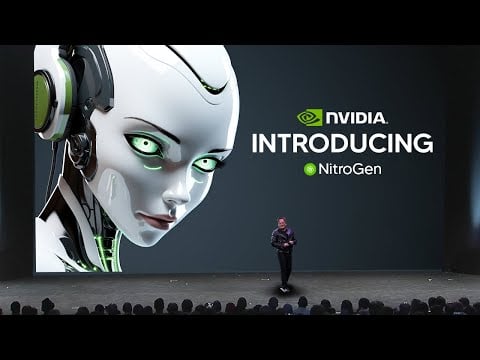
  • NVIDIA Nitrogen AI Open Source Gaming AI Without Game-Specific Tuning

    NVIDIA Nitrogen AI Open Source Gaming AI Without Game-Specific Tuning

    NVIDIA Nitrogen AI Open Source Gaming AI Without Game-Specific Tuning

    NVIDIA Nitrogen AI reaches forty to sixty percent success in many titles, especially fast 3D action games with complex movement.

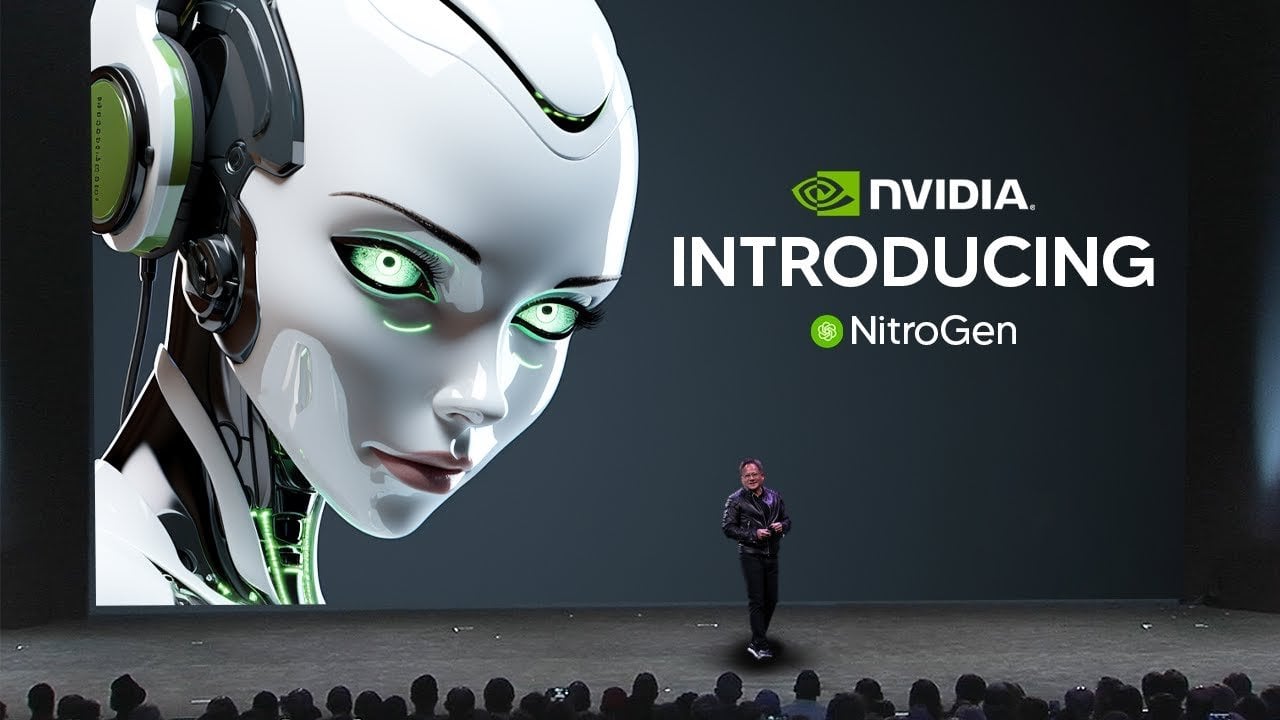
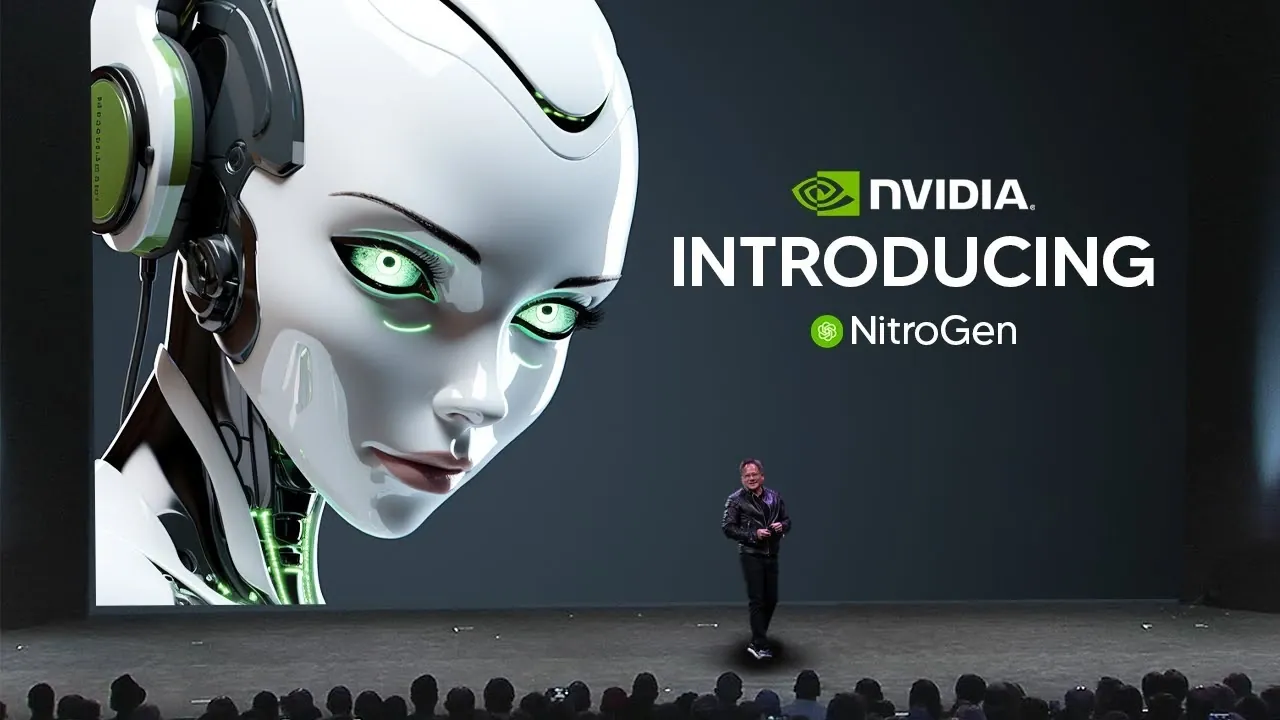
    What if an AI could master any video game without ever having played it before? NVIDIA’s latest innovation, Nitrogen, has turned this once-unimaginable concept into reality. AI Grid breaks down how this new generalist AI agent is redefining the boundaries of artificial intelligence. Unlike traditional models that rely on exhaustive training for specific tasks, Nitrogen uses imitation learning to adapt seamlessly to entirely new environments. With over 40,000 hours of annotated gameplay fueling its development, this AI doesn’t just play games, it learns, strategizes, and evolves. The implications are staggering, not just for gaming but for industries far beyond it.

    This overview explores Nitrogen’s ability to process raw visual inputs, translate them into controller actions, and excel in environments with unpredictable rules and physics. By bypassing the resource-heavy demands of reinforcement learning, Nitrogen sets a new standard for efficiency and adaptability in AI systems. But what does this mean for the future of robotics, autonomous vehicles, or even industrial automation? As you uncover how NVIDIA’s universal simulator and multi-game foundation agent power this innovation, you’ll see why Nitrogen is more than a technical achievement, it’s a glimpse into the future of intelligent, adaptable machines.

    NVIDIA’s Nitrogen AI Agent

    TL;DR Key Takeaways :

    • NVIDIA introduced Nitrogen, a generalist AI agent capable of playing any video game without prior training, marking a significant step toward artificial general intelligence (AGI) through advanced generalization capabilities.
    • Nitrogen uses imitation learning, training on 40,000+ hours of annotated gameplay footage, allowing it to adapt to diverse gaming environments without relying on reinforcement learning or game-specific data.
    • The AI is powered by a Universal Simulator, a Multi-Game Foundation Agent, and an Internet-Scale Video Action Dataset, achieving a 40-60% success rate across various game types, particularly excelling in 3D action-heavy games.
    • Beyond gaming, Nitrogen’s transferable skills have potential applications in robotics, autonomous systems, industrial automation, and safe AI testing, showcasing its adaptability to real-world challenges.
    • NVIDIA has open sourced Nitrogen to foster collaborative research, aiming to accelerate innovation in AI generalization and expand its impact across industries.

    Nitrogen is designed to function as a generalist AI gaming agent, capable of processing raw visual input, pixels from a game screen, and converting it into corresponding controller actions. Unlike traditional AI models that depend on extensive training in specific environments, Nitrogen operates without prior exposure to individual games. This is achieved through imitation learning, a method where the AI observes and learns from human gameplay.

    The training process is powered by an extensive dataset comprising over 40,000 hours of gameplay footage, each annotated with controller overlays. This approach enables Nitrogen to develop transferable skills that can be applied across a wide range of games, making it a versatile and adaptive AI agent. By focusing on imitation learning, Nitrogen bypasses the limitations of reinforcement learning, which often requires significant computational resources and game-specific data.

    The Technology Driving Nitrogen

    Nitrogen’s capabilities are built on an innovative technological framework that integrates several key components, each contributing to its adaptability and performance:

    • Universal Simulator: This tool transforms commercial video games into research environments, allowing Nitrogen to interact with diverse game physics, rules, and objectives. It provides a controlled yet varied testing ground for the AI.
    • Multi-Game Foundation Agent: A foundational AI model that processes visual inputs and predicts sequences of controller actions across multiple game genres. This model is designed to generalize its decision-making processes across different gaming scenarios.
    • Internet-Scale Video Action Dataset: A massive collection of gameplay videos that trains the AI in human strategies, spatial reasoning, and decision-making processes. This dataset is critical for developing Nitrogen’s ability to adapt to new environments.

    This framework enables Nitrogen to achieve a success rate of 40-60% across various game types, with particularly strong performance in 3D action-heavy games. Its ability to generalize across different environments demonstrates advanced spatial reasoning and pattern recognition, setting a new benchmark for AI versatility.

    The Age of AI Agents Begins : NVIDIA Nitrogen

    Learn more about AI Agents by reading our previous articles, guides and features :

    Performance, Efficiency, and Broader Implications

    Nitrogen’s generalization capabilities distinguish it from earlier AI models such as OpenAI Five and DeepMind’s AlphaStar, which were confined to specific games or environments. By using imitation learning instead of reinforcement learning, Nitrogen significantly reduces the data and computational resources required for training. This efficiency not only enhances its adaptability but also makes it a cost-effective solution for developing AI systems capable of operating in diverse scenarios.

    Beyond gaming, Nitrogen’s transferable skills have potential applications in real-world domains. Its spatial reasoning and decision-making abilities could be applied to robotics, autonomous vehicles, and industrial automation. By excelling in environments with varying rules and physics, Nitrogen demonstrates the adaptability needed for broader AI deployment.

    Applications Beyond Gaming

    Although Nitrogen’s primary testing ground is gaming, its implications extend far beyond the realm of entertainment. Video games provide a controlled and cost-effective environment for training AI in perception, control, and decision-making. These skills are directly applicable to several fields, including:

    • Robotics: Enhancing robots’ ability to navigate complex environments and perform tasks autonomously, such as in manufacturing or healthcare settings.
    • Autonomous Systems: Improving decision-making in self-driving cars, drones, and other automated systems that require adaptability to dynamic environments.
    • Industrial Automation: Streamlining manufacturing and logistics operations through intelligent automation, reducing costs and improving efficiency.
    • Safe AI Testing: Using virtual environments to test and refine AI systems before deploying them in real-world scenarios, making sure safety and reliability.

    Nitrogen’s success underscores the importance of generalization in AI development. By demonstrating adaptability across diverse environments, it paves the way for intelligent systems capable of addressing complex, real-world challenges. This adaptability is particularly valuable in industries where flexibility and problem-solving are critical.

    Open Source and Collaborative Research

    NVIDIA has made Nitrogen open source, inviting researchers and developers to explore its capabilities and contribute to its evolution. This decision aligns with a growing trend in AI research, where open collaboration accelerates innovation. By sharing Nitrogen’s framework and datasets, NVIDIA aims to push the boundaries of AI generalization, much like the advancements seen in language models and computer vision systems.

    It is important to note that Nitrogen is not intended to replace human gameplay. Instead, it serves as a research tool, offering insights into the development of adaptable AI systems. Gaming acts as a stepping stone, providing a controlled environment to refine technologies that could benefit a wide range of industries. This collaborative approach ensures that Nitrogen’s potential is maximized, fostering advancements that extend beyond its initial scope.

    A Milestone in AI Development

    Nitrogen represents a major milestone in the development of generalist AI agents. Its ability to generalize across diverse gaming environments without game-specific training underscores the potential of imitation learning as a powerful alternative to traditional reinforcement learning. By excelling in adaptability and efficiency, Nitrogen sets a new standard for AI systems designed to operate in dynamic and unpredictable scenarios.

    Beyond gaming, Nitrogen’s transferable skills position it as a valuable tool for robotics, autonomous systems, and industrial automation. NVIDIA’s decision to open source Nitrogen further amplifies its impact, encouraging collaboration and innovation within the AI research community. As the era of generalist AI agents begins, Nitrogen stands as a testament to the possibilities of intelligent, adaptable systems capable of addressing the complexities of the real world.

    Media Credit: TheAIGRID

    Filed Under: AI, Technology News, Top News

    Latest Geeky Gadgets Deals

    Disclosure: Some of our articles include affiliate links. If you buy something through one of these links, Geeky Gadgets may earn an affiliate commission. Learn about our Disclosure Policy.
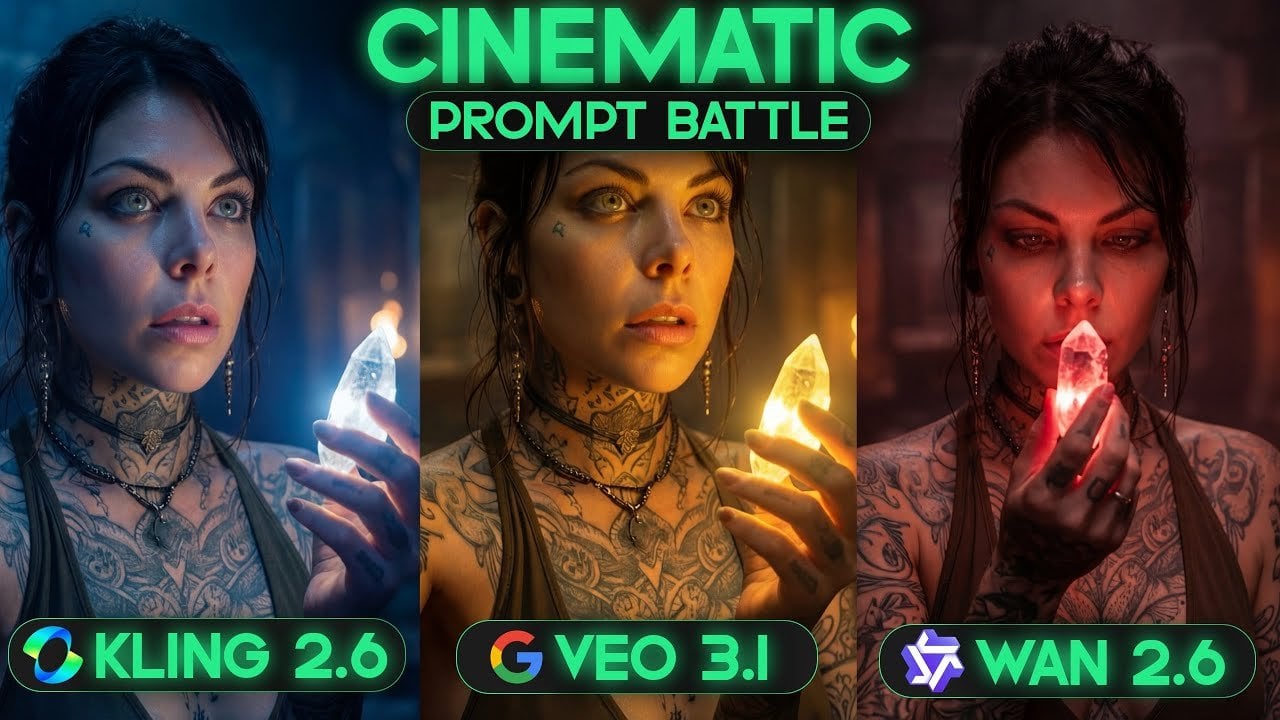
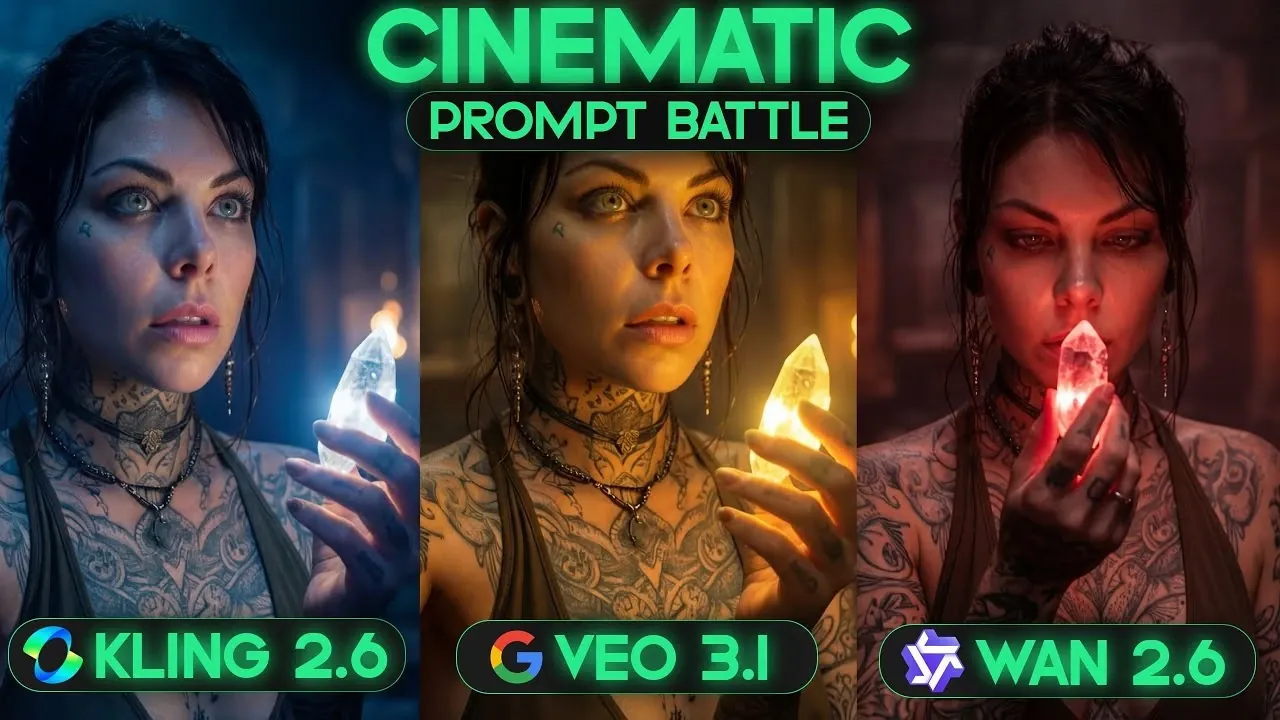
  • Kling 2.6 vs Veo 3.1 vs WAN 2.6 : AI Video Quality Compared

    Kling 2.6 vs Veo 3.1 vs WAN 2.6 : AI Video Quality Compared

    Kling 2.6 vs Veo 3.1 vs WAN 2.6 : AI Video Quality Compared

    Side-by-side clips show Kling 2.6 with crisp lighting and steady framing against natural Veo 3.1 performances.

    What makes an AI video model truly stand out? Is it the lifelike speech synthesis, the cinematic visuals, or the seamless lip synchronization that brings characters to life? Below CyberJungle breaks down the performance of three leading AI video generation models, Kling 2.6, Veo 3.1, and WAN 2.6, each vying for dominance in this rapidly evolving field. From Kling’s stunning visuals to Veo’s natural character interactions and WAN’s dynamic pacing, this comparison highlights both the exciting possibilities and the unique challenges these models bring to the table. Whether you’re an indie creator or a seasoned professional, understanding these differences is key to unlocking the full potential of AI-driven storytelling.

    This comprehensive report examines how these models perform across critical areas like speech synthesis, visual rendering, and cinematic quality. Which one excels at crafting emotionally resonant characters? Which struggles with audio clarity or texture consistency? And most importantly, which model aligns best with your creative vision? CyberJungle’s analysis goes beyond technical details, exploring real-world applications to provide actionable insights. By the end, you’ll have a deeper understanding of how each model balances brilliance and imperfection, offering new possibilities for the future of AI-powered media.

    AI Video Models Quick Comparison

    TL;DR Key Takeaways :

    • AI video generation is transforming content creation, with Kling 2.6, Veo 3.1, and WAN 2.6 offering distinct strengths in areas like speech synthesis, visual rendering, and cinematic quality.
    • Kling 2.6 excels in visual fidelity and cinematic rendering but struggles with natural speech synthesis and character movement fluidity.
    • Veo 3.1 is the best choice for natural performances, precise lip synchronization, and lifelike body language, though it occasionally faces issues with camera angles and dialogue duplication.
    • WAN 2.6 prioritizes dynamic pacing and natural-sounding speech but falls short in visual consistency, audio clarity, and overall quality compared to its competitors.
    • Freepik complements AI video generation by offering tools like image-to-video conversion, inpainting, and upscaling technology to enhance workflow efficiency and video quality.

    Strengths & Weaknesses

    Each model offers distinct advantages, but their performance varies depending on the specific requirements of a project. Below is a concise breakdown of their core strengths and limitations:

    • Kling 2.6: Known for its exceptional visual fidelity, Kling 2.6 excels in areas like lighting, rendering, and maintaining character coherence. However, its speech synthesis lacks the natural flow found in other models, and its character movements can appear rigid. This model is ideal for projects where visual quality takes precedence over nuanced character performances.
    • Veo 3.1: Veo 3.1 stands out for its natural speech pacing, precise lip synchronization, and lifelike body language. Its attention to micro-acting details, such as subtle gestures and eye movements, makes it a top choice for character-driven narratives. However, occasional issues with camera angles and rare instances of dialogue duplication may arise.
    • WAN 2.6: WAN 2.6 offers dynamic pacing and natural-sounding speech in specific scenarios but struggles with inconsistent textures, overly synthetic visuals, and weaker audio clarity. It is best suited for projects where pacing is a priority, though it falls short in overall quality compared to its competitors.

    Performance Breakdown by Use Case

    To determine which model is best suited for your project, it’s essential to evaluate their performance across various use cases. Here’s a closer look at how each model performs in specific scenarios:

    • Monologues and Dialogues: Kling 2.6 provides consistent framing and character coherence, making it a reliable choice for scripted content. However, Veo 3.1 surpasses it with its natural pacing and superior lip synchronization, resulting in more engaging and realistic performances.
    • ASMR and Sound Effects: Both Kling 2.6 and Veo 3.1 deliver high-quality audio clarity, which is crucial for ASMR and sound-focused projects. WAN 2.6, on the other hand, struggles with audio inconsistencies, making it less dependable for sound-intensive applications.
    • Singing and Music: Veo 3.1 outperforms its competitors in musical applications due to its advanced speech synthesis and precise timing. Kling 2.6 and WAN 2.6 fail to achieve the same level of realism and synchronization required for singing performances.
    • Cinematic Rendering: Kling 2.6 excels in visual quality, offering superior lighting effects and cinematic appeal. Veo 3.1 compensates with more natural character performances, making it a better fit for emotionally driven or character-focused scenes.

    Kling 2.6 vs Veo 3.1 vs WAN 2.6 : Ultimate AI Video Comparison

    Find more information on AI video generation by browsing our extensive range of articles, guides and tutorials.

    Enhancing Workflow with Freepik

    For creators seeking to optimize their workflows, platforms like Freepik provide valuable tools that complement AI video generation. By integrating with models such as Kling 2.6, Veo 3.1, and WAN 2.6, Freepik enhances the creative process with features designed to improve efficiency and quality. Key functionalities include:

    • Image-to-Video Conversion: Transform static images into dynamic video content quickly and effortlessly, reducing production time.
    • Inpainting Tools: Refine video frames by correcting imperfections or seamlessly adding new elements, making sure a polished final product.
    • Upscaling Technology: Enhance the resolution and realism of your videos, delivering professional-grade results that meet high-quality standards.

    Freepik’s versatility makes it an indispensable resource for creators aiming to adapt to diverse project requirements while maintaining a streamlined workflow.

    Choosing the Right Model for Your Needs

    Selecting the most suitable AI video generation model depends on your project’s specific priorities. If your primary focus is on achieving exceptional visual fidelity and consistent framing, Kling 2.6 is a strong contender. For creators prioritizing natural performances, detailed character interactions, and lifelike body language, Veo 3.1 emerges as the standout choice. While WAN 2.6 may lack the versatility of its competitors, it remains a viable option for projects that emphasize pacing over realism.

    By incorporating tools like Freepik into your workflow, you can further enhance your creative capabilities, seamlessly integrating multiple AI tools to achieve your vision. With the right combination of technology and strategy, you can elevate your content creation process, producing videos that captivate and engage your audience.

    Media Credit: CyberJungle

    Filed Under: AI, Guides

    Latest Geeky Gadgets Deals

    Disclosure: Some of our articles include affiliate links. If you buy something through one of these links, Geeky Gadgets may earn an affiliate commission. Learn about our Disclosure Policy.
  • JustDone AI Review – Empowering AI tools for Generating Articles

    JustDone AI Review – Empowering AI tools for Generating Articles

    JustDone AI Review – Empowering AI tools for Generating Articles

    Do you ever wish your content could just… get done for you?

    And no, not the vacuuming (although you can get an AI robot for that too).

    We’re talking about your writing, research, and content production. That’s exactly what JustDone AI aims to deliver — a versatile suite of AI tools designed to speed up content creation for marketers, creators, and students.

    But is JustDone AI actually good?

    Here, we will look at the following:

    • What JustDone AI is best for
    • How to use it effectively
    • Types of content you can create
    • How much this tool costs
    • Key features
    • The pros and cons
    • Top alternatives
    • Whether JustDone AI content gets detected
    • The final verdict on JustDone AI

    JustDone AI Quick Review

    JustDone AI is simple to use, with a clean interface and intuitive workflow. It offers a broad feature set, covering everything from social media posts and email campaigns to academic writing support. Customer support is responsive, pricing is reasonable, and while some outputs can feel slightly generic (a common issue with 100% AI-generated content), the platform is highly effective for speeding up content creation.

    Ratings:

    • Ease of Use: 10/10
    • Features: 9/10
    • Customer Support: 9/10
    • Price: 8/10
    • Speed: 7/10
    • Detection Risk: Low with the Humanizer tool
    • Overall Score: 8/10

    Overall, JustDone AI is a very handy tool for students, writers, and marketers. With its many tools, it significantly reduces the time and effort needed for content creation while maintaining quality when used effectively.

    Who is JustDone AI Best For?

    JustDone AI is primarily designed for marketers and content creators. Its wide range of tools makes it easy to create precise content tailored to different platforms, whether it’s social media, blogs, ads, emails, or e-commerce.

    Students, academic writers, and professionals will also find it helpful. Features like the paraphraser, summarizer, plagiarism checker, citation generator, and AI Researcher help improve clarity, accuracy, and structure in essays, theses, and research papers.

    For social media content, the platform offers tools for Instagram, X, LinkedIn, and YouTube. If your focus is customer communication, there are templates for emails, push notifications, and SMS. Overall, JustDone AI is ideal for anyone who wants fast support with writing, rewriting, and idea generation without spending excessive time on repetitive editing.

    How to Use JustDone AI Effectively

    To make the most of JustDone AI, provide clear and detailed prompts. Doing so reduces the need for multiple drafts and minimizes editing time. Combining tools — such as research, writing, and fact-checking — produces stronger and more accurate content. The AI Humanizer tool can help make outputs sound natural and reduce the risk of detection in academic environments.

    What Types of Content Can You Create With JustDone AI?

    JustDone AI covers a wide range of content types. You can generate academic support materials, fact-check information, produce marketing copy, write emails, create social media content, and produce long-form articles. It also supports e-commerce content like product descriptions and ad copy.

    Whether you need a short Instagram caption, a TikTok script, a blog post, or a 1,500-word article, JustDone AI provides templates and tools to speed up content creation while maintaining quality.

    How Much Does It Cost?

    JustDone AI

    JustDone AI Pricing Plan

    JustDone AI offers three plans:

    • The Start Plan costs $2 for 7 days of full access, after which it renews at $39.99 per month.
    • The Unlimited Monthly Plan is $19.99 per month.
    • The Unlimited Annual Plan is $9.99 per month, billed annually.

    The annual plan provides the best value for those who use the tool regularly.

    Key JustDone AI Features

    JustDone AI offers over 25 specialized tools for writing, editing, and research. Some of the most useful include:

    • Academic Tools: Paraphraser, AI Researcher, summarizer, plagiarism checker, citation machine, and AI Humanizer.
    • Article Generator: Creates full articles on specific topics.
    • Chat (AI Assistant): A conversational AI for brainstorming, rewriting, and Q&A.
    • File and Website Analyzer: Upload PDFs, DOCs, or TXT files, or analyze web pages.
    • Social Media Tools: Generates posts for Instagram, X, LinkedIn, and YouTube.
    • Email Writer & Ad Copy: Helps craft professional emails, push notifications, and Google/Facebook ads.
    • SEO Blog Templates & Long Articles: Generate optimized, structured content for blogs and websites.
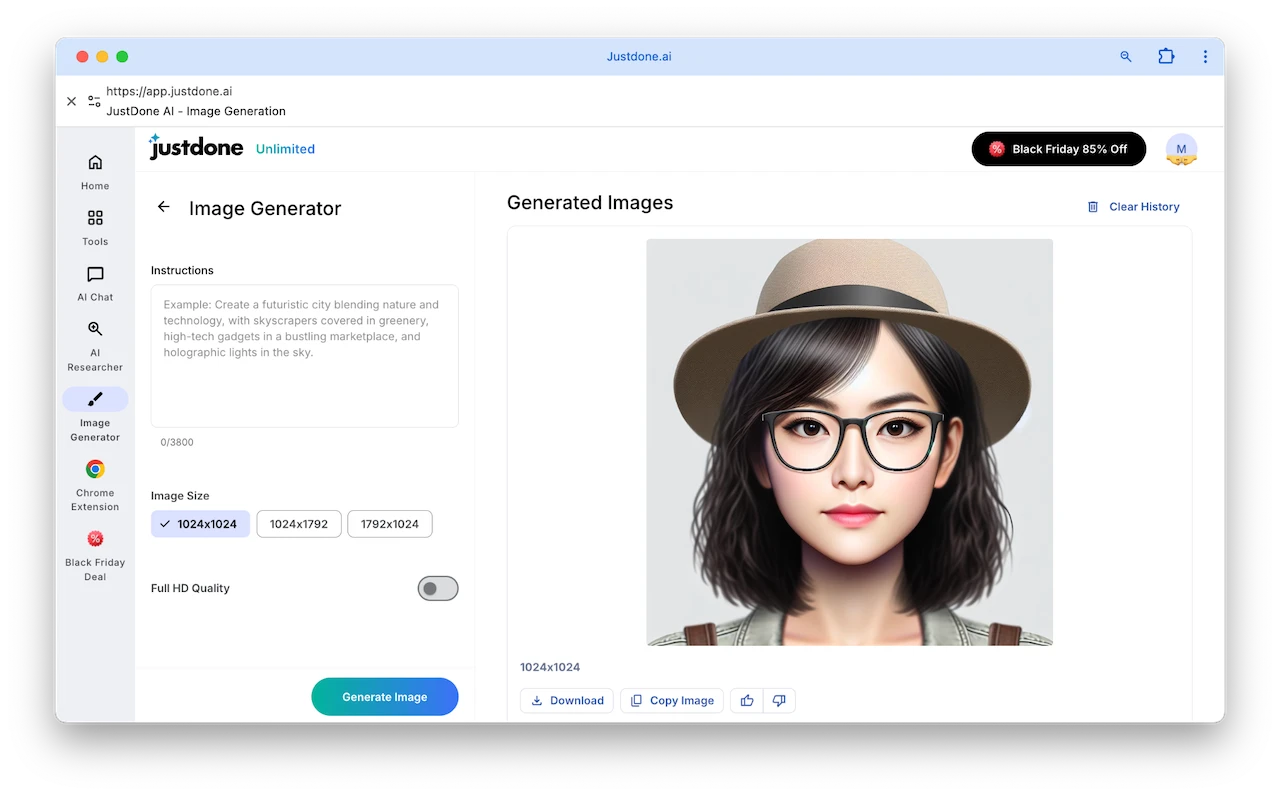
    • Image Generator: Create AI images in multiple sizes, including Full HD options.

    JustDone AI

    These tools are designed to reduce repetitive work, improve writing quality, and streamline content creation for any use case.

    Onboarding

    JustDone AI Onboarding

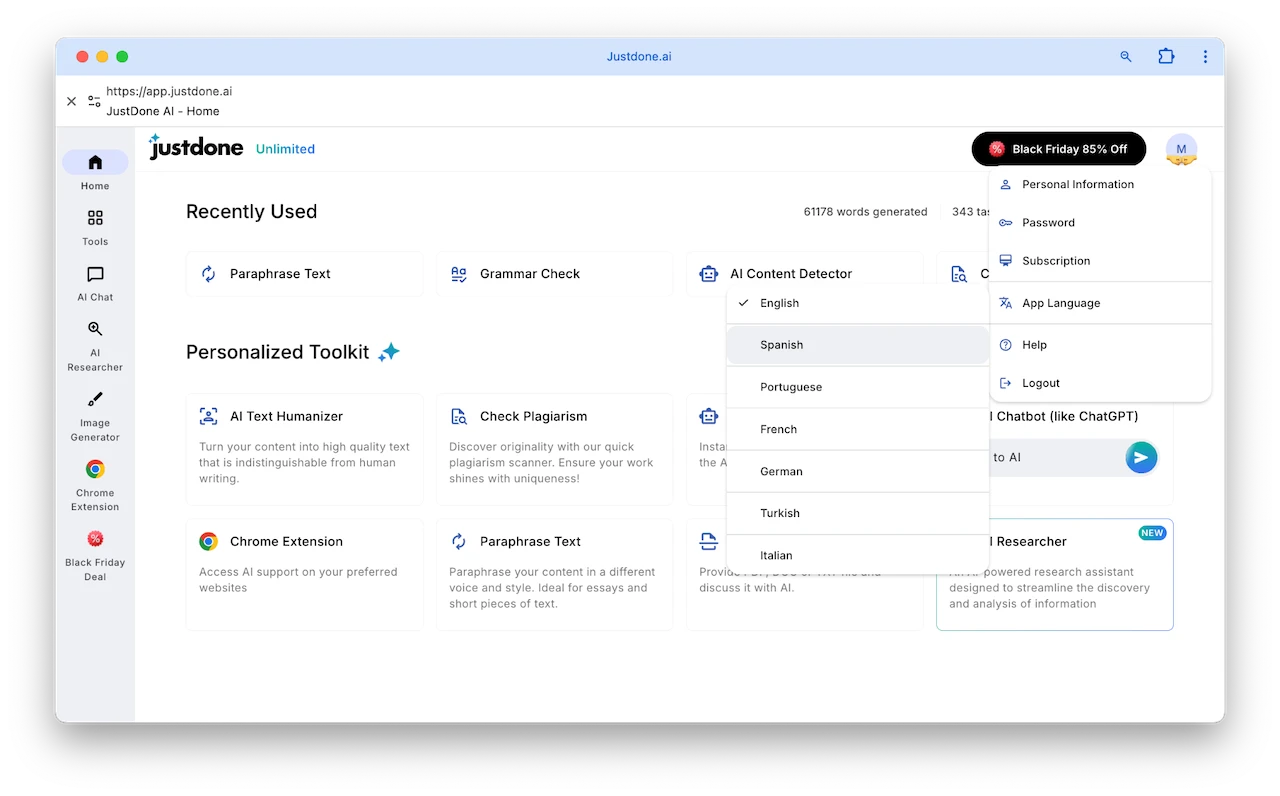
    When you first access JustDone AI after purchasing a subscription, you’ll go through a quick and simple onboarding process. It’s designed to help you set up your preferences, such as choosing your preferred language. For example, if you select Spanish, the platform will automatically switch to that language.

    The onboarding does not affect the features or tools available to you.

    JustDone AI

    JustDone AI

    Personalized Toolkit

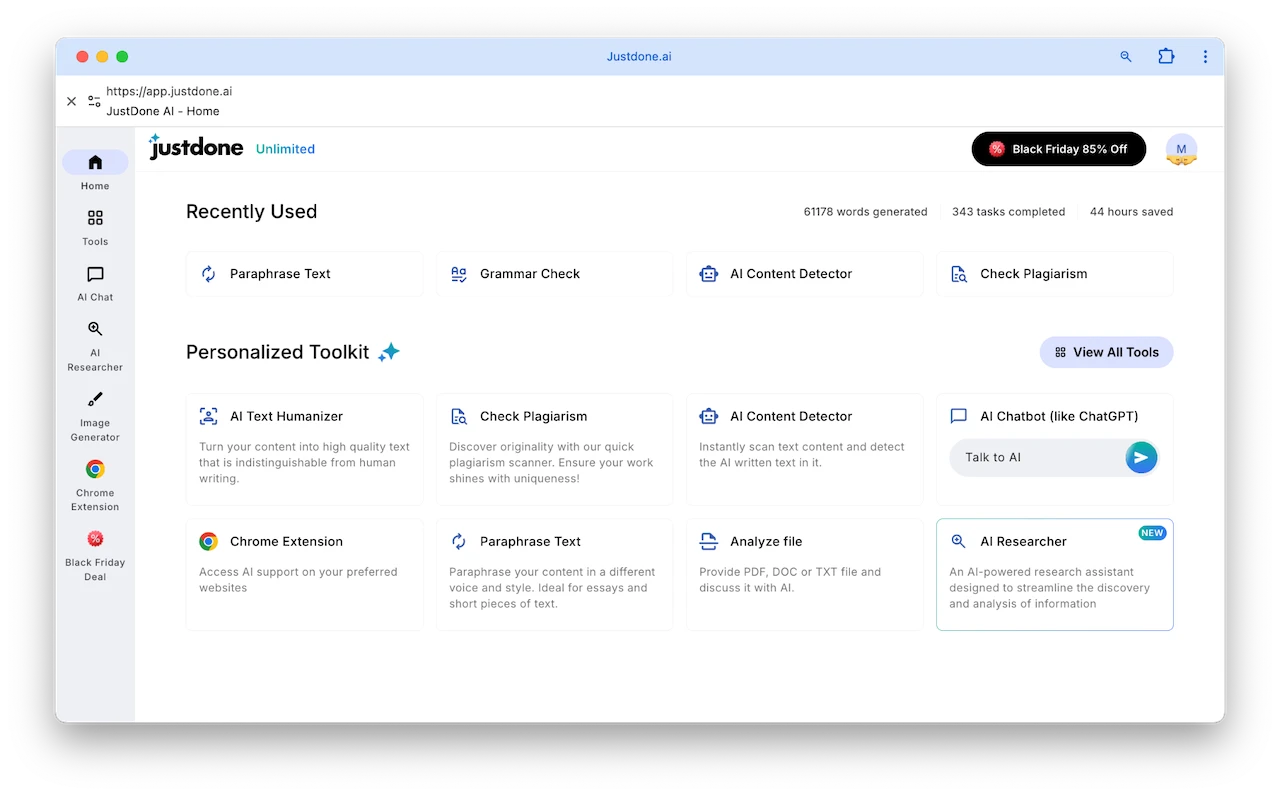
    JustDone AI writing and text editing tools include the range of instruments for different tasks. You can personalize the toolkit depending on what kind of assistance you use most often. If you’re a student, your best choice can include AI detector, Plagiarism checker, Paraphrasing tool, and Grammar check. With them, you can make sure your writing is plagiarism-free, no AI-generated, and grammatically correct. JustDone AI

    JustDone AI

    JustDone AI writing and text editing tools

    Tools

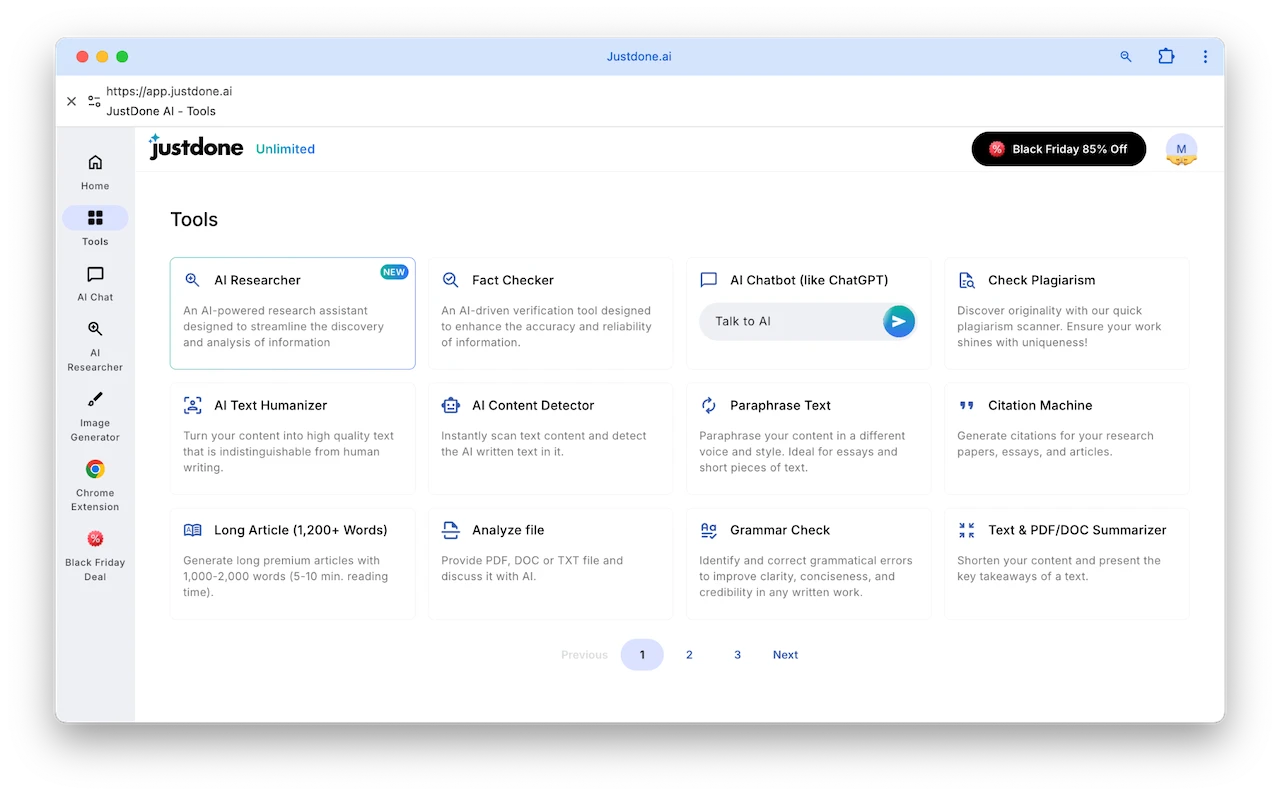
    JustDone offers plenty of tools that is most useful for academia sphere. Students, independent learners, researchers, and professors can use them to validate texts, fact-check information, detect AI, and so on. JustDone AI

    JustDone AI

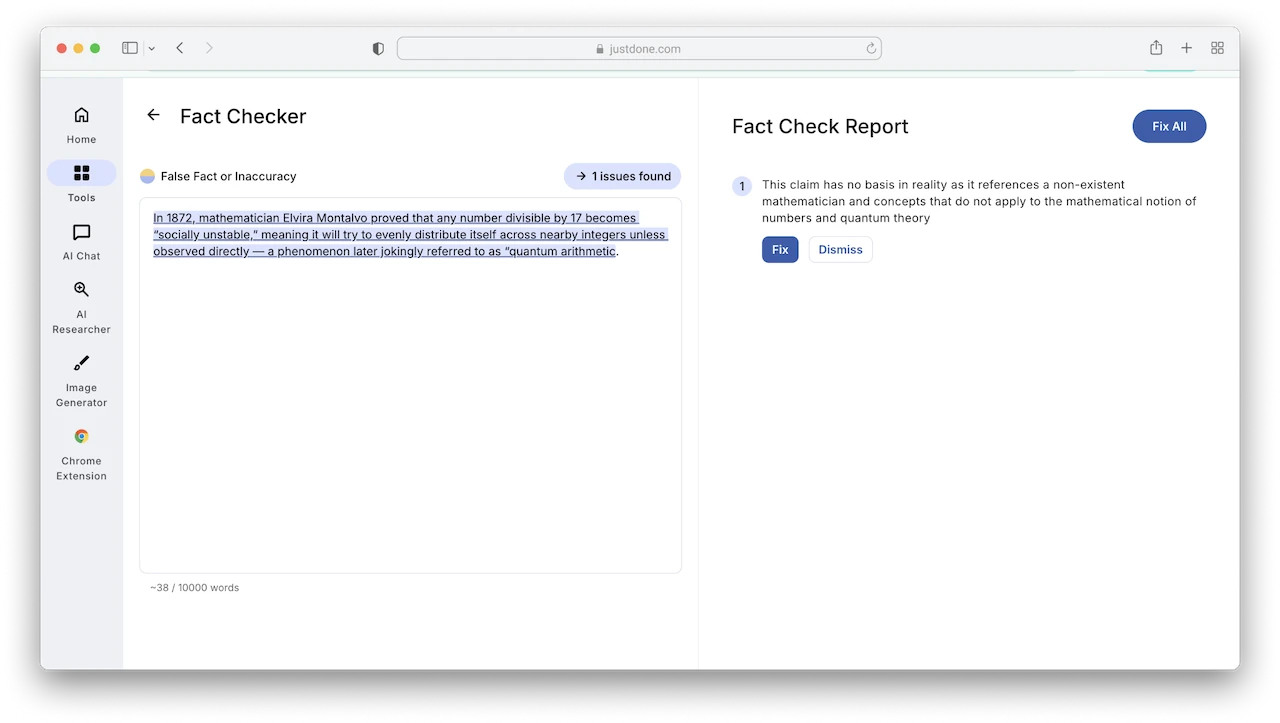
    For instance, see how good fact-checker mentions fake facts bringing credibility to content.

    JustDone AI

    JustDone AI

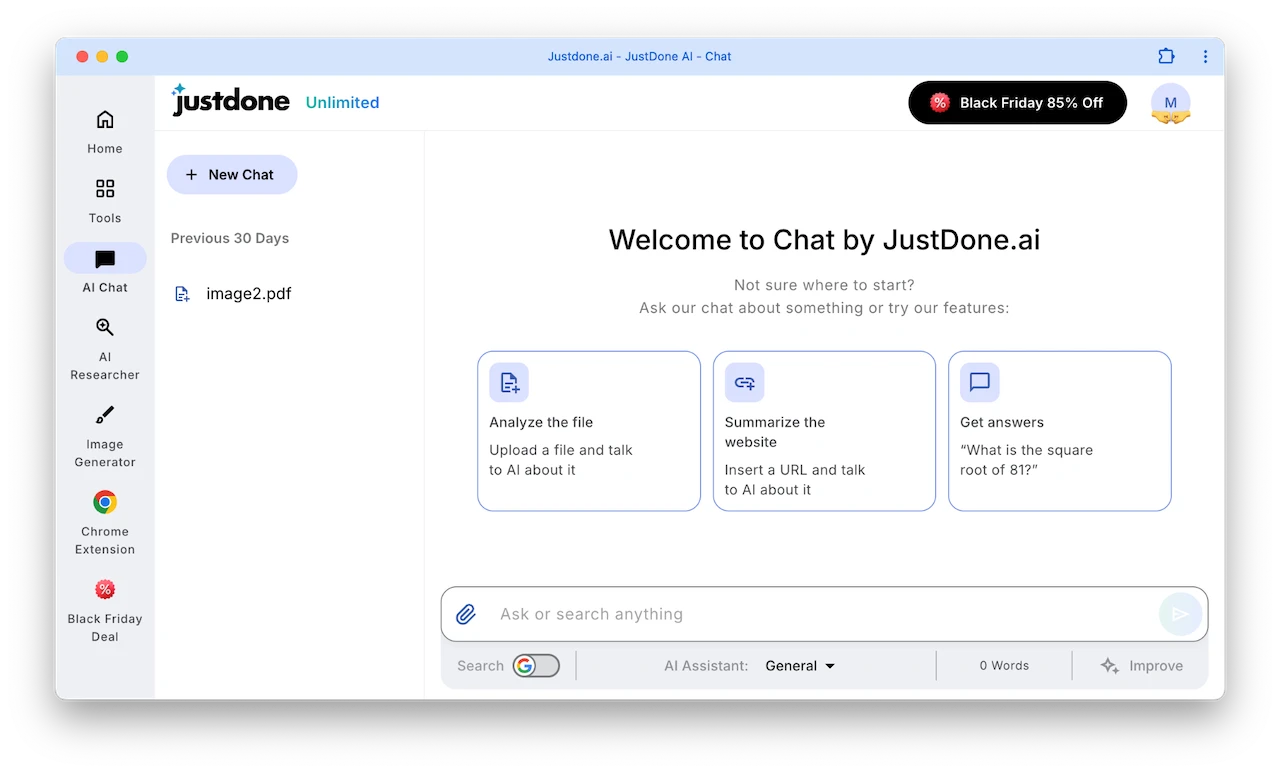
    Chat (AI Assistant)

    JustDone includes its own built-in ChatGPT-style generator. You can use it to brainstorm ideas, analyze or summarize articles, or just ask quick questions. It doesn’t feel dramatically different from something like ChatGPT, Claude, or Gemini, but having everything in one workspace does make the whole workflow a lot easier.

    With JustDone’s AI Chat, yu can choose what kind of assistance you need – general or more role-specified like career counselor, marketing director, motivational coach, business analyst, etc. The answers differ depending on the mode you choose.

    JustDone AI

    JustDone AI

    JustDone AI Chatbot

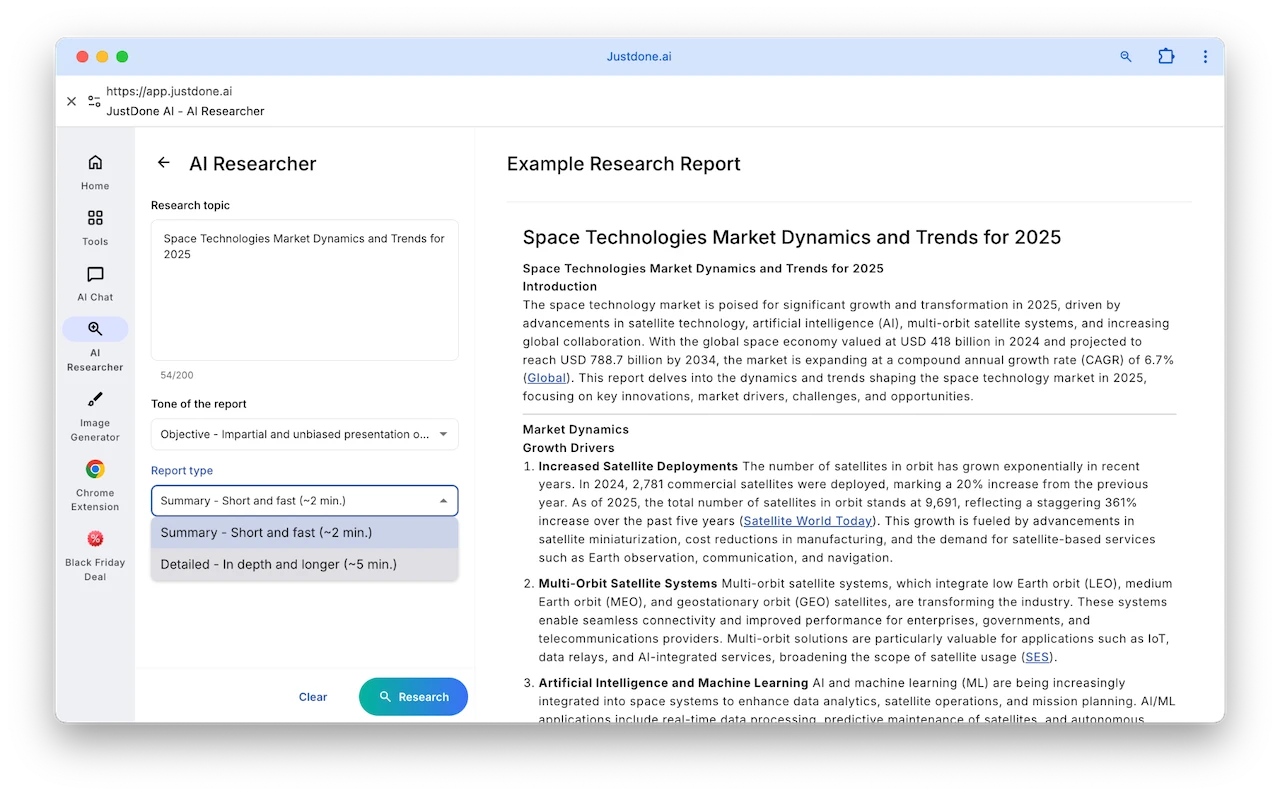
    AI Researcher

    A built-in research assistant that generates reports in different tones and styles. It allows students, analysts, and content researchers to choose tone (Objective, Formal, Analytical, Persuasive, Descriptive, etc.) and Report Type (Summary or Detailed). JustDone AI

    JustDone AI

    JustDone AI Alternatives

    If JustDone AI doesn’t fully match your needs, there are several other generative AI tools worth considering. For academic writing, QuillBot and Scribbr stand out. Both are designed to help students and academic writers improve the quality of their texts, using AI to assist with editing, paraphrasing, and checking for accuracy. Since they belong to the same parent company, their tools complement each other, offering a cohesive set of resources for academic work.

    When it comes to creative and marketing content, Wordtune and Jasper AI are popular alternatives. Wordtune specializes in rewriting and refining text style, making your writing clearer and more engaging. Jasper AI, on the other hand, is geared toward generating marketing copy, blog posts, and social media content, providing a wide range of features to streamline content creation and save time. Together, these tools offer flexible options depending on whether your focus is academic, creative, or marketing-oriented.

    Detection and Plagiarism Considerations

    Content generated by JustDone AI can be optimized to reduce detection in plagiarism tools. Using the AI Humanizer and paraphrasing tools makes text more natural. While no AI content is guaranteed to be fully undetectable, JustDone helps minimize detection risks, making it suitable for professional use.

    JustDone AI: The Final Verdict

    Overall, we were very impressed by the tools and features on offer at JustDone AI, especially given that it is a much less well-known tool compared to other generative AI subscriptions on offer.

    Its wide range of tools makes it a versatile platform for generating, editing, and optimizing content. Outputs can occasionally feel generic, but with well-crafted prompts, the platform significantly reduces the time and effort required to produce content.

    We would recommend testing out the seven-day trial to see if the tool suits your requirements. For those who frequently create content or need academic support, it offers excellent value.

    Frequently Asked Questions About JustDone AI

    Is JustDone AI secure and reliable?

    The JustDone AI team leverages advanced AI technology to help create precise and high-quality content, providing resources in a secure and reliable environment.

    Does JustDone AI cost money?

    JustDone offers a short trial period, after which you must choose a paid plan to continue using the tool.

    What is the difference between JustDone AI and ChatGPT?

    While both are generative AI tools, JustDone provides task-specific tools for marketing, social media, academic writing, paraphrasing, and more, all in one platform.

    Filed Under: AI, Reviews

    Latest Geeky Gadgets Deals

    Disclosure: Some of our articles include affiliate links. If you buy something through one of these links, Geeky Gadgets may earn an affiliate commission. Learn about our Disclosure Policy.
  • NotebookLM Alternative Open Notebook : Local & Private with Mind Maps, Podcasts & More

    NotebookLM Alternative Open Notebook : Local & Private with Mind Maps, Podcasts & More

    NotebookLM Alternative Open Notebook : Local & Private with Mind Maps, Podcasts & More

    Open Notebook running in Docker on a laptop, showing document analysis and context settings for private research.

    What if you could have a fully private, AI-powered assistant that doesn’t just take notes but transforms the way you work, without ever sending your data to the cloud? WorldofAI breaks down the innovative potential of Open Notebook, a free, open source alternative to Google’s Notebook LM. Unlike its corporate counterpart, Open Notebook runs locally, giving you complete control over your data while offering advanced features like document analysis, podcast creation, and even customizable AI responses. It’s not just about note-taking; it’s about redefining how you interact with your research, projects, and ideas.

    In this deep dive, we’ll explore how Open Notebook combines state-of-the-art AI capabilities with a privacy-first approach to deliver a seamless and customizable experience. Whether you’re a researcher looking to extract insights from dense PDFs, a student organizing complex topics, or a professional creating audio content on the fly, this guide will show you why Open Notebook is quickly becoming a favorite among productivity enthusiasts. And if you’re curious about how it stacks up against other alternatives like Hyperbook LM or Google’s Notebook LM, you’ll discover what makes this platform stand out. Sometimes, the best solutions aren’t just free, they’re the ones you control.

    What Sets Open Notebook Apart?

    TL;DR Key Takeaways :

    • Open Notebook is a free, open source, locally hosted AI tool designed for privacy, customization, and flexibility, making it an excellent alternative to Google’s Notebook LM.
    • Key features include document analysis, contextual exploration, podcast generation, customizable content transformations, granular context control, and REST API integration.
    • It supports multiple AI models and providers, allowing users to tailor configurations while making sure data privacy through local hosting.
    • Hyperbook LM builds on Open Notebook’s capabilities, adding advanced features like web scraping, mind map generation, and slide deck creation for more complex use cases.
    • Both tools prioritize data confidentiality and adaptability, making them ideal for researchers, students, and professionals in fields requiring secure and advanced productivity solutions.

    Open Notebook is not just another note-taking application; it integrates state-of-the-art AI capabilities to enhance productivity and streamline workflows. Its unique features make it a powerful tool for users who demand more than basic note-taking functionality. Key highlights include:

    • Document Analysis: Extract insights and generate summaries from various file formats, including PDFs and text documents, allowing efficient content review.
    • Contextual Exploration: Use AI-driven tools to delve deeper into topics, uncover nuanced connections, and explore related concepts.
    • Podcast Generation: Create audio content using customizable templates and advanced text-to-speech models, making it easier to share ideas in an audio format.
    • Customizable Content Transformations: Generate tailored outputs, ranging from concise summaries to detailed, in-depth reports, to suit your specific needs.
    • Granular Context Control: Adjust AI response parameters to ensure precise, context-specific results that align with your goals.
    • REST API Integration: Seamlessly connect Open Notebook with other tools and workflows, allowing advanced use cases and enhanced functionality.

    These features make Open Notebook a versatile tool for users who require more than just basic note-taking, offering a comprehensive solution for research, analysis, and productivity.

    How to Set Up and Configure Open Notebook

    Setting up Open Notebook is a straightforward process, even for users with limited technical expertise. By using Docker Desktop, you can deploy the application locally, making sure that your data remains private and secure. The platform supports a variety of AI models, including those for language processing, text-to-speech, embedding, and speech-to-text functionalities.

    To get started, you will need API keys from your preferred AI model providers, such as OpenAI or Google. These keys can be easily integrated into the system, allowing you to customize the tool to meet your specific requirements. The local hosting setup ensures that sensitive data stays under your control, making it an excellent choice for privacy-conscious users.

    NotebookLM Alternative Open Notebook Explored

    Find more information on NotebookLM by browsing our extensive range of articles, guides and tutorials.

    Exploring Hyperbook LM: A Feature-Rich Alternative

    For users seeking even greater functionality, Hyperbook LM offers an enhanced open source solution. Building on the capabilities of Open Notebook, Hyperbook LM introduces additional features such as web scraping, mind map generation, and slide deck creation. These tools are particularly useful for users with more complex or specialized needs.

    Hyperbook LM also integrates advanced tools like Hyper Browser and Eleven Labs, further expanding its versatility. However, deploying Hyperbook LM requires cloning its repository and configuring it for local use, which may demand a higher level of technical expertise. Despite this, its extensive feature set makes it a compelling option for users who require advanced research and productivity tools.

    Comparing Open Notebook and Hyperbook LM to Notebook LM

    Both Open Notebook and Hyperbook LM offer significant advantages over Google’s Notebook LM, particularly for users who prioritize data privacy and customization. Unlike Notebook LM, these tools are locally hosted, making sure that sensitive data remains under your control. Additionally, they provide features that are not available in Notebook LM, such as:

    • Podcast generation for creating audio content.
    • Web scraping to gather information from online sources.
    • Mind map creation for visualizing ideas and concepts.

    These capabilities make Open Notebook and Hyperbook LM more versatile and adaptable to a wide range of use cases, from academic research to professional project management. Their open source nature also allows users to tailor the tools to their unique needs, offering a level of flexibility that proprietary solutions like Notebook LM cannot match.

    Practical Applications of Open Notebook and Hyperbook LM

    Open Notebook and Hyperbook LM are designed to address a variety of research and productivity challenges. Their advanced features make them suitable for numerous practical applications, including:

    • Analyzing and organizing diverse sources, such as links, text, and files, to streamline research workflows.
    • Generating insights, summaries, and detailed reports for academic, professional, or personal projects.
    • Creating podcasts or audio content with customizable configurations to share ideas in an engaging format.
    • Developing visual aids like mind maps and slide decks to enhance presentations and brainstorming sessions.

    These tools are particularly valuable for users in fields where data confidentiality and advanced functionality are critical, such as academia, healthcare, or legal research.

    Why Choose Open Notebook or Hyperbook LM?

    The primary advantage of Open Notebook and Hyperbook LM lies in their flexibility and privacy-focused design. Both tools support multiple AI models and providers, allowing you to customize configurations to suit your specific needs. By hosting these solutions locally, you gain complete control over your data, making sure that sensitive information remains secure.

    This makes them especially appealing for users in industries where data confidentiality is paramount. Additionally, their open source nature enables users to modify and extend the tools to meet unique requirements, offering a level of adaptability that proprietary solutions often lack. Whether you’re a researcher, student, or professional, these tools provide the functionality and control needed to excel in your work.

    By combining advanced features, local hosting, and extensive customization options, Open Notebook and Hyperbook LM stand out as powerful alternatives to proprietary solutions like Notebook LM. Their ability to integrate innovative AI capabilities with user-centric design ensures that they remain relevant and effective tools for a wide range of applications.

    Media Credit: WorldofAI

    Filed Under: AI, Top News

    Latest Geeky Gadgets Deals

    Disclosure: Some of our articles include affiliate links. If you buy something through one of these links, Geeky Gadgets may earn an affiliate commission. Learn about our Disclosure Policy.
  • MiniMax M2.1 vs Gemini 3 Flash : Smarter Planning and Tools at Lower AI Costs

    MiniMax M2.1 vs Gemini 3 Flash : Smarter Planning and Tools at Lower AI Costs

    MiniMax M2.1 vs Gemini 3 Flash : Smarter Planning and Tools at Lower AI Costs

    It shows the system can create simple 3D scenes and UI concepts, offering useful results without premium pricing.

    What if the next big leap in AI wasn’t locked behind corporate paywalls but was instead freely available for anyone to explore, adapt, and innovate with? That’s exactly the promise of MiniMax M2.1, the latest iteration of the new open source agent AI. Below, Universe of AI breaks down how this update builds on the strengths of its predecessor, delivering smarter planning, seamless API integration, and expanded coding language support, all while staying true to its mission of accessibility and affordability. With MiniMax M2.1, the “impossible triangle” of balancing performance, cost, and speed feels less like a paradox and more like a reality that developers can finally embrace.

    This guide will walk you through the fantastic features of MiniMax M2.1 and why it’s poised to reshape how developers approach complex workflows and automation. From its ability to handle structured coding plans to its real-world applications in industries like gaming and business automation, there’s a lot to uncover. Whether you’re a seasoned developer or just curious about the future of open source AI, this is your chance to see how innovation thrives when barriers are removed. The question isn’t whether MiniMax M2.1 can compete with proprietary systems, it’s how far it can push the boundaries of what’s possible.

    MiniMax M2.1 Overview

    TL;DR Key Takeaways :

    • MiniMax M2.1 enhances its predecessor with features like multi-coding language support, API integration, and improved tools for structured coding, making it more versatile and developer-friendly.
    • It maintains a balance between performance, cost, and speed, operating at just 8% of the cost of proprietary models while delivering competitive functionality and usability.
    • The model excels in agent-based tasks such as coding, planning, and workflow automation, making it ideal for developers working on complex and large-scale projects.
    • Its open source nature fosters accessibility, customization, and innovation, empowering developers to deploy, adapt, and experiment without proprietary constraints.
    • MiniMax M2.1 demonstrates real-world applications across industries, including interactive 3D environments, gaming, and business process optimization, offering a cost-effective alternative to high-end AI systems.

    MiniMax M2 earned its reputation by excelling in agent-based tasks, distinguishing itself from general-purpose conversational AI models. Unlike systems designed for broad-spectrum applications, MiniMax M2 specialized in long-term, structured tasks such as coding, planning, and tool integration within workflows.

    Its open source nature, including access to model weights, empowered developers to deploy it locally and customize it to meet specific requirements. This flexibility, combined with its affordability, made it a standout choice. Operating at just 8% of the cost of Cloud Sonnet while delivering nearly double the inference speed, MiniMax M2 achieved a rare balance between performance, cost, and speed—a balance often referred to as solving the “impossible triangle.” This practical approach resonated with developers who valued usability and efficiency over chasing benchmark scores.

    What’s New in MiniMax M2.1?

    MiniMax M2.1 builds on the strengths of its predecessor by introducing targeted updates that enhance its usability and expand its range of applications. These improvements are designed to address the practical needs of developers while maintaining the model’s accessibility:

    • Multi-Coding Language Support: Expanded programming language compatibility increases its versatility, allowing developers to work across diverse environments.
    • API Integration: Official API support simplifies the process of embedding the model into existing systems and workflows, reducing implementation complexity.
    • Structured Coding Plans: Enhanced tools for structured coding improve its ability to assist with complex and large-scale development projects.
    • Developer Usability: Continuous testing and refinements ensure the model remains reliable and user-friendly for building and automating workflows.

    These updates make MiniMax M2.1 a robust and adaptable platform, capable of supporting intricate systems while maintaining its focus on accessibility and ease of use.

    MiniMax M2.1 Open Source Agent AI

    Gain further expertise in MiniMax by checking out these recommendations.

    Striking the Balance: Performance, Cost, and Speed

    The “impossible triangle” philosophy remains at the core of MiniMax M2.1’s design. By balancing performance, cost, and speed, the model ensures practicality without sacrificing accessibility. While it may not achieve the highest benchmark scores compared to proprietary models, its affordability and usability make it an attractive option for developers working within constrained budgets.

    This balance allows MiniMax M2.1 to excel in real-world applications, offering a reliable and cost-effective alternative to high-end proprietary systems. Developers can use its capabilities to streamline workflows, automate processes, and build complex systems without incurring significant financial burdens.

    Real-World Applications of MiniMax M2.1

    MiniMax M2.1 demonstrates its versatility across a wide range of industries and use cases. Its ability to assist in developing interactive 3D environments and games highlights its potential in the entertainment and simulation sectors. Additionally, its capacity to automate workflows and integrate tools makes it a valuable asset for businesses aiming to optimize operations and reduce costs.

    For developers, MiniMax M2.1 offers a practical solution for tackling complex tasks such as coding, planning, and system integration. While it may not feature the advanced capabilities of proprietary models like Gemini 3 Flash, it provides competitive functionality at a fraction of the cost. Its interactive user interface and ability to handle structured tasks make it an ideal choice for those seeking affordable and effective AI solutions.

    The Role of Open source AI in Innovation

    MiniMax M2.1 underscores the growing significance of open source AI in today’s technological landscape. By offering advanced tools that are both accessible and affordable, it enables developers to innovate without being limited by proprietary constraints. Open source models like MiniMax M2.1 foster collaboration, customization, and experimentation, creating a community-driven approach to AI development.

    This widespread access of AI tools encourages broader participation and innovation across industries. Developers, researchers, and businesses alike can benefit from the flexibility and adaptability of open source models, driving progress in fields ranging from software development to automation and beyond.

    Advancing Open source AI with MiniMax M2.1

    MiniMax M2.1 represents a significant advancement in the evolution of open source agent-based AI. By refining the original M2 model and introducing features such as multi-coding language support and API integration, it addresses the practical needs of developers while maintaining a focus on affordability and usability.

    As open source AI continues to gain momentum, MiniMax M2.1 stands out as a practical and innovative solution for building and automating complex systems. Whether you are a developer seeking to streamline workflows or a business looking for cost-effective AI tools, MiniMax M2.1 offers a compelling option in the rapidly expanding world of AI technology.

    Media Credit: Universe of AI

    Filed Under: AI, Top News

    Latest Geeky Gadgets Deals

    Disclosure: Some of our articles include affiliate links. If you buy something through one of these links, Geeky Gadgets may earn an affiliate commission. Learn about our Disclosure Policy.