• Fast AI Launches Raising Risks for Users ,Society & Businesses

    Fast AI Launches Raising Risks for Users ,Society & Businesses

    Fast AI Launches Raising Risks for Users ,Society & Businesses

    Graphic showing the AI launch sprint, with safety warnings overshadowed by countdown clocks and profit targets.

    What happens when the race to dominate the AI market becomes a sprint rather than a marathon? In the video, Will Lamerton breaks down the growing tension between innovation and responsibility as companies like OpenAI and Anthropic rush to release increasingly advanced models. These organizations promise new advancements, but their rapid development cycles are raising serious questions about whether safety and ethics are being sacrificed in favor of market dominance. With stories of compromised principles and insufficient testing surfacing, the stakes couldn’t be higher, not just for the industry, but for society at large. Are we trading long-term trust for short-term innovation?

    In the video below Will Lamerton explores the high-stakes competition driving AI companies to cut corners, revealing the risks of releasing unvetted systems into the world. From biased decision-making to the spread of misinformation, the consequences of prioritizing speed over safety are far-reaching and deeply concerning. Lamerton also highlights an alternative path: decentralized AI development, which could shift the focus toward transparency, ethics, and public accountability. If you’ve ever wondered whether the future of AI is being shaped by corporate interests or societal needs, this breakdown will leave you questioning the direction we’re heading, and what role you can play in steering it.

    AI Race: Ethics vs Speed

    TL;DR Key Takeaways :

    • The rapid competition among AI companies like OpenAI, Anthropic, and Google to release advanced models often prioritizes speed and market dominance over safety and ethics.
    • Shortened development cycles increase risks such as biased decision-making, misinformation, and potential malicious misuse due to inadequate safety measures and testing.
    • Profit motives and proprietary models limit transparency and accountability, raising concerns about whether AI development aligns with societal well-being.
    • Decentralized and open source AI development offers a promising alternative, promoting transparency, ethics, and equitable access to AI’s benefits.
    • Individuals can influence AI’s future by supporting ethical practices, advocating for transparency, and participating in community-driven initiatives to ensure responsible innovation.

    Speed Over Safety: The AI Development Race

    AI companies are locked in a high-stakes race to release increasingly powerful models, such as OpenAI’s GPT-5.2 and Anthropic’s Opus 4.5/4.7. This competition is driven by intense market pressures and the expectations of investors, leading to shorter development cycles. While this approach accelerates innovation, it often sacrifices the time needed for thorough testing and robust safety protocols.

    For example, Anthropic, once a vocal advocate for AI safety, has faced criticism for allegedly compromising its principles in order to remain competitive. This shift reflects a broader industry trend where market dominance takes precedence over ethical and responsible AI deployment. The consequences of this approach are far-reaching, as it increases the likelihood of releasing systems that are insufficiently vetted for safety and reliability.

    Why Safety and Ethics Are at Risk

    The rapid pace of AI development often results in inadequate safety measures, leaving systems vulnerable to unintended consequences. When companies prioritize speed, they may cut corners on essential testing and oversight, which can lead to significant risks. These risks include:

    • Biased decision-making that perpetuates inequality and discrimination.
    • The spread of misinformation through unreliable or inaccurate AI outputs.
    • The potential for malicious misuse of AI systems, such as in cyberattacks or surveillance.

    These risks highlight the importance of prioritizing safety and ethics in AI development. Poorly vetted models can cause societal harm, eroding trust in technologies that are meant to improve lives. As someone interested in the future of technology, you should consider the broader implications of these shortcuts and advocate for more responsible practices.

    AI Race to Release Models : Cutting Corners on Safety

    Explore further guides and articles from our vast library that you may find relevant to your interests in AI Models.

    Profit Motives vs Public Interest

    The influence of profit motives on AI development is undeniable. Companies often prioritize satisfying investors and capturing market share, sometimes at the expense of ethical considerations. This misalignment between corporate goals and societal well-being has led to growing skepticism about the intentions of major AI players.

    One concerning trend is the focus on proprietary models and closed ecosystems. These practices limit transparency and accountability, making it difficult for users to understand how AI systems operate or whether they align with their values. Without clear oversight, it becomes challenging to ensure that these technologies are being developed and deployed in ways that benefit society as a whole.

    Decentralization: A Path to Ethical AI

    Decentralized AI development offers a promising alternative to the current profit-driven model. By supporting open source projects and privacy-focused initiatives, you can help create an ecosystem that prioritizes transparency, ethics, and accessibility. Decentralized systems empower communities to shape the direction of AI, making sure it serves public interests rather than corporate agendas.

    Open source AI platforms, for instance, enable developers from around the world to collaborate, share knowledge, and address diverse needs. These initiatives can act as a counterbalance to the dominance of large corporations, promoting a more equitable distribution of AI’s benefits. By fostering a culture of openness and collaboration, decentralized development can help ensure that AI technologies are designed with societal well-being in mind.

    Your Role in Shaping AI’s Future

    As an individual, you have the power to influence the trajectory of AI development. By advocating for ethical practices and supporting community-driven projects, you contribute to a movement that prioritizes long-term societal interests. Here are some actionable steps you can take:

    • Support open source AI initiatives through funding, participation, or advocacy.
    • Stay informed about AI advancements and their potential societal implications.
    • Encourage transparency and accountability in the companies and technologies you engage with.

    Collective action is essential to holding companies accountable and making sure responsible AI development. By staying engaged and informed, you can help shape a future where innovation and ethics coexist.

    The Bigger Picture: Why Change Is Necessary

    AI holds immense potential to transform society, offering solutions to complex problems and improving quality of life. However, if mishandled, it also poses significant risks. The current trajectory of profit-driven development underscores the urgent need for a shift in how AI is created and deployed.

    To achieve this, companies must adopt business models that balance innovation, profit, and ethical responsibility. Transparency, accountability, and community involvement should become central to AI development, making sure these technologies align with societal values. By advocating for these principles, you can help steer the industry toward a more sustainable and equitable future.

    The Path Forward

    The race to release advanced AI models highlights the tension between innovation and responsibility. While competition drives progress, it also raises critical questions about safety, ethics, and the role of profit motives in shaping technology. By supporting decentralized, community-driven AI development, you can help ensure these powerful tools are used for the greater good. The future of AI depends on collective action and a shared commitment to aligning technological advancement with societal well-being.

    Media Credit: Will Lamerton

    Filed Under: AI, Technology News, Top News

    Latest Geeky Gadgets Deals

    Disclosure: Some of our articles include affiliate links. If you buy something through one of these links, Geeky Gadgets may earn an affiliate commission. Learn about our Disclosure Policy.
  • Gemini Flash 3 : Practical Pick for Multimodal Reasoning at Speed & Low Cost

    Gemini Flash 3 : Practical Pick for Multimodal Reasoning at Speed & Low Cost

    Gemini Flash 3 : Practical Pick for Multimodal Reasoning at Speed & Low Cost

    Google's Flash 3 model explained with real token pricing, showing faster responses and solid reasoning for daily tasks.

    What if the future of AI wasn’t about chasing headlines or showcasing flashy, overhyped features, but instead focused on solving real-world problems with precision and purpose? Enter Gemini 3 Flash, a model that flips the script on the AI race. Designed for practical deployment rather than fleeting buzz, this latest addition to Google AI’s Gemini lineup prioritizes efficiency, scalability, and affordability. In an era where businesses are increasingly wary of ballooning costs and impractical solutions, Gemini 3 Flash offers a refreshing alternative: a tool built to deliver value where it matters most, on the ground, in the hands of those who need it.

    In this exploration, we’ll uncover why Gemini 3 Flash stands out in a crowded AI landscape. You’ll discover how its cost-effective design and adaptive reasoning capabilities make it a fantastic option for industries grappling with tight budgets and high operational demands. From its ability to handle multimodal reasoning to its knack for balancing performance with affordability, this model is a testament to what happens when innovation meets practicality. As we delve deeper, you might find yourself rethinking what “innovative” truly means in the context of AI.

    Gemini 3 Flash Overview

    TL;DR Key Takeaways :

    • Gemini 3 Flash is designed for cost-sensitive and latency-critical environments, offering efficient, scalable, and affordable multimodal reasoning capabilities.
    • It features a “thinking levels” mechanism that dynamically adjusts reasoning depth based on task complexity, making sure optimal resource allocation for both simple and complex tasks.
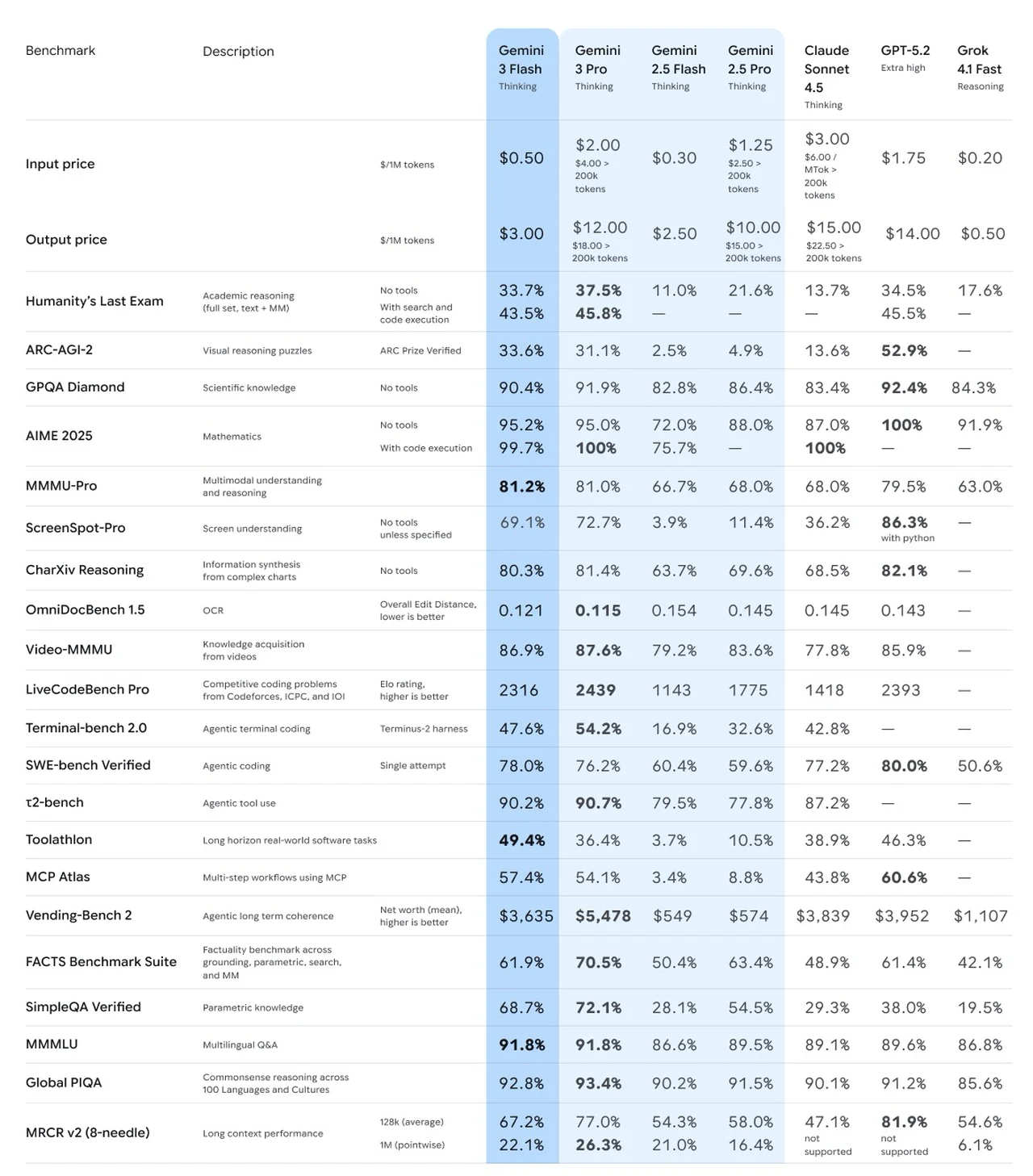
    • With competitive pricing at $0.50 per million tokens for input and $3 per million tokens for output, it provides a cost-effective alternative to premium AI models like Gemini 3 Pro and GPT 5.2.
    • Gemini 3 Flash excels in multimodal reasoning, handling tasks like visual understanding, screenshot analysis, and software engineering, while achieving strong benchmark performance in Arc AGI 2 and MMU Pro.
    • Its versatility supports applications in customer service, content moderation, and data analysis, making it a practical and scalable AI solution for real-world business needs.

    Where Gemini 3 Flash Fits in the Lineup

    Gemini 3 Flash builds upon the advanced reasoning architecture of its sibling, Gemini 3 Pro, while introducing optimizations that emphasize efficiency and adaptability. A standout feature is its “thinking levels” mechanism, which dynamically adjusts the depth of reasoning based on the complexity of the task. This ensures that simpler tasks are processed with minimal computational overhead, while more complex challenges receive the necessary resources for accurate and thorough execution.

    By focusing on these targeted optimizations, Gemini 3 Flash fills a critical niche within the Gemini lineup. It provides robust AI capabilities for organizations that prioritize cost-efficiency and low latency without compromising on quality. This makes it particularly valuable for industries requiring scalable AI solutions but operating under tight budget constraints. Its design ensures that businesses can use advanced AI without the financial burden of premium models.

    Affordability Without Compromise

    One of the most compelling aspects of Gemini 3 Flash is its competitive pricing structure, which is designed to make advanced AI accessible to a broader range of users. Input processing costs are set at $0.50 per million tokens, while output generation is priced at $3 per million tokens. These rates are significantly lower than those of competing models, such as Gemini 3 Pro, Claude Sonicet 4.5, and GPT 5.2.

    This cost-effectiveness is particularly advantageous for organizations managing large-scale data processing or deploying AI across multiple workflows. By reducing token-based expenses, Gemini 3 Flash enables businesses to achieve their AI objectives while staying within budgetary constraints. It offers a solution that combines affordability with practical functionality, making sure that businesses can scale their operations without sacrificing quality.

    Gemini 3 Flash : Built for Deployment, Not Hype!

    Stay informed about the latest in Gemini Flash by exploring our other resources and articles.

    Performance That Delivers

    Despite its focus on affordability, Gemini 3 Flash delivers impressive performance across a variety of benchmarks, demonstrating its capability to handle complex reasoning tasks. It has achieved competitive results in the Arc AGI 2 and GPQA Diamond benchmarks, which evaluate advanced problem-solving and general-purpose question-answering abilities.

    In the realm of multimodal reasoning, Gemini 3 Flash excels in tasks requiring visual understanding, as evidenced by its strong performance in the MMU Pro and Screen Spot Pro benchmarks. These capabilities make it particularly effective for applications such as screenshot analysis, user interface reasoning, and other scenarios that require the integration of textual and visual inputs.

    Additionally, the model has proven its value in software engineering contexts, as demonstrated by its results in the Live Code Bench. This makes it a powerful tool for developers, offering support for tasks such as coding, debugging, and software design. Its versatility ensures that it can meet the diverse needs of professionals across various technical domains.

    Versatile Applications

    Gemini 3 Flash is engineered to support a wide range of applications, particularly in environments where cost-efficiency and operational speed are critical. Its ability to handle agentic workflows—tasks requiring autonomous reasoning and decision-making—makes it a versatile tool for industries such as:

    • Customer service: Automating responses, resolving queries, and improving user experiences.
    • Content moderation: Making sure compliance with guidelines by analyzing and filtering content efficiently.
    • Data analysis: Processing and interpreting large datasets to extract actionable insights.

    The model’s multimodal capabilities enable it to process and interpret diverse data types, including text, images, and structured datasets. This makes it particularly well-suited for use cases like visual understanding, where it can analyze screenshots or interpret user interfaces with precision. Its low latency further enhances its suitability for real-time applications and high-throughput environments, making sure that it can meet the demands of dynamic operational settings.

    Strategic Value for Businesses

    Gemini 3 Flash represents a significant advancement in making sophisticated AI accessible and practical for widespread use. By balancing quality, cost, and latency, it offers a compelling price-to-performance ratio that aligns with the needs of various industries. Its design prioritizes scalability and efficiency, making it an ideal choice for businesses aiming to integrate AI into their operations at scale.

    For organizations seeking a cost-effective alternative to premium AI models, Gemini 3 Flash delivers consistent, high-quality performance without the associated expense. Its ability to handle diverse tasks—ranging from data processing to autonomous decision-making—ensures that it remains a valuable asset for businesses navigating the complexities of modern AI integration.

    Real-World Usability at Its Core

    Gemini 3 Flash is more than just another AI model; it is a thoughtfully engineered solution designed to address the practical challenges of real-world deployment. Whether you’re managing large datasets, automating workflows, or exploring new AI-driven applications, Gemini 3 Flash provides the performance, affordability, and efficiency needed to achieve your goals. Its focus on practical deployment ensures that it remains a reliable and versatile tool for businesses striving to harness the power of AI in a cost-effective and impactful manner.

    Media Credit: Universe of AI

    Filed Under: AI, Technology News, Top News

    Latest Geeky Gadgets Deals

    Disclosure: Some of our articles include affiliate links. If you buy something through one of these links, Geeky Gadgets may earn an affiliate commission. Learn about our Disclosure Policy.
  • From ShadCN Presets to Stitch Prototypes : Simple Stack to Ship Faster

    From ShadCN Presets to Stitch Prototypes : Simple Stack to Ship Faster

    From ShadCN Presets to Stitch Prototypes : Simple Stack to Ship Faster

    ShadCN component presets applied in a React project, showing consistent styles and accessible buttons across a clean layout.

    What if fixing your UI wasn’t just a challenge but an opportunity to redefine your entire design process? For developers and designers, the struggle to create seamless, visually cohesive interfaces often feels like a balancing act between creativity and consistency. Enter ShadCN, a new library that promises to simplify and elevate UI design for React and Next.js projects. With its focus on accessibility, customization, and integration, ShadCN isn’t just another tool, it’s a solution to the common frustrations of modern web development. Whether you’re battling inconsistent layouts or searching for a way to streamline prototyping, ShadCN’s innovative approach could be the fantastic option your workflow has been waiting for.

    In this preview, we’ll explore how ShadCN and its ecosystem of tools are reshaping the way developers approach UI design. From highly customizable components to AI-powered enhancements, ShadCN offers a suite of features designed to address the pain points of creating polished, user-friendly interfaces. You’ll discover how tools like Drawbridge, Google Stitch, and Claude AI seamlessly integrate with ShadCN to tackle everything from UI inconsistencies to browser compatibility testing. But this isn’t just about tools, it’s about transforming your process into something more efficient, creative, and user-centric. Could this be the new standard for UI design? Let’s take a closer look.

    Streamlining UI Design Tools

    TL;DR Key Takeaways :

    • ShadCN offers highly customizable and accessible UI components for React and Next.js, allowing developers to create visually cohesive and user-friendly designs with full control over styles and functionality.
    • Google Stitch simplifies prototyping with interactive features and seamless export options, while Coolors enhances design consistency by streamlining color theme exploration.
    • Drawbridge addresses UI inconsistencies with precision, allowing targeted fixes without disrupting the overall layout, making sure polished and professional designs.
    • AI-powered tools like Claude AI and Puppeteer MCP automate repetitive tasks, browser testing, and compatibility checks, enhancing productivity and maintaining high-quality standards.
    • ShadCN’s ecosystem, combined with tools like Superhero for design replication, enables developers to streamline workflows, focus on creativity, and deliver exceptional user experiences.

    What Sets ShadCN Apart?

    ShadCN distinguishes itself by providing a robust collection of highly customizable and accessible UI components tailored specifically for React and Next.js projects. These components enable you to craft visually cohesive designs while retaining full control over styles and functionality. Key features include:

    • Pre-designed presets for rapid implementation.
    • Theme modification options for creating unique visual identities.
    • Seamless integration into existing workflows and tools.

    Whether you’re designing a hero section, navigation bar, or footer, ShadCN simplifies the process, making sure your UI aligns with both user needs and project objectives. Its flexibility makes it an essential tool for developers and designers aiming to deliver polished, user-friendly interfaces.

    Prototyping Simplified with Google Stitch and Coolors

    Prototyping is a critical phase in UI design, and Google Stitch provides a comprehensive platform for creating interactive prototypes. With features like Gemini 3 Pro Thinking and Nano Banana, Stitch enables you to test navigation flows, clickable areas, and overall user experience before finalizing your designs. This ensures that your prototypes are not only functional but also user-centric.

    The integration of Coolors further enhances the prototyping process by simplifying the exploration of color themes. This ensures your designs maintain a consistent and visually appealing identity.

    Exporting prototypes is equally efficient. Google Stitch supports multiple export formats, including AI Studio, Jules, and Claude, allowing you to share designs across platforms or collaborate seamlessly with team members. This flexibility ensures that your prototypes are ready for immediate implementation, streamlining the transition from concept to execution.

    ShadCN with Google Stitch Practical Workflow Tips

    Browse through more resources below from our in-depth content covering more areas on Google Gemini 3.

    Resolving UI Inconsistencies with Drawbridge

    UI inconsistencies, even minor ones, can disrupt the overall user experience. Drawbridge is a specialized tool designed to address these issues with precision. By allowing you to isolate specific sections of your design, Drawbridge allows for targeted fixes without impacting the overall layout.

    Its advanced screenshot handling capabilities and integration with Claude code further enhance its utility, allowing you to resolve problems quickly and efficiently. This tool is particularly valuable for maintaining a polished and professional appearance across your projects, making sure that every element aligns with your design standards.

    AI-Powered Enhancements: Claude AI and Puppeteer MCP

    Artificial intelligence is transforming design workflows, and Claude AI exemplifies this shift. With its background agent functionality, Claude automates repetitive tasks, allowing you to focus on the creative aspects of your project.

    For browser testing, Claude integrates seamlessly with Puppeteer MCP, automating compatibility checks across various devices and browsers. This ensures that your designs perform consistently, regardless of the platform or environment. By using these AI-driven tools, you can enhance productivity while maintaining high standards of quality and accessibility.

    Inspiration and Replication for Design Consistency

    Inspiration plays a vital role in the design process, and curated galleries featuring hero sections, navigation bars, footers, and custom 404 pages provide a wealth of ideas to spark creativity. Tools like Superhero take this a step further by allowing you to replicate design inspirations directly into your projects.

    This feature not only saves time but also ensures consistency across different UI elements, reducing the need for manual adjustments. By streamlining the process of incorporating design inspirations, these tools empower you to focus on refining and enhancing your projects.

    Enhancing Workflows with AI-Driven Tools

    The integration of AI-driven tools into design workflows has transformed how developers and designers approach their projects. By automating repetitive tasks, reducing reliance on technical teams, and allowing faster prototyping, these tools allow you to focus on innovation and creativity.

    From ShadCN’s customizable components to Google Stitch’s prototyping capabilities, the emphasis is on creating user-centric designs with minimal friction. These tools are designed to enhance productivity while maintaining high standards of quality and accessibility, making sure that your projects meet both functional and aesthetic goals.

    Empowering UI Design with ShadCN and Its Ecosystem

    ShadCN and its suite of complementary tools represent a significant advancement in UI design. By prioritizing customization, accessibility, and efficiency, these resources empower developers and designers to create exceptional user experiences. Whether you’re using AI-driven solutions like Claude AI, prototyping with Google Stitch, or resolving UI inconsistencies with Drawbridge, these tools provide the foundation for streamlined workflows and visually stunning designs.

    With ShadCN, you gain the flexibility and functionality needed to elevate your projects, delivering interfaces that resonate with users and stand out in today’s competitive digital landscape.

    Media Credit: AI LABS

    Filed Under: AI, Technology News, Top News

    Latest Geeky Gadgets Deals

    Disclosure: Some of our articles include affiliate links. If you buy something through one of these links, Geeky Gadgets may earn an affiliate commission. Learn about our Disclosure Policy.
  • AI Doesn’t Replace Coaches — It Makes Them Stronger: How BodyPark ATOM Becomes the ‘Second Pair of Eyes’ in Professional Training

    AI Doesn’t Replace Coaches — It Makes Them Stronger: How BodyPark ATOM Becomes the ‘Second Pair of Eyes’ in Professional Training

    AI Doesn’t Replace Coaches — It Makes Them Stronger: How BodyPark ATOM Becomes the ‘Second Pair of Eyes’ in Professional Training

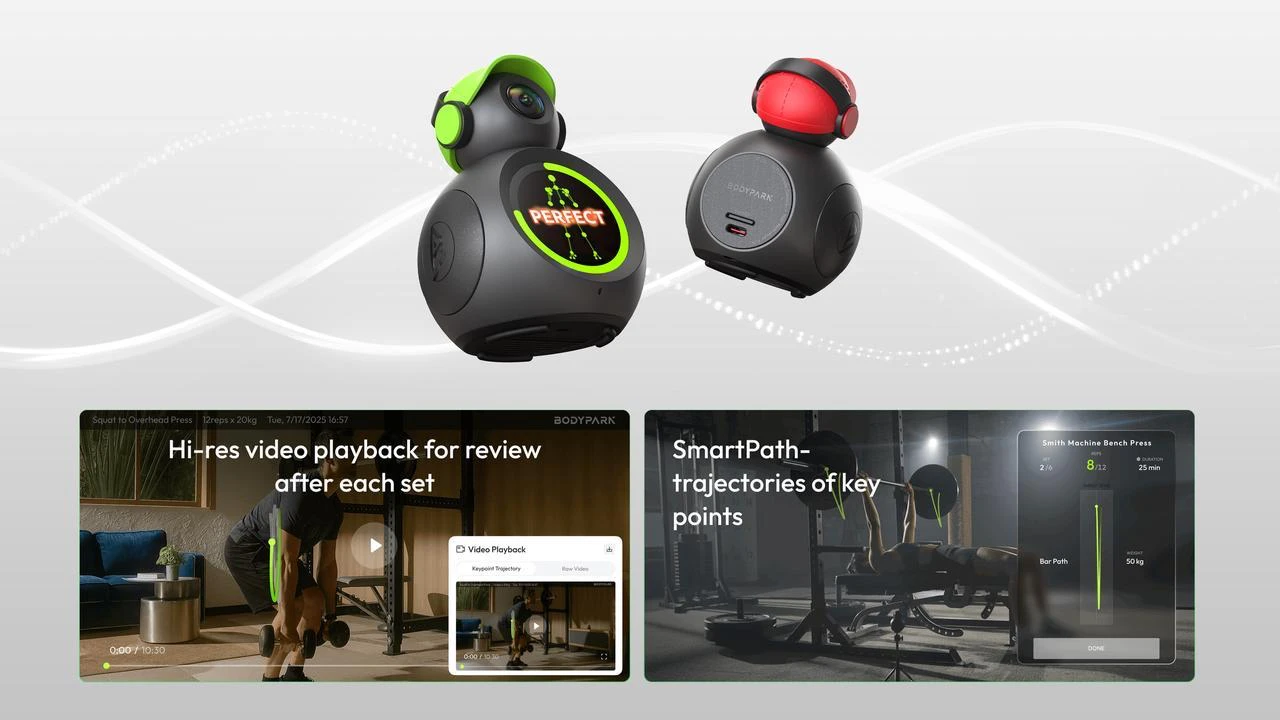
    Everyone who’s ever tried to get stronger has had trouble with their form one way or another. Pinning down the correct form from the get-go is a privilege of a few — most of us know what it’s like to be unsure about our form. And tracking apps, at least in their current form, cannot help, even with all the improvements that came with the rise of AI fitness: Reps, sets, and calories are easy to track with today’s fitness devices—there are plenty of tools that can log the numbers. But devices that not only count and record, but also evaluate how well you move, are rare. BodyPark’s ATOM is built to solve exactly that problem—bringing both intelligent tracking and meaningful movement analysis into one system.

    BodyPark ATOM — The World’s First True AI Fitness Companion

    ATOM’s creators introduced it as the world’s first AI Fitness Companion, and
    “intelligence” here is not an empty word. BodyPark developed a unique DeepBody™ Engine that’s able to accurately recognize about 96% human poses and track more than 34 skeletal key points, including an industry-exclusive lumbar point along your spine. It recognizes over 1,000 movements when you train, like strength, calisthenics and functional training. The app does full real-time tracking when you exercise. It recognizes movement and offers voice correction if something is off. You get automatic video replay and AI analysis reports inside the app, to check the results and improve them once you’re done.

    In practice, that means ATOM doesn’t just declare that “you did 10 squats,” once you’re done. It sees how your knees track, how your hips shift, what your spine is doing and how consistent each rep is. People who train on their own – without a professional coach watching their form – rarely have access to such detailed, real-time feedback.

    BodyPark ATOM

    A Smart Fitness Device That Cares About Your Gains

    Currently, most tools just log bare data — what happened and how often. ATOM is built with a different goal which is to prioritize movement quality as the main metric. Real-time movement recognition and correction is its biggest advantage over other fitness apps. When you train in front of the device, it doesn’t just track what you’re doing, but how you’re doing it (your posture, joint angles, etc). And it gives you live voice cues if you’re performing the move wrong.

    ATOM has automatic rep counting and set tracking. Once you’re done with the exercise, use the movement replay and improvement analysis feature to watch back your set with force-line and motion-path overlays and get clear suggestions on what to fix next time.

    Its AI training tracking system allows you to turn each workout into practical data you can build your future, improved, exercise and performance upon. After each session you can look at your:

    ● Range of motion during the exercise;

    ● Displacement and movement path;

    ● Stability and consistency.

    It’s the kind of information you’d normally only be able to get out of a keen coach that closely tracks your performance. Here it’s baked into a small smart fitness device — all you need to do is try some exercises with it and check the results. The in-depth analytical abilities are what makes ATOM a truly intelligent strength training system, not a fancy camera.

    BodyPark ATOM

    AI Fitness Coach in Your Pocket: Exercise Whenever You Want — And Still Improve

    ATOM doesn’t just analyze the data you give it, but certainly be worthy of a place in your training regimen even if it did just that. What really makes it feel like you’ve got a portable AI fitness coach looking over you is its ability to suggest smart adjustments to your plan. Adaptive AI training planning pairs BodyPark’s multi-agent Fitness Engine with large models such as Gemini, DeepSeek, and Qwen to recommend programs matched to your performance, fatigue, goals, and mobility. You can control sessions with text, voice, or your own programming, or choose from a library of 1,000+ movements. Just click the one you like or one that feels particularly challenging, then read ATOM’s report to see how you can improve.

    ATOM isn’t here to replace coaches, they’ll always have their place. But there are plenty of people who don’t have access to them: solo gym-goers, busy people who can’t take out large chunks of their time to visit gyms, those who simply prefer training at home, or don’t want long-term PT fees. ATOM’s here to help fitness enthusiasts — all fitness enthusiasts. In fact, it’s here to help professional coaches by providing more in-depth analysis for their students.

    Traditional training tools can record but they cannot give recommendations on how to get better. Current apps and smartwatches count repetitions, duration or heart rate, but they cannot tell movement quality. Action cameras can capture workout footage, but cannot analyze mistakes.

    ATOM plugs that gap by combining the “eyes of a professional coach” with AI powered training analytics, including real time recognition, instant correction, automatic motion recording, and performance tracking -all without the need for wearables, markers, or additional setup. It doesn’t just tell you how much you trained; it tells you how well you trained. That’s why every session becomes more visible, safer, more effective, and, frankly, more worth committing to.

    It’s also designed to make exercise accessible. It can work in commercial gyms and home gyms, but also in areas not designed for working out: offices, hotel rooms, even outdoor spots. The 160° fisheye lens captures full-body movement even in tighter rooms. Weighing just 155g, it easily fits into any bag wherever you are, making it a compact, portable companion for all occasions — a true compact and portable 24/7 companion. The battery lasts about 72 hours on standby and over 7 hours of continuous training. No wearables are required, and it’s ready to use instantly. Just place it on the floor, snap it to a metal surface with the magnet, or mount it on a tripod.

    Additional design features include an adjustable tilt angle, a built-in speaker with Bluetooth headphone mode, and a high-contrast 1.43″ AMOLED screen. Physical privacy protection is built in as well: ATOM features a colorful, slide-down privacy cap that physically blocks the camera when not in use—offering a simple and effective way to ensure peace of mind between sessions.

    Interested? Here’s What Else You Need to Know

    ATOM is still new to the market and currently live on Kickstarter. The Early Bird tier is now available, starting at USD $139 (plus shipping)—offering a solid discount for early supporters. The higher the tiers go, the bigger the discount you get, with the highest tiers getting all the way to 46% off a bundle.

    You don’t need to worry about ATOM missing the market. The campaign has long surpassed its initial goals by a wide margin and is now near $400,000 with more than 1,600 backers. The production is underway, and the first ATOMs will likely be available in Q1 2026. Clearly, BodyPark’s AI-powered fitness technology focusing on advanced movement understanding and intelligent training feedback has hit it right with the target audience: everyday users that would benefit from coaching-level tools as much as, if not more, than the athletes.

    If you want to dig into the technical details or see the device in action, you can head to BodyPark ATOM – World’s First AI Fitness Companion by BodyPark on Kickstarter.

    BodyPark ATOM

    BodyPark ATOM

    Filed Under: AI, Gadgets News, Guides

    Latest Geeky Gadgets Deals

    Disclosure: Some of our articles include affiliate links. If you buy something through one of these links, Geeky Gadgets may earn an affiliate commission. Learn about our Disclosure Policy.
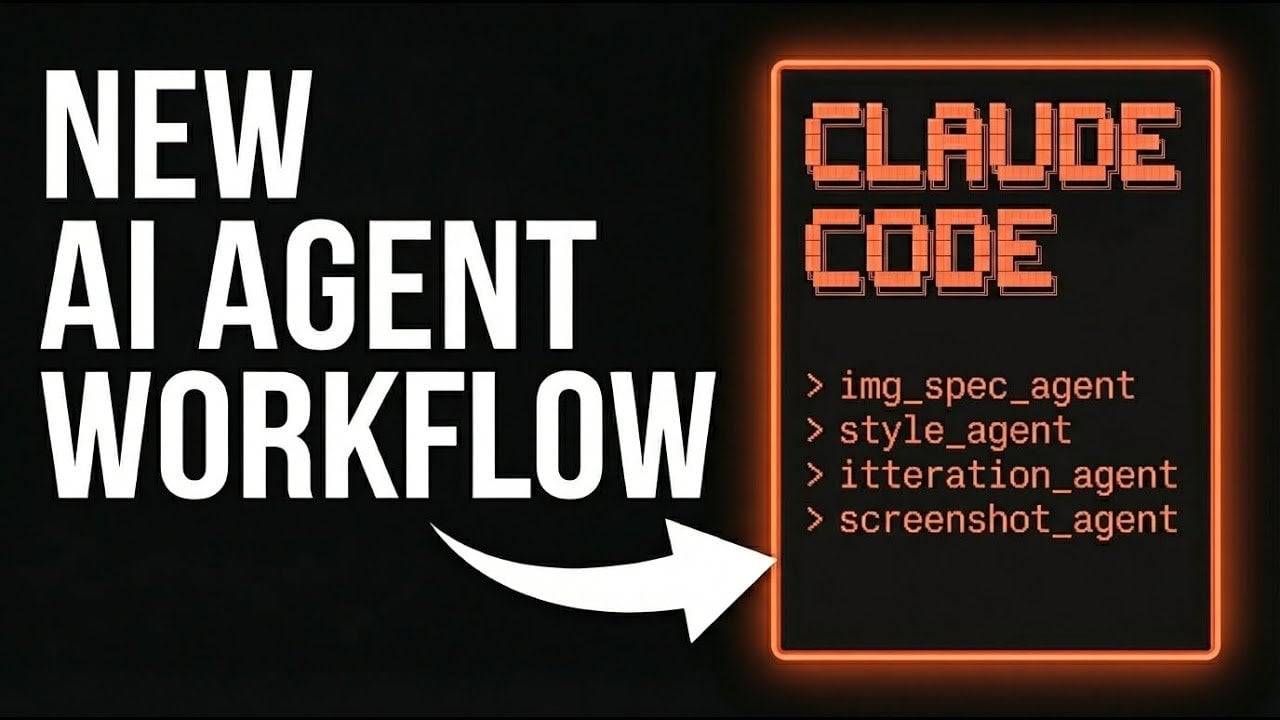
  • Using Claude Code Subagents to Turn Images into a Working Build Guides

    Using Claude Code Subagents to Turn Images into a Working Build Guides

    Using Claude Code Subagents to Turn Images into a Working Build Guides

    Example Path of Exile 2 build page with custom background art, skill icons, and a responsive rage meter.

    What if you could turn a simple image into fully functional code, without lifting a finger to write it yourself? The rise of AI-powered tools like Claude Code is making this a reality, and it’s not just about saving time; it’s about reimagining how we approach web development altogether. By using specialized AI subagents, developers can now automate complex tasks, refine designs through iterative feedback, and produce polished, interactive web pages with unprecedented efficiency. Imagine creating a visually stunning, feature-rich guide for a game like Path of Exile 2—complete with custom visuals, skill trees, and dynamic elements, all while focusing on creativity rather than coding. This isn’t just a glimpse into the future; it’s happening now.

    In this deep dive, All About AI explore how Claude Code’s AI subagents work together to transform ideas into reality. From the Image Generator that lays the foundation for your design to the Iteration Agent that ensures every detail is perfected, each subagent plays a critical role in simplifying the development process while maintaining high-quality standards. You’ll discover how iterative workflows, custom asset creation, and dynamic content integration come together to produce seamless results. Whether you’re a seasoned developer or just curious about the possibilities of AI in web design, this structured approach offers insights that could reshape how you think about building digital experiences. After all, when machines collaborate like humans, the potential is limitless.

    AI Subagents for Web Development

    TL;DR Key Takeaways :

    • Claude Code uses AI subagents to streamline web development, with each subagent specializing in tasks like image generation, styling, progress monitoring, and iterative refinement.
    • The workflow emphasizes iterative development, making sure high-quality outcomes by refining design, functionality, and visual elements through multiple feedback loops.
    • Custom asset creation, such as background images, skill icons, and interactive elements, enhances the visual appeal and coherence of the final product.
    • The structured process results in a polished, user-friendly, and immersive guide for Path of Exile 2, featuring detailed skill information, gear recommendations, and interactive features.
    • Key advantages of using AI subagents include increased efficiency, tailored customization, and improved quality assurance, making it a powerful tool for dynamic web development projects.

    How the Workflow Functions

    The workflow in Claude Code begins with your input, which is managed by a main agent. This main agent orchestrates the efforts of four distinct AI subagents, each assigned a specialized role. These subagents collaborate through iterative loops to design, refine, and implement the page’s elements. At least three iterations are typically required to ensure the final product meets high-quality standards.

    • Image Generator: Develops a visual blueprint for the page layout and design.
    • Style Agent: Creates custom assets inspired by reference files to align with a specific art style.
    • Screenshot Agent: Captures snapshots of the page’s progress and provides actionable feedback for improvement.
    • Iteration Agent: Refines the page by addressing errors, implementing feedback, and enhancing functionality.

    This structured workflow ensures that all design elements and assets are seamlessly integrated, resulting in a cohesive and visually engaging final product.

    The Role and Contributions of Each Subagent

    Each subagent plays a critical role in the development process, contributing unique expertise to ensure the page’s quality and functionality.

    • Image Generator: This subagent establishes the foundation by creating a visual specification. It defines key elements such as the page layout, skill tree integration, and navigation links, making sure a clear starting point for development.
    • Style Agent: Using inspiration files, this subagent designs custom assets like background images, skill icons, and rage bars. These assets are tailored to the guide’s theme, enhancing its visual appeal and coherence.
    • Screenshot Agent: By capturing snapshots of the page at various stages, this subagent allows you to monitor progress, evaluate design choices, and identify areas for improvement.
    • Iteration Agent: This subagent focuses on refining the page by addressing errors, incorporating feedback, and enhancing both design and functionality. It ensures that the final product meets high standards of quality and usability.

    Together, these subagents form a cohesive system that simplifies the development process while maintaining a high standard of quality.

    Image to Code : AI Subagents in Claude Code

    Stay informed about the latest in Claude Code by exploring our other resources and articles.

    Custom Asset Creation and Seamless Integration

    A standout feature of this workflow is its emphasis on custom asset generation. The style agent uses inspiration files to produce visuals that are uniquely tailored to the guide’s theme. These assets include:

    • Background Images: Set the tone and atmosphere of the page, creating an immersive experience.
    • Skill Icons: Provide visual clarity and highlight key abilities within the guide.
    • Rage Bars: Add dynamic, interactive elements that enhance the user experience.

    The integration of these assets follows an iterative process. For instance, the skill tree begins as a basic layout and evolves into a fully interactive feature. Navigation links are added to improve usability, while animations and gear visuals bring the guide to life. This step-by-step approach ensures that every element is both functional and visually cohesive, resulting in a polished final product.

    The Importance of Iterative Development

    At the core of this workflow lies iterative development, a process that focuses on refining the page through multiple development loops. Each iteration addresses errors, incorporates new features, and enhances design elements to achieve a high-quality outcome.

    • Early Iterations: Concentrate on structural elements such as layout, navigation, and basic functionality.
    • Later Iterations: Focus on fine-tuning visual details and completing complex features, such as the skill tree and interactive elements.

    Feedback loops are integral to this process. By evaluating the page’s progress at each stage, you can make informed decisions about adjustments and improvements. This ensures that the final product meets both aesthetic and functional requirements, delivering a user-friendly and visually engaging experience.

    The Final Outcome

    The end result of this workflow is a comprehensive and visually appealing build guide for Path of Exile 2. This guide includes:

    • Custom visuals that align with the game’s theme, creating an immersive experience for users.
    • Detailed skill information and gear recommendations to assist players effectively.
    • A polished, user-friendly layout with interactive features that enhance usability and engagement.

    This structured approach demonstrates the potential of AI subagents to create dynamic, high-quality content efficiently, making it an invaluable tool for web development projects.

    Key Advantages of AI Subagents in Web Development

    The integration of AI subagents in Claude Code offers several significant benefits for web development. By automating repetitive tasks and providing iterative feedback, these tools enable you to focus on creativity and design. Key advantages include:

    • Efficiency: Automating routine tasks reduces time and effort, allowing for faster project completion.
    • Customization: Inspiration-driven styling ensures a unique and cohesive visual theme tailored to your project’s needs.
    • Quality Assurance: Iterative development guarantees a polished and functional final product that meets high standards.

    Whether you’re creating a guide for a game or designing other types of dynamic content, this approach represents a powerful and efficient solution. By combining AI-driven tools with a structured workflow, you can achieve results that are both innovative and professional, setting a new standard for web development.

    Media Credit: All About AI

    Filed Under: AI, Guides

    Latest Geeky Gadgets Deals

    Disclosure: Some of our articles include affiliate links. If you buy something through one of these links, Geeky Gadgets may earn an affiliate commission. Learn about our Disclosure Policy.
  • Gemini 3 Flash Gets Faster, Smarter and Cheaper to Run

    Gemini 3 Flash Gets Faster, Smarter and Cheaper to Run

    Gemini 3 Flash Gets Faster, Smarter and Cheaper to Run

    Workflow diagram highlighting resume parsing, sentiment checks, and image analysis powered by Gemini 3 Flash.

    What if your daily workhorse could not only keep pace with your demanding schedule but also anticipate your needs, adapt to your preferences, and save you money in the process? Enter Gemini 3 Flash, the latest innovation from Google DeepMind, designed to redefine what an AI assistant can do. With its unmatched speed, precision, and versatility, Gemini 3 Flash isn’t just an upgrade, it’s a fantastic option. Imagine an AI that processes massive datasets faster than ever, seamlessly integrates text, images, and audio, and adapts to your unique workflows. Whether you’re a developer racing against deadlines, a business optimizing resources, or a researcher juggling complex data, Gemini 3 Flash promises to be the reliable partner you didn’t know you needed.

    In this exploration of Gemini 3 Flash, Sam Witteveen uncovers how its multimodal capabilities, token efficiency, and customizable workflows set it apart from its predecessors and competitors alike. You’ll discover how it balances innovative performance with cost-effectiveness, making it an accessible yet powerful tool for diverse industries. But it’s not all perfection, there are limitations to consider, and we’ll delve into those too. By the end, you’ll have a clear sense of whether this AI powerhouse is the upgrade your workflow has been waiting for, or if it’s simply another tool in an already crowded landscape. Sometimes, the smallest refinements can spark the biggest revolutions.

    What Makes Gemini 3 Flash Unique?

    TL;DR Key Takeaways :

    • Gemini 3 Flash offers enhanced speed, precision, and versatility, making it a cost-effective and advanced solution for businesses and developers.
    • Key features include improved token efficiency, multimodal capabilities for handling diverse data types, and customizable settings for tailored workflows.
    • It excels in tasks like structured data extraction, sentiment analysis, and automation, rivaling higher-tier models in performance while maintaining affordability.
    • Transparent pricing with a pay-as-you-go model ensures scalability, with costs set at $0.50 per million input tokens and $3 per million output tokens.
    • While it has limitations in spatial understanding, ongoing updates and a trial option in AI Studio make it accessible and adaptable for diverse applications.

    Gemini 3 Flash represents more than just an incremental improvement, it’s a significant advancement in AI technology. Its standout features include:

    • Enhanced performance that rivals the higher-tier Gemini 3 Pro in critical benchmarks.
    • Cost-efficient token usage, ideal for high-volume and resource-intensive tasks.
    • Multimodal capabilities for processing diverse data types, including text, images, and audio.
    • Customizable settings to adapt to specific workflows and business needs.

    These attributes make Gemini 3 Flash a versatile tool for applications ranging from app development to data processing and automation, offering both flexibility and reliability.

    Performance: Faster, Smarter, and More Accurate

    Gemini 3 Flash Benchmarks

    Gemini 3 Flash delivers a noticeable improvement in speed and accuracy compared to its predecessor. It excels in handling complex tasks such as structured data extraction, sentiment analysis, and multimodal processing. In many cases, it matches or even surpasses the performance of the Gemini 3 Pro, making it a cost-effective alternative for users who prioritize efficiency without compromising quality.

    This optimization ensures that businesses can process large datasets, automate workflows, and generate actionable insights faster, allowing them to stay competitive in a fast-paced environment.

    Gemini 3 Flash : Your Daily Workhorse Upgraded

    Learn more about the latest Gemini 3 AI models with the help of our in-depth articles and helpful guides.

    Token Efficiency: Reducing Costs Without Sacrificing Quality

    One of the most compelling features of Gemini 3 Flash is its token efficiency, which reduces operational costs while maintaining high levels of precision. By requiring fewer tokens to complete tasks, it becomes an economical choice for businesses managing high-volume workflows. For example:

    • Sentiment analysis tasks can be performed with minimal computational overhead, saving time and resources.
    • Large-scale structured data extraction becomes more cost-effective, especially for industries like finance and healthcare.

    This efficiency makes Gemini 3 Flash particularly appealing for organizations looking to optimize their budgets while maintaining robust performance.

    Multimodal Capabilities: Seamlessly Handling Diverse Data

    Gemini 3 Flash is designed to process multiple data formats, including text, images, audio, and PDFs, making it a powerful tool for handling diverse workflows. Its ability to integrate these data types into a single, cohesive process ensures consistent and accurate results. Key applications include:

    • Extracting structured data from scanned documents, such as invoices or contracts.
    • Generating actionable insights from multimedia content, including videos and podcasts.
    • Parsing resumes or analyzing complex datasets for recruitment or research purposes.

    This versatility allows businesses to streamline operations and improve decision-making across a variety of industries.

    Customization: Tailored Solutions for Every Workflow

    Flexibility is a cornerstone of Gemini 3 Flash’s design. Its customizable settings allow users to prioritize either speed or depth of analysis, depending on their specific requirements. Additional features include:

    • Support for structured outputs, simplifying data processing and integration.
    • Code execution and function calling, allowing automation of repetitive tasks.
    • Customizable workflows for app development, data analysis, or other specialized tasks.

    These options empower users to fine-tune the model’s capabilities, making sure it aligns perfectly with their operational goals.

    Applications: Empowering App Development and Automation

    Gemini 3 Flash is particularly effective in app development and automation, offering tools like the Antigravity IDE and Gemini CLI to streamline processes. These tools enable users to:

    • Accelerate development cycles and reduce time-to-market for new applications.
    • Automate repetitive tasks, such as data processing or sentiment analysis, freeing up resources for strategic initiatives.
    • Use AI for complex coding tasks, improving productivity and reducing errors.

    Its ability to handle structured data and execute code makes it an invaluable asset for developers and businesses aiming to optimize their workflows.

    Pricing: Transparent and Scalable

    While Gemini 3 Flash is slightly more expensive than its predecessor, its pricing structure remains competitive and accessible. The pay-as-you-go model ensures scalability for businesses of all sizes, with costs set at:

    • $0.50 per million input tokens, making it affordable for data-heavy tasks.
    • $3 per million output tokens, making sure cost-effectiveness for generating detailed outputs.

    This transparent pricing model allows organizations to plan their budgets effectively while benefiting from advanced AI capabilities.

    Limitations and Future Prospects

    Despite its many strengths, Gemini 3 Flash has some limitations. Its performance in tasks requiring precise spatial understanding or 3D bounding box detection is inconsistent, which may impact industries relying heavily on spatial analysis, such as logistics or augmented reality. However, Google DeepMind has committed to addressing these challenges in future updates, making sure the model continues to evolve and meet the growing demands of its users.

    Accessibility: Explore Before You Commit

    To help users evaluate its capabilities, Gemini 3 Flash is available for testing in AI Studio. This trial option allows businesses and developers to explore its features and assess its suitability for their specific use cases without requiring an API key. This risk-free approach ensures that users can make informed decisions before integrating the model into their workflows.

    A Reliable AI for Diverse Applications

    Gemini 3 Flash combines cost-effectiveness, advanced functionality, and customization to deliver a robust solution for businesses and developers. Its improvements in token efficiency, multimodal capabilities, and performance make it a valuable tool for tasks ranging from app development to data processing and automation. While there is room for improvement in spatial understanding, its current features position it as a reliable and versatile AI model. With ongoing updates and enhancements, Gemini 3 Flash is well-equipped to remain a leading choice in the rapidly evolving AI landscape.

    Media Credit: Sam Witteveen

    Filed Under: AI, Technology News, Top News

    Latest Geeky Gadgets Deals

    Disclosure: Some of our articles include affiliate links. If you buy something through one of these links, Geeky Gadgets may earn an affiliate commission. Learn about our Disclosure Policy.

  • Gemini 3 Turns Meetings, Emails and Long Reports into Actions Easily

    Gemini 3 Turns Meetings, Emails and Long Reports into Actions Easily

    Gemini 3 Turns Meetings, Emails and Long Reports into Actions Easily

    Dashboard view showing Gemini 3.0 turning emails and reports into tasks, with clear next steps and deadlines.

    What if you could unlock a tool that doesn’t just help you work faster but fundamentally transforms how you work, all in less time than it takes to finish your morning coffee? Enter Gemini 3, the latest evolution in productivity technology, designed to meet the relentless demands of modern professionals. Imagine a platform that can seamlessly analyze a week’s worth of meeting recordings, cross-reference financial reports for inconsistencies, and even generate interactive dashboards, all while you focus on the bigger picture. Bold claim? Perhaps. But with its dynamic generative interfaces and advanced multimodal understanding, Gemini 3.0 is poised to redefine what it means to work efficiently in 2026.

    In this practical guide, you’ll discover how to master Gemini 3 in just 12 minutes, unlocking features that can save hours of manual effort and elevate your decision-making. From automating repetitive tasks to extracting actionable insights from complex datasets, this tool isn’t just about keeping up, it’s about staying ahead. Whether you’re a project manager juggling competing priorities or a creative professional refining your next big idea, Gemini 3.0 offers solutions tailored to your needs. By the end, you might just find yourself rethinking what productivity looks like in a world where technology does more than assist, it anticipates.

    Gemini 3 Key Features

    TL;DR Key Takeaways :

    • Gemini 3 features advanced multimodal understanding, allowing simultaneous processing of text, images, audio, and video for faster, more informed decision-making.
    • Its streamlined document analysis extracts relevant information, cross-references datasets, and reduces manual effort, improving accuracy and efficiency.
    • Enhanced workspace search and automation integrate with tools like Google Workspace, automating routine tasks and providing quick access to critical information.
    • Dynamic generative interfaces allow users to create interactive tools, dashboards, and layouts tailored to specific needs, enhancing productivity and decision-making.
    • Improved intent recognition and constructive feedback ensure precise outputs, reduce revisions, and help refine work for professional-quality results.

    Gemini 3.0 introduces a suite of innovative features aimed at addressing common workplace challenges. From processing diverse data formats to automating repetitive tasks, this tool is designed to save time, improve accuracy, and enhance decision-making. Below, we delve into its standout features and how they can elevate your productivity.

    Advanced Multimodal Understanding

    One of Gemini 3.0’s most powerful capabilities is its ability to process multiple data formats, such as text, images, audio, and video, simultaneously. This feature is invaluable for professionals who need to integrate information from various sources quickly and effectively. For example:

    • Convert meeting recordings into structured training materials or detailed reports, eliminating the need for time-consuming manual transcription.
    • Analyze user reactions during UI/UX research by interpreting facial expressions or vocal tones, providing actionable insights to refine product designs.

    By using all available data types, Gemini 3.0 enables faster, more informed decision-making, making sure no critical detail is overlooked.

    Master Gemini 3 for Work in 12 Minutes

    Check out more relevant guides from our extensive collection on Gemini 3 that you might find useful.

    Streamlined Document Analysis

    Handling large volumes of information is no longer a daunting task with Gemini 3.0. Its advanced document analysis capabilities allow you to extract relevant information from extensive files, such as financial reports or meeting transcripts, while identifying inconsistencies across datasets. Key benefits include:

    • Quickly locate specific details in lengthy documents without losing context, saving hours of manual searching.
    • Cross-reference multiple sources to ensure accuracy and consistency in your analysis, reducing the risk of errors.

    This feature transforms how you approach complex projects, allowing you to focus on strategic insights rather than tedious data extraction.

    Enhanced Workspace Search and Automation

    Gemini 3.0 integrates seamlessly with tools like Google Workspace, transforming how you retrieve and organize information. Its advanced search functionality and automation capabilities turn scattered data into actionable insights, helping you stay organized and efficient. Here’s how it works:

    • Automate routine tasks such as drafting emails, creating performance reviews, or managing inboxes, freeing up time for higher-priority work.
    • Quickly access the exact files, emails, or data you need, even during high-pressure situations, making sure you stay on track.

    This feature ensures you always have the right information at your fingertips, boosting productivity and reducing stress during critical projects.

    Dynamic Generative Interfaces

    Gemini 3.0’s ability to create interactive tools and visual layouts tailored to your needs is a standout feature. Whether you’re building dashboards, comparison tables, or calculators, this functionality minimizes manual effort and enhances decision-making. Practical applications include:

    • Generate real-time financial dashboards for project tracking and reporting, making sure you stay informed about key metrics.
    • Create customized tools that adapt to specific tasks, streamlining workflows and improving efficiency.

    By automating these processes, Gemini 3.0 allows you to focus on strategic goals, making it an indispensable tool for professionals managing complex projects.

    Improved Intent Recognition

    Gemini 3.0’s enhanced intent recognition simplifies collaboration and ensures precise results, even when instructions are vague. Unlike earlier versions, it uses contextual understanding to interpret your needs and deliver outputs that align closely with your expectations. For instance:

    • Provide a few examples, and the model can mimic specific writing styles or adapt to unique project requirements, saving time and effort.
    • Generate outputs that meet your standards, even when your instructions are incomplete or ambiguous.

    This improvement reduces the need for constant revisions, making sure your work is polished and professional from the start.

    Constructive Feedback and Critical Analysis

    Gemini 3.0 goes beyond simple task execution by offering critical feedback to help you refine your work. It identifies inconsistencies, logical gaps, and areas for improvement, making sure your outputs are of the highest quality. Use cases include:

    • Review presentations or reports with an eye for storytelling and data interpretation weaknesses, enhancing their overall impact.
    • Receive actionable suggestions to improve clarity, coherence, and effectiveness in your work.

    This feature fosters continuous improvement, helping you deliver results that meet and exceed professional standards.

    Practical Applications of Gemini 3.0

    Gemini 3.0’s versatile features cater to a wide range of professional needs, making it a valuable tool across industries. Here are some practical applications:

    • Analyze financial reports with automated discrepancy detection, making sure accuracy in critical decisions.
    • Transform meeting transcripts into actionable insights, streamlining decision-making processes.
    • Create dynamic dashboards for project management and performance tracking, keeping teams aligned and informed.
    • Use multimodal data analysis for UI/UX research, allowing more effective product refinement.
    • Automate routine tasks in Google Workspace, such as email drafting and file organization, to save time and reduce workload.

    Gemini 3.0 equips professionals with the tools they need to excel in today’s fast-paced work environment, offering solutions that are both practical and impactful.

    Media Credit: Jeff Su

    Filed Under: AI, Guides

    Latest Geeky Gadgets Deals

    Disclosure: Some of our articles include affiliate links. If you buy something through one of these links, Geeky Gadgets may earn an affiliate commission. Learn about our Disclosure Policy.

  • RayNeo X3 Pro Review : Brilliant AR Display, Gemini Voice Support, but Brief Battery

    RayNeo X3 Pro Review : Brilliant AR Display, Gemini Voice Support, but Brief Battery

    RayNeo X3 Pro Review : Brilliant AR Display, Gemini Voice Support, but Brief Battery

    RayNeo X3 Pro smart glasses highlighting the short runtime compared with Meta.

    What if you could wear the future on your face? The RayNeo X3 Pro smart glasses promise just that, a sleek, lightweight device that blends innovative augmented reality (AR) technology with everyday practicality. From a 43-inch virtual screen that transforms how you consume media to real-time navigation and live translation, these glasses aim to redefine the boundaries of wearable tech. But with innovation comes scrutiny: can this ambitious device overcome its glaring limitation, battery life under an hour? In this analysis, we’ll explore whether the RayNeo X3 Pro lives up to its bold claims or if it’s another tech marvel held back by real-world constraints.

    Guided by Steven Sullivan’s thorough insights, we’ll break down the design, functionality, and performance of these smart glasses to uncover their true potential. You’ll discover how the 6,000-nit dual-lens display ensures visibility even in direct sunlight, why the live translation feature could be a fantastic option for travelers, and how the glasses’ AI assistant might simplify your daily routine. Yet, as we delve deeper, questions linger: does the limited battery life make this innovation impractical for professionals on the go? Stay with us as we unpack the promise and pitfalls of the RayNeo X3 Pro, offering a balanced look at whether it’s a glimpse of tomorrow or a step too soon.

    RayNeo X3 Pro Overview

    TL;DR Key Takeaways :

    • The RayNeo X3 Pro smart glasses feature a lightweight design (76 grams) with dual full-color lenses offering a peak brightness of 6,000 nits and a 43-inch virtual screen for immersive AR experiences.
    • Key functionalities include real-time AR navigation, live translation supporting 14 languages, AI-powered assistance, advanced media playback, and AR camera capabilities for video recording and transcription.
    • The glasses operate on an open Android ecosystem, supporting popular apps like TikTok, YouTube, and Instagram, enhancing versatility for both work and leisure activities.
    • Despite their advanced features, the glasses have a limited battery life of under one hour, which may hinder extended use for professionals and frequent travelers.
    • RayNeo offers a trade-in program valid until January 5, 2026, allowing users to upgrade from older models or competitors’ glasses with up to $799 in credit toward the X3 Pro.

    Design and Display

    At just 76 grams, the RayNeo X3 Pro glasses are designed with comfort and portability in mind. Their lightweight and compact build make them more discreet and easier to wear compared to many competitors, including Meta’s smart glasses. The dual full-color lenses deliver a peak brightness of 6,000 nits, making sure excellent visibility even in bright outdoor conditions. This feature is particularly beneficial for users who frequently navigate or work in environments with strong sunlight. The glasses’ virtual screen, equivalent to a 43-inch display, enhances the user experience by offering an immersive platform for navigation, media playback, and other applications. This combination of portability and display quality makes the RayNeo X3 Pro a compelling choice for users seeking both functionality and style.

    Core Features and Functionality

    The RayNeo X3 Pro glasses are packed with features that cater to a wide range of user needs, making them versatile tools for both personal and professional use. Key functionalities include:

    • AR Navigation: The glasses provide real-time navigation by overlaying walking and biking directions directly onto your field of view. This feature ensures seamless and intuitive guidance, eliminating the need to constantly check your smartphone.
    • Live Translation: Supporting 14 languages, the glasses offer real-time translation of both text and audio. This capability is particularly useful for travelers and professionals working in multilingual environments.
    • AI Assistant: Powered by Gemini AI, the assistant responds to voice commands, manages tasks, and provides contextual information. This feature streamlines daily activities, making the glasses a practical tool for productivity.
    • Media Playback: The glasses enhance entertainment by displaying song details, lyrics, and offering three distinct sound modes, Standard, Whisper, and Surging. These modes cater to different listening preferences, making sure an optimal audio experience.
    • Camera and Recording: Equipped with advanced AR camera capabilities, the glasses support video recording of up to 50 minutes (with a maximum of 9 minutes per session), burst photo mode, and AR screen recording. AI transcription and summarization further enhance productivity by converting audio recordings into text, making them ideal for meetings and note-taking.

    These features collectively position the RayNeo X3 Pro as a versatile and innovative device, capable of meeting the demands of modern users.

    RayNeo X3 Pro Glasses Full Review

    Below are more guides on smart glasses from our extensive range of articles.

    User Interface and Controls

    The RayNeo X3 Pro glasses are designed with an intuitive user interface that simplifies navigation and enhances usability. Touch controls allow you to easily access menus, adjust settings, and interact with apps. Quick menus can be customized to control brightness, volume, and sound modes, making sure a personalized and user-friendly experience. These controls are strategically designed to minimize distractions, allowing you to focus on tasks without unnecessary interruptions. The seamless integration of these features underscores the glasses’ commitment to practicality and ease of use.

    App Ecosystem

    Built on an open Android ecosystem, the RayNeo X3 Pro glasses support a wide range of popular apps, including TikTok, YouTube, and Instagram. This compatibility allows you to stay connected, entertained, and productive without relying on additional devices. The glasses also include features such as teleprompters and notifications, further enhancing their versatility. Whether you’re using them for work presentations, social media engagement, or leisure activities, the app ecosystem ensures that the glasses can adapt to your needs.

    Comparison with Competitors

    In a competitive market, the RayNeo X3 Pro glasses distinguish themselves with several standout features. Their dual-lens display offers superior brightness and clarity, reaching a peak brightness of 6,000 nits, which is significantly higher than many competitors. The live translation feature is another highlight, providing support for 14 languages with impressive accuracy. These advantages make the RayNeo X3 Pro particularly appealing for users who prioritize display quality and multilingual functionality. However, when it comes to battery life, Meta’s smart glasses have a clear edge, offering a runtime of 4-6 hours compared to the RayNeo X3 Pro’s less than one hour. This limitation may influence purchasing decisions for users who require extended usage.

    Battery Life and Limitations

    The compact and lightweight design of the RayNeo X3 Pro glasses comes with a trade-off: limited battery life. With a runtime of under an hour, the glasses require frequent recharging, which can disrupt extended use. This limitation is particularly challenging for professionals, travelers, and other users who need continuous functionality throughout the day. While the glasses excel in other areas, improving battery efficiency would significantly enhance their overall appeal and usability.

    Trade-In Program

    To encourage upgrades, RayNeo is offering a limited-time trade-in program. Users can trade in their RayNeo X2 or Meta display glasses for up to $799 in credit toward the purchase of the X3 Pro. This offer is valid until January 5, 2026, providing an attractive incentive for early adopters to upgrade to the latest technology. The program reflects RayNeo’s commitment to customer satisfaction and its efforts to make innovative AR technology more accessible.

    Final Thoughts

    The RayNeo X3 Pro glasses deliver an impressive combination of advanced AR functionality, high-quality display, and app integration in a sleek and lightweight design. They are particularly well-suited for users who value innovative features and portability. However, the limited battery life remains a significant drawback, especially for those requiring extended usage. Despite this limitation, the RayNeo X3 Pro sets a high standard in the smart glasses market, offering a glimpse into the future of AR technology while highlighting areas for potential improvement.

    Media Credit: Steven Sullivan

    Filed Under: AI, Technology News, Top News

    Latest Geeky Gadgets Deals

    Disclosure: Some of our articles include affiliate links. If you buy something through one of these links, Geeky Gadgets may earn an affiliate commission. Learn about our Disclosure Policy.
  • Ultimate Local Al Coding Guide for 2026 : GPUs, Models & Setup Tips

    Ultimate Local Al Coding Guide for 2026 : GPUs, Models & Setup Tips

    Ultimate Local Al Coding Guide for 2026 : GPUs, Models & Setup Tips

    Chart comparing Quen 2.5 and OpenAI GPT sizes after quantization, balancing speed and accuracy.

    What if you could harness the power of innovative AI models without ever relying on the cloud? Imagine a coding setup where every line of code you generate stays on your machine, shielded from external servers and subscription fees. This isn’t some far-off dream, local AI coding has arrived, and it’s reshaping how developers work. By running AI models directly on your hardware, you gain unparalleled control over your projects, from optimizing performance to safeguarding sensitive data. But here’s the catch: setting up a local AI environment isn’t just about downloading a model, it’s about understanding the tools, hardware, and techniques that make it all work seamlessly.

    In this comprehensive learning guide, Zen van Riel takes you through the essentials of building your own local AI coding setup for 2026 and beyond. You’ll uncover the secrets to choosing the right hardware, from GPUs with massive VRAM to budget-friendly alternatives like Apple’s M-series chips. Discover how to optimize open source models for your specific needs, whether you’re analyzing sprawling repositories or generating complex scripts. Along the way, you’ll explore practical tools like LM Studio and Visual Studio Code, as well as strategies to overcome challenges like hardware limitations. The possibilities are vast, but the journey starts with one question: how will you take control of your AI workflow?

    Local AI Coding Essentials

    TL;DR Key Takeaways :

    • High-performance hardware, particularly GPUs with substantial VRAM or systems with unified memory like Apple’s M-series chips, is essential for running local AI models efficiently.
    • Optimizing AI models through techniques like quantization and context length tuning helps balance performance and hardware limitations, allowing efficient local setups.
    • Key tools such as LM Studio, Visual Studio Code, and open source coding agents streamline the process of setting up and managing local AI environments.
    • Local AI coding is ideal for tasks like repository analysis, code generation, and prototyping, offering independence from cloud-based solutions while reducing latency and costs.
    • Challenges like hardware limitations can be mitigated by starting with smaller projects, using quantized models, and adopting hybrid approaches that combine local and cloud-based solutions.

    Why Hardware is the Foundation of Local AI Coding

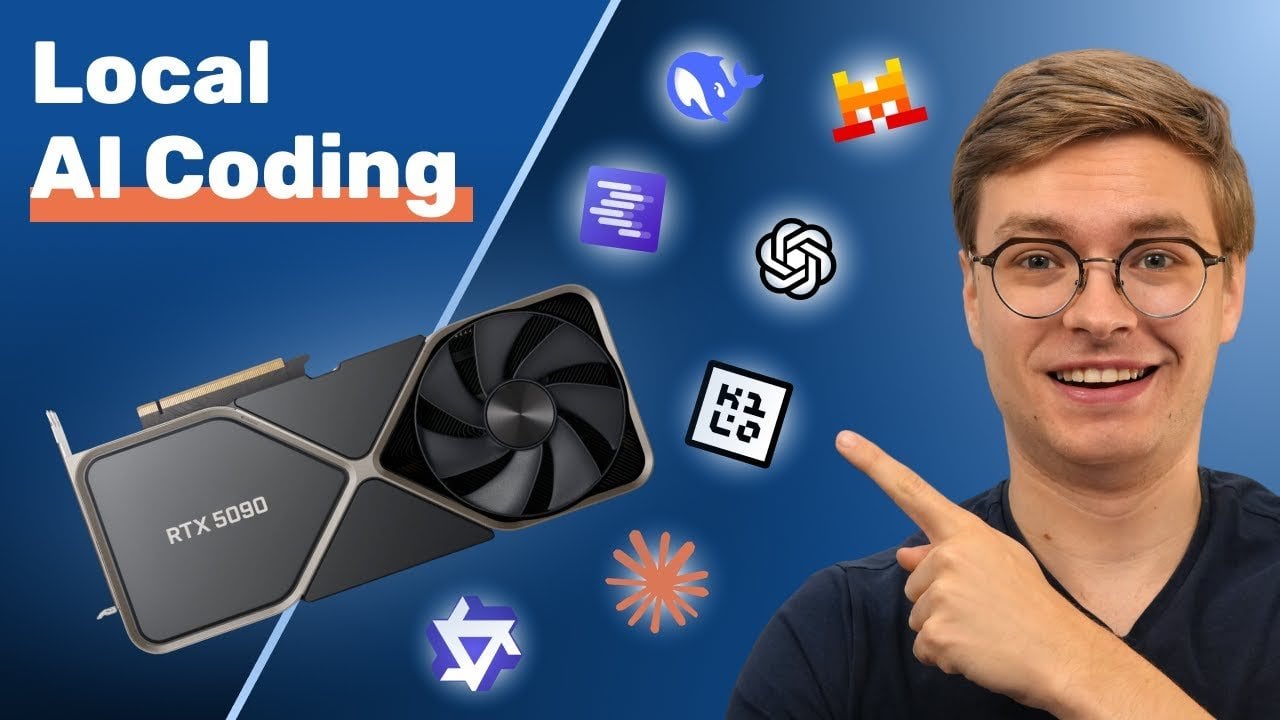
    The hardware you choose is the cornerstone of a successful local AI setup. High-performance GPUs, such as the RTX 5090, are particularly well-suited for handling large models and extensive context lengths due to their substantial VRAM capacity. However, even with a limited budget, meaningful results can be achieved using older GPUs or devices with unified memory, such as Apple’s M-series chips, which are compatible with smaller, quantized models. Key hardware considerations include:

    • VRAM capacity: Larger models demand more memory to run efficiently, making VRAM a critical factor.
    • Unified memory: Systems like MacBooks, where CPU and GPU share resources, can effectively support smaller models.
    • Cooling and power: High-performance GPUs require robust cooling systems and reliable power supplies to operate optimally.

    Investing in the right hardware ensures that your local AI environment can handle the computational demands of modern models while maintaining stability and efficiency.

    Optimizing AI Models for Local Performance

    Selecting and optimizing AI models is essential to balance performance with your hardware’s capabilities. Open source models, such as Qwen 2.5 (32 billion parameters) or OpenAI GPT (20 billion parameters), offer flexibility and customization but can be resource-intensive. Quantized models, which reduce size and computational requirements, provide an excellent alternative for local setups.

    When optimizing models, consider the following factors:

    • Model size: Larger models deliver higher accuracy but require significant VRAM and computational power.
    • Quantization: Reduces model size and computational load with minimal impact on performance, making it ideal for local use.
    • Context length: Longer context lengths enhance usability for coding tasks but increase memory demands.

    By tailoring models to your hardware and specific use cases, you can achieve a balance between accuracy, speed, and resource efficiency.

    Complete Local AI Coding Guide for 2026

    Explore further guides and articles from our vast library that you may find relevant to your interests in local AI setups.

    Context Length: A Key Factor in Coding Efficiency

    Context length plays a pivotal role in determining how much information a model can process at once, making it particularly important for tasks like analyzing large code repositories or generating complex scripts. However, longer context lengths can strain hardware, leading to performance bottlenecks. To address these challenges, consider implementing the following techniques:

    • Flash attention: Optimizes memory usage during model inference, improving efficiency.
    • K-cache quantization: Reduces memory requirements for intermediate results, enhancing performance.
    • Context length tuning: Adjusts model parameters to strike a balance between memory usage and usability.

    These strategies enable you to maximize the utility of your local AI setup while minimizing resource constraints, making sure smooth performance for a variety of coding tasks.

    Essential Tools for Building a Local AI Environment

    A range of tools is available to simplify the process of setting up and managing local AI environments. These tools enhance functionality, streamline workflows, and make it easier to test and deploy models effectively. Key tools to consider include:

    • LM Studio: A user-friendly platform for downloading, testing, and running AI models in a controlled environment.
    • Visual Studio Code: A versatile coding and debugging platform that integrates seamlessly with AI tools.
    • Local servers: Host AI models and APIs locally for seamless integration into your projects.
    • Open source coding agents: Tools like Continue, Kilo Code, or Claude Code Router enhance functionality for tasks such as repository analysis and code generation.

    By using these tools, you can create a robust and efficient local AI environment capable of handling a wide range of coding applications.

    Practical Applications of Local AI Coding

    Local AI environments are well-suited for a variety of real-world applications, offering developers the ability to work independently without relying on cloud-based solutions. Common use cases include:

    • Repository analysis: Identify patterns, errors, or inefficiencies in codebases to improve overall quality.
    • Code generation: Automate repetitive tasks or generate boilerplate code to save time and effort.
    • Prototyping: Test new ideas and concepts without the latency or costs associated with cloud services.

    For instance, a quantized model can efficiently analyze a small repository, flagging redundant code or suggesting improvements. However, for larger or more complex projects, hybrid approaches that combine local and cloud-based solutions may be necessary to overcome hardware limitations.

    Addressing Challenges in Local AI Coding

    While local AI coding offers significant benefits, it also presents challenges, particularly when dealing with large-scale or highly complex tasks. Hardware limitations can restrict performance, even with optimization techniques, making it essential to strike a balance between model size, speed, and accuracy. To overcome these challenges, consider the following strategies:

    • Start small: Begin with simpler scripts or smaller projects to test your setup and identify potential bottlenecks.
    • Use quantized models: Use models that reduce resource demands without sacrificing too much performance.
    • Adopt hybrid approaches: Combine local and cloud-based solutions for tasks that exceed your hardware’s capabilities.

    By carefully planning and optimizing your setup, you can maximize the potential of your local AI environment while addressing its inherent limitations.

    Empowering Your Workflow with Local AI Coding

    Creating a local AI coding environment enables developers to work independently, free from the constraints of cloud APIs and associated costs. By investing in the right hardware, optimizing models, and using tools like LM Studio and Visual Studio Code, you can achieve efficient performance for a wide range of coding tasks. While local setups may face limitations, adopting hybrid strategies can help you tackle more complex projects effectively. With careful planning and a focus on optimization, local AI coding offers a powerful way to enhance your workflow in 2026 and beyond.

    Media Credit: Zen van Riel

    Filed Under: AI, Guides

    Latest Geeky Gadgets Deals

    Disclosure: Some of our articles include affiliate links. If you buy something through one of these links, Geeky Gadgets may earn an affiliate commission. Learn about our Disclosure Policy.
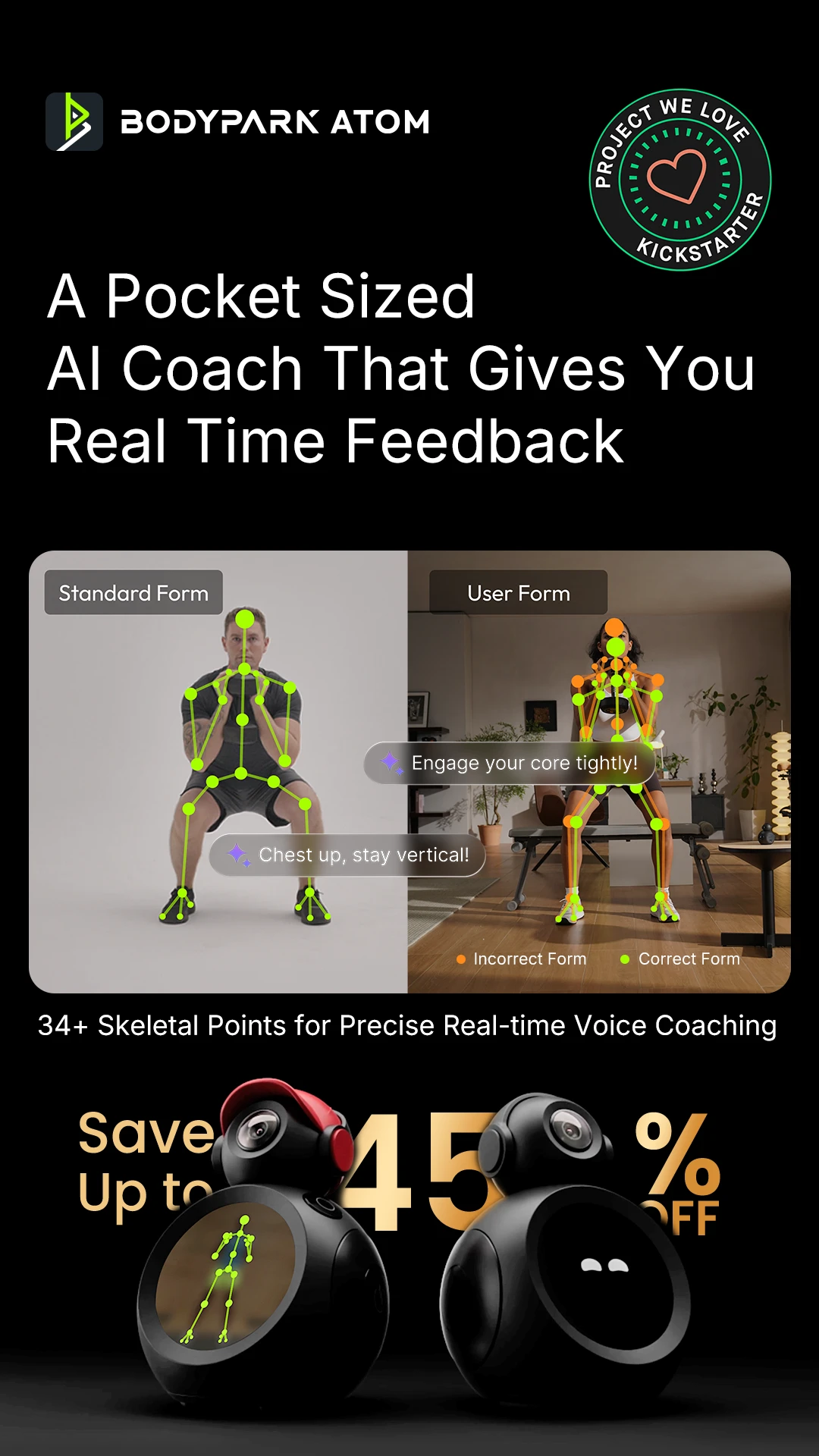
  • New Gemini 3 Flash Released : Faster, Smarter and Cheaper

    New Gemini 3 Flash Released : Faster, Smarter and Cheaper

    New Gemini 3 Flash Released : Faster, Smarter and Cheaper

    Illustration of a developer using the Flash model to code faster while selecting medium thinking level for accuracy.

    What if the upgrade you didn’t even know you needed suddenly became the one you couldn’t live without? That’s the story of Gemini 3 Flash, the latest AI model from Google DeepMind that’s quietly redefining expectations. Positioned as a more budget-friendly sibling to Gemini 3 Pro, this model doesn’t just hold its own, it challenges the status quo. With faster processing speeds, advanced reasoning capabilities, and multimodal adaptability, Gemini 3 Flash is proving that you don’t need to break the bank for innovative performance. Whether you’re a developer racing against deadlines or a creative professional seeking precision, this upgrade might just be the unexpected fantastic option you’ve been waiting for.

    In this breakdown, Prompt Engineering explore what makes Gemini 3 Flash so compelling, from its cost-efficiency to its ability to excel in time-sensitive tasks like coding and problem-solving. You’ll discover how its customizable features and seamless integration options make it a versatile tool across industries, from software development to content creation. But is it truly the perfect balance of speed, affordability, and capability? Or does its lower price tag come with trade-offs you can’t ignore? By the end, you’ll have a clearer picture of whether Gemini 3 Flash is the upgrade your workflow has been missing, or the one you didn’t see coming.

    What Sets Gemini 3 Flash Apart

    TL;DR Key Takeaways :

    • Gemini 3 Flash is a cost-effective AI model by Google DeepMind, offering high performance in coding, reasoning, and multimodal applications, making it a versatile tool for developers, researchers, and creatives.
    • It surpasses predecessors like Gemini 2.5 Pro and Gemini 3 Pro in speed and efficiency, excelling in benchmarks such as SweetBench (coding), GPQA Diamond (scientific reasoning), and Humanity’s Last Exam (problem-solving).
    • Key features include enhanced reasoning, spatial awareness, multimodal input processing, and customizable settings, allowing adaptability across industries like software development, content creation, and visual analysis.
    • Gemini 3 Flash integrates seamlessly into workflows via platforms like AI Studio and Vortex, with API support for dynamic reasoning allocation and compatibility with Gemini 3 Pro’s parameters.
    • With input token costs at $0.50 per million, it offers significant affordability while maintaining high-quality outputs, though it has limitations in handling highly intricate tasks and partially operational features like simulated environments.

    Gemini 3 Flash redefines expectations in AI performance, particularly in domains like programming and logical reasoning. It outpaces its predecessors, including Gemini 2.5 Pro and Gemini 3 Pro, with faster processing speeds, making it an excellent choice for time-sensitive tasks. On critical benchmarks, it demonstrates exceptional performance:

    • SweetBench: Surpasses Gemini 3 Pro in programming-related challenges, showcasing its ability to handle complex coding tasks efficiently.
    • GPQA Diamond: Matches Gemini 3 Pro in scientific reasoning, proving its capability in handling intricate problem-solving scenarios.
    • Humanity’s Last Exam: Displays advanced analytical and problem-solving skills, reinforcing its suitability for high-stakes applications.

    These results highlight Gemini 3 Flash’s ability to deliver high-quality outputs while maintaining a competitive edge in speed and efficiency.

    Advanced Features and Capabilities

    Gemini 3 Flash is equipped with a range of advanced features that enhance its adaptability and usability across various industries. Key capabilities include:

    • Enhanced Reasoning: Excels in solving complex problems with logical precision, making it a reliable tool for analytical tasks.
    • Spatial Awareness: Demonstrates a strong understanding of visual and geometric relationships, allowing effective handling of tasks requiring spatial interpretation.
    • Multimodal Inputs: Seamlessly processes diverse media formats, including text, images, and other data types, making sure versatility in application.
    • Customizable Settings: Offers adjustable resolution (low, medium, high) and dynamic reasoning levels (minimal to high), allowing users to tailor its performance to specific project requirements.

    These features make Gemini 3 Flash a powerful and adaptable tool for professionals in fields ranging from software development to creative design.

    Gemini 3 Flash : The Upgrade We Didn’t Expect

    Check out more relevant guides from our extensive collection on Google Gemini 3 that you might find useful.

    Applications Across Industries

    Gemini 3 Flash is particularly effective for tasks that demand both precision and creativity. Its practical applications span multiple industries, including:

    • Software Development: Ideal for coding, debugging, website creation, and generating SVG animations, making it a valuable asset for developers.
    • Content Creation: Produces creative outputs with well-defined prompts, supporting designers, writers, and other creative professionals in generating high-quality content.
    • Visual Analysis: Uses its spatial understanding to excel in tasks requiring detailed visual interpretation, such as image analysis and design optimization.

    For professionals seeking a cost-effective alternative to Gemini 3 Pro, Gemini 3 Flash delivers comparable performance while maintaining affordability, making it an attractive choice for budget-conscious projects.

    Seamless Integration and API Support

    Gemini 3 Flash is designed for seamless integration into existing workflows, making sure minimal disruption during adoption. It is currently available in preview through platforms such as:

    • AI Studio
    • Vortex
    • Google Antigravity
    • Gemini CLI

    The model supports API integration with tools and function-calling capabilities, allowing users to dynamically allocate reasoning power based on task complexity. Additionally, its shared API parameters with Gemini 3 Pro ensure a smooth transition for users already familiar with the Pro version, further simplifying its implementation.

    Affordability and Cost Efficiency

    One of the standout features of Gemini 3 Flash is its affordability. Input token costs are set at $0.50 per million, with only a slight increase in output token costs. This pricing structure offers significant savings compared to Gemini 3 Pro, making it an ideal choice for developers and organizations aiming to optimize their budgets without compromising on performance. By delivering high-quality results at a fraction of the cost, Gemini 3 Flash enables users to achieve their goals more efficiently.

    Limitations and Considerations

    While Gemini 3 Flash offers impressive capabilities, it is important to be aware of its limitations to ensure it aligns with your specific needs:

    • Complexity Challenges: May struggle with highly intricate puzzles or tasks requiring nuanced attention to detail, which could limit its effectiveness in certain advanced scenarios.
    • Partial Functionality: Features like simulated environments are only partially operational, potentially restricting its use in specialized applications.

    Understanding these limitations can help users make informed decisions about when and how to deploy Gemini 3 Flash effectively.

    Maximizing Efficiency with Gemini 3 Flash

    To fully use the strengths of Gemini 3 Flash, consider using it in tandem with Gemini 3 Pro. While Gemini 3 Pro excels in planning and orchestration, Gemini 3 Flash is optimized for implementation tasks, offering a balance of speed, cost, and capability. This complementary approach allows users to maximize efficiency and value, making sure the best possible outcomes for their projects.

    Gemini 3 Flash represents a significant step forward in accessible AI technology, offering a robust combination of performance, versatility, and cost-effectiveness. By understanding its features, applications, and limitations, users can unlock its full potential and achieve exceptional results across a wide range of tasks.

    Media Credit: Prompt Engineering

    Filed Under: AI, Technology News, Top News

    Latest Geeky Gadgets Deals

    Disclosure: Some of our articles include affiliate links. If you buy something through one of these links, Geeky Gadgets may earn an affiliate commission. Learn about our Disclosure Policy.