• OpenAI’s Latest ChatGPT AI Image AI Generator Speeds up Creation & Cuts Cost

    OpenAI’s Latest ChatGPT AI Image AI Generator Speeds up Creation & Cuts Cost

    OpenAI’s Latest ChatGPT AI Image AI Generator Speeds up Creation & Cuts Cost

    Comparison show GPT Image 1.5 strengths against Nano Banana Pro in editing and text clarity

    Could a single update in AI technology shift the balance of power in the competitive world of image generation? With the release of ChatGPT Image 1.5, OpenAI has introduced a tool so advanced it’s being hailed as a potential fantastic option, and a direct challenge to Google’s Nano Banana Pro. Boasting four times faster image generation speeds and a 20% reduction in costs, GPT Image 1.5 doesn’t just aim to compete; it threatens to redefine the playing field entirely. This isn’t just about incremental improvements, it’s about whether Nano Banana Pro, once a leader in the space, can keep up with the sheer pace of innovation.

    In this piece, Matt Wolfe explores what makes ChatGPT Image 1.5 so disruptive, from its creative breakthroughs like multi-step editing and likeness retention to its technical precision in handling complex layouts and text rendering. But is this enough to dethrone Nano Banana Pro, which has long been celebrated for its consistency and reliability? By unpacking the strengths, weaknesses, and unique features of these two AI giants, we’ll uncover whether OpenAI’s latest release is truly the beginning of a new era, or just another chapter in the ongoing rivalry. The answer might surprise you.

    Why ChatGPT Image 1.5 Stands Out

    TL;DR Key Takeaways :

    • ChatGPT Image 1.5 offers significant advancements in speed (4x faster), cost efficiency (20% API cost reduction), and streamlined workflows, making it a practical and budget-friendly choice for diverse users.
    • New creative features, such as a dedicated “Images” tab with preset styles, likeness retention for consistent appearances, and a discovery feature for trending use cases, enhance user creativity and accessibility.
    • Technical improvements include multi-step editing, better spatial reasoning, enhanced text rendering, and advanced handling of complex elements like faces and logos, catering to professional and intricate projects.
    • Compared to Google’s Nano Banana Pro, GPT Image 1.5 excels in creative flexibility and adaptability, though Nano Banana Pro offers better consistency in preserving original elements during edits.
    • ChatGPT Image 1.5 is accessible to all ChatGPT users without a waitlist, featuring a user-friendly interface designed for both technical and non-technical users, providing widespread access to access to advanced AI tools.

    GPT Image 1.5 brings a host of advancements that cater to a diverse range of users, from developers to creative professionals. Its performance upgrades and innovative features make it a significant player in the AI space. Here are the key factors that set it apart:

    • Speed: The model generates images up to four times faster than its predecessor, making it a practical choice for time-sensitive projects where efficiency is critical.
    • Cost Efficiency: API costs for both image inputs and outputs have been reduced by 20%, providing a more budget-friendly solution for businesses and individual users alike.
    • Streamlined Workflows: The ability to handle multiple image generation tasks simultaneously eliminates delays caused by sequential processing, significantly improving productivity.

    These enhancements not only improve the user experience but also position GPT Image 1.5 as a versatile tool for a wide range of applications.

    New Features That Inspire Creativity

    GPT Image 1.5 introduces features designed to empower users to explore and execute creative ideas with greater ease and flexibility. These tools enhance both accessibility and creative potential:

    • Dedicated “Images” Tab: A user-friendly interface with preset visual styles such as pop art, sketch, and plushy allows users to experiment with different aesthetics effortlessly.
    • Likeness Retention: This feature enables users to maintain consistent appearances across multiple images, making sure uniformity in projects like branding or storytelling.
    • Discovery Feature: By highlighting trending use cases, such as creating personalized holiday cards or experimenting with artistic transformations, this feature encourages users to explore new creative possibilities.

    These additions make GPT Image 1.5 not just a tool but a platform for innovation, catering to both seasoned professionals and casual users.

    Did ChatGPT Just Kill Nano Banana?

    Dive deeper into ChatGPT 5 with other articles and guides we have written below.

    Enhanced Capabilities for Precision and Versatility

    The technical improvements in GPT Image 1.5 elevate its utility for complex and professional applications. These enhancements address some of the most demanding requirements in AI image generation:

    • Multi-Step Editing: Users can now add or remove elements, blend styles, and refine images with greater precision, allowing more detailed and iterative creative processes.
    • Improved Spatial Reasoning: The model demonstrates better adherence to complex layouts and designs, making it suitable for intricate projects like architectural renderings or infographics.
    • Text Rendering: Enhanced capabilities in handling dense, small, or formatted text make it a reliable choice for projects requiring detailed textual elements, such as posters or advertisements.
    • Advanced Handling: The model excels in rendering challenging elements like crowds, faces, and logos while maintaining brand consistency, a critical factor for commercial applications.

    These capabilities make ChatGPT Image 1.5 a robust tool for users seeking precision, versatility, and reliability in their creative endeavors.

    How It Compares to Nano Banana Pro

    GPT Image 1.5 and Google’s Nano Banana Pro are both leading models in the AI image generation space, each with its unique strengths. Here’s how they compare:

    • Memory Retention: GPT Image 1.5 excels in maintaining context during multi-step edits, though it occasionally alters unintended elements. Nano Banana Pro, on the other hand, demonstrates greater consistency in preserving original elements.
    • Text Rendering and Brand Consistency: Both models perform comparably in these areas, though their approaches differ slightly, with GPT Image 1.5 offering more flexibility in creative edits.
    • Editing Precision: While Nano Banana Pro provides better consistency in preserving original elements, GPT Image 1.5 stands out for its adaptability and creative freedom.

    The choice between the two models ultimately depends on the specific needs of the user, whether they prioritize precision or creative flexibility.

    Limitations to Consider

    Despite its many advancements, GPT Image 1.5 is not without its limitations. Users should be aware of the following challenges:

    • Inaccuracies in Complex Layouts: The model may struggle with intricate spatial layouts, occasionally failing to fully adhere to prompts in highly detailed scenarios.
    • Interpretative Outputs: As a creative tool, GPT Image 1.5 generates outputs that are inherently interpretative, making it unsuitable for tasks requiring strict factual accuracy.

    Understanding these limitations can help users set realistic expectations and use the model effectively within its capabilities.

    Accessibility for All Users

    OpenAI has made accessibility a priority with GPT Image 1.5, making sure that its advanced features are available to a broad audience:

    • Immediate Availability: The model is accessible to all ChatGPT users, both free and paid, without the need for a waitlist, providing widespread access to access to innovative AI technology.
    • User-Friendly Interface: Designed with non-technical users in mind, the interface simplifies the process of generating high-quality images, reducing the need for complex prompts or technical expertise.

    These efforts make GPT Image 1.5 an inclusive tool, empowering users from all backgrounds to harness the power of AI-driven creativity.

    A New Era of AI Creativity

    GPT Image 1.5 represents a significant advancement in AI image generation, combining speed, affordability, and innovative features to meet the diverse needs of its users. While it faces strong competition from Google’s Nano Banana Pro, its blend of performance and versatility positions it as a formidable player in the evolving landscape of AI-driven creativity. By addressing both the technical and creative demands of its users, GPT Image 1.5 sets a new standard for what AI image generation tools can achieve.

    Media Credit: Matt Wolfe

    Filed Under: AI, Technology News, Top News

    Latest Geeky Gadgets Deals

    Disclosure: Some of our articles include affiliate links. If you buy something through one of these links, Geeky Gadgets may earn an affiliate commission. Learn about our Disclosure Policy.
  • Google Stitch Guide : No-Code to Working App in Minutes With Gemini 3

    Google Stitch Guide : No-Code to Working App in Minutes With Gemini 3

    Google Stitch Guide : No-Code to Working App in Minutes With Gemini 3

    Dashboard, welcome, and client detail pages auto-built, showing how Google's free tool supports step-by-step design changes.

    What if creating a stunning, professional app interface took less time than brewing your morning coffee? Enter Google Stitch, the innovative AI-powered tool that’s turning the design world on its head. Imagine typing a few simple prompts and watching as a polished, multi-screen app layout materializes before your eyes, no coding, no technical expertise, just seamless creativity. Bold claim? Perhaps. But with its ability to generate customized, ready-to-use designs in mere minutes, Google Stitch isn’t just a tool; it’s a fantastic option for developers, entrepreneurs, and creatives alike. Whether you’re a seasoned pro or a complete novice, this free platform is rewriting the rules of app and web design.

    In this guide, Brock Mesarich explains how Google Stitch combines AI innovation with intuitive design to simplify the creative process. You’ll discover its standout features, like multi-screen design generation, real-time customization, and seamless integration with Google AI Studio for turning static designs into fully functional apps. But that’s not all, this tool isn’t just about speed; it’s about empowering users to create interfaces that are both visually stunning and highly functional. Could this be the future of app development? Let’s unpack the possibilities and see how Google Stitch is reshaping the way we think about design.

    What is Google Stitch?

    TL;DR Key Takeaways :

    • Google Stitch is a free AI-powered design tool that simplifies app and web interface creation, allowing users to generate professional-grade designs in minutes with minimal input.
    • The platform offers features like multi-screen design, iterative refinement, annotations for collaboration, and design adaptation, catering to a wide range of design needs.
    • Seamlessly integrated with Google AI Studio, Google Stitch allows users to transform static designs into fully functional applications, reducing the need for extensive coding knowledge.
    • Customization options include fine-tuning layouts, deploying designs to custom URLs, and integrating with GitHub for advanced development and version control.
    • Google Stitch is accessible to small businesses, non-technical users, and developers, making it a versatile tool for creating functional and visually appealing designs efficiently.

    Google Stitch is a innovative platform designed to simplify the process of creating app and web interfaces. Using simple text prompts, it allows you to generate polished designs for a variety of use cases, such as welcome screens, dashboards, or client interaction pages. The platform is designed to be accessible to users with varying levels of technical expertise, making sure that even those without coding experience can create professional-grade designs. Additionally, it offers robust customization options, allowing you to adjust colors, layouts, and styles to align with your unique vision.

    Key Features of Google Stitch

    Google Stitch stands out for its versatility and its ability to cater to a wide range of design needs. Below are some of its most notable features:

    • Multi-Screen Design: Effortlessly create multiple screens tailored to your app or web platform, whether for mobile or desktop use.
    • Iterative Refinement: Make adjustments throughout the design process to ensure your final product aligns with your vision.
    • Annotations for Collaboration: Add notes and comments directly to your designs, facilitating collaboration or serving as personal reminders during the design process.
    • Design Adaptation: Replicate or adapt elements from existing websites to maintain consistency across platforms and enhance user experience.

    These features make Google Stitch a versatile tool for users seeking to create functional and visually appealing designs in a streamlined manner.

    Google Stitch with Gemini 3 Pro Builds Apps in Minutes

    Take a look at other insightful guides from our broad collection that might capture your interest in Gemini 3.

    Seamless Integration with Google AI Studio

    A standout feature of Google Stitch is its seamless integration with Google AI Studio. This integration allows you to export your designs directly into the studio, where they can be transformed into fully functional applications. AI models like Gemini 3 Pro automate coding and prototyping tasks, allowing you to build advanced features such as project dashboards or client interaction tools. This streamlined workflow significantly reduces the need for extensive coding knowledge, making app development more accessible to a broader audience. By combining design and development in one cohesive process, Google Stitch and Google AI Studio empower you to bring your ideas to life with minimal friction.

    Customization and Deployment

    Customization lies at the core of Google Stitch’s functionality. Once you generate your initial designs, you can fine-tune them to include specific features or adjust layouts to better suit your needs. The platform allows you to deploy finalized designs to custom URLs, creating a personalized user experience that aligns with your brand or project goals. For developers seeking greater control, Google Stitch supports integration with GitHub, allowing advanced development, version control, and collaboration. This flexibility ensures that your project can evolve and adapt as your requirements change, making it a versatile tool for both beginners and experienced developers.

    Who Can Benefit from Google Stitch?

    Google Stitch is designed to cater to a wide range of users, from beginners to experienced developers. Below are some of the key groups who can benefit from this tool:

    • Small Businesses and Startups: Quickly develop apps to support business operations, customer engagement, or marketing efforts without the need for a dedicated development team.
    • Non-Technical Users: Create professional-grade designs without requiring programming expertise, making it an ideal solution for individuals or teams with limited technical resources.
    • Developers: Use Google Stitch as a starting point for more complex projects, using its integration with GitHub for advanced customization and development.

    While Google Stitch excels at simplifying design and development, it is important to note that it may not fully replace professional developers for highly intricate or specialized projects. Complex functionalities may require additional prompts, refinements, or external expertise to achieve the desired outcome.

    Empowering the Future of Design

    Google Stitch, in combination with Google AI Studio, represents a significant advancement in app and web design. By offering AI-driven design generation, robust customization options, and seamless deployment tools, it enables you to create and launch functional applications with ease. Whether you are an experienced developer or a beginner, this toolset simplifies the design process, making professional app development more accessible than ever. With its ability to produce high-quality designs in minutes, Google Stitch is poised to become an essential resource in the evolving landscape of AI-powered app creation.

    Media Credit: AI for Non Techies

    Filed Under: AI, Guides

    Latest Geeky Gadgets Deals

    Disclosure: Some of our articles include affiliate links. If you buy something through one of these links, Geeky Gadgets may earn an affiliate commission. Learn about our Disclosure Policy.

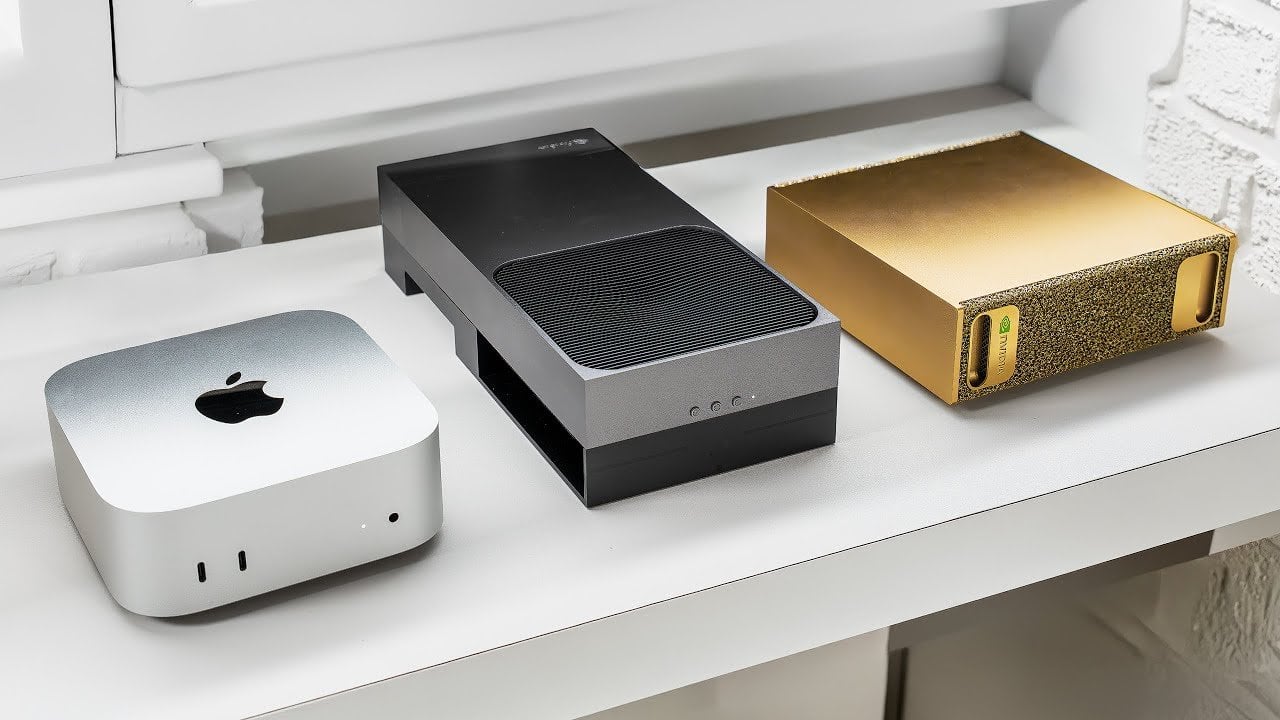
  • Jetson Thor vs DJX Spark vs Mac Mini M4 Pro : Local AI ML Showdown

    Jetson Thor vs DJX Spark vs Mac Mini M4 Pro : Local AI ML Showdown

    Jetson Thor vs DJX Spark vs Mac Mini M4 Pro : Local AI ML Showdown

    Diagram of Blackwell-based boards, noting 3nm CPU process on Spark and 4nm design on Thor for communication.

    Why pay more for the same specs? In the ever-evolving world of AI hardware, where performance and efficiency reign supreme, it’s not uncommon to see devices with nearly identical specifications priced worlds apart. Take, for instance, the battle between NVIDIA’s Jetson Thor, DJX Spark, and Apple’s Mac Mini M4 Pro. Two of these systems boast a whopping 128GB of RAM, yet one comes with a price tag that’s over $1,000 lighter. It’s a stark reminder that when it comes to innovative tech, the cost isn’t always tied to capability. So, how do you decide which system delivers the best value for your needs without breaking the bank?

    This overview by Alex Ziskind provides more insights into the nuances of cost-efficiency, performance benchmarks, and energy consumption across these three contenders. Whether you’re training dense machine learning models, managing sparse workloads, or simply seeking a reliable, energy-efficient system for smaller tasks, each device offers a distinct set of strengths. But which one strikes the perfect balance for your priorities? As you navigate the trade-offs between memory capacity, power consumption, and hardware architecture, you might discover that the most affordable option doesn’t just save you money, it might also be the smartest choice.

    AI Hardware Comparison

    TL;DR Key Takeaways :

    • The NVIDIA Jetson Thor and DJX Spark both feature 128GB of RAM, making them ideal for memory-intensive AI tasks, while the Mac Mini M4 Pro offers 64GB, suitable for smaller-scale machine learning applications.
    • The Jetson Thor is the most cost-efficient option, priced over $1,000 less than the DJX Spark, while the Mac Mini M4 Pro provides a budget-friendly solution for lightweight tasks.
    • Power efficiency varies, with the Mac Mini M4 Pro consuming just 8 watts, the Jetson Thor using 31 watts, and the DJX Spark consuming 44 watts during basic operations, reflecting their performance capabilities.
    • Hardware architecture differs, with the DJX Spark using a 3nm CPU process for high-demand workloads, the Jetson Thor focusing on deterministic latency with a 4nm CPU process, and the Mac Mini M4 Pro offering a simpler, versatile design.
    • Cooling systems are optimized for each device, with the DJX Spark featuring advanced cooling for intensive tasks, the Jetson Thor balancing performance and heat management, and the Mac Mini M4 Pro requiring minimal cooling due to its low power usage.

    Memory and Cost Efficiency

    Memory capacity is a cornerstone of AI hardware performance, directly influencing the ability to handle complex machine learning tasks. Both the Jetson Thor and DJX Spark are equipped with 128GB of RAM, making them ideal for memory-intensive workloads such as training large-scale models like Llama 3.3 70B. However, the Jetson Thor distinguishes itself as the more budget-friendly option, priced over $1,000 less than the DJX Spark. This affordability makes it an attractive choice for users who need high memory capacity without exceeding their budget.

    In contrast, the Apple Mac Mini M4 Pro, with its 64GB of RAM, is better suited for smaller-scale machine learning tasks. While it lacks the capacity for training dense models, it remains a cost-effective solution for lightweight applications. Its ability to efficiently handle smaller workloads ensures that users with less demanding requirements can still achieve reliable performance without investing in excessive hardware.

    Performance Benchmarks: Dense vs. Sparse Models

    Performance varies significantly across these systems, particularly in their ability to handle dense and sparse model workloads. The DJX Spark excels in processing sparse models such as GPT OSS 12B, thanks to its 3nm CPU process and optimized GPU cores. These features enable faster computation, higher throughput, and superior performance in tasks like prompt processing and token generation.

    The Jetson Thor, while less powerful overall, performs competitively with dense models like Llama 3.3 70B. Although it operates at a slower pace compared to the DJX Spark, it remains a viable option for users focused on dense model training. Meanwhile, the Mac Mini M4 Pro struggles with memory-intensive tasks due to its lower RAM capacity, but it delivers consistent and reliable performance for smaller-scale machine learning applications.

    Jetson Thor vs DJX Spark & When to Pick Apple M4 Pro Mac Mini Instead

    Below are more guides on local AI hardware from our extensive range of articles.

    Power Consumption and Efficiency

    Power efficiency is a critical factor, particularly for users aiming to minimize energy consumption. The Mac Mini M4 Pro leads in this category, consuming just 8 watts during basic operations. This low power usage makes it an excellent choice for general-purpose use and lightweight machine learning tasks, especially in environments where energy savings are a priority.

    The Jetson Thor strikes a balance between power efficiency and performance, consuming approximately 31 watts during standard operations. This moderate power usage makes it suitable for users who require a balance of computational power and energy efficiency. On the other hand, the DJX Spark, while offering superior computational capabilities, consumes 44 watts during basic operations, with energy usage nearly doubling under heavy workloads. This higher power consumption reflects its advanced performance but may be a drawback for users with strict energy constraints.

    Hardware and Architecture

    The hardware architecture of these systems plays a significant role in their performance and suitability for various tasks. Both the Jetson Thor and DJX Spark use NVIDIA’s Blackwell chips, which feature advanced Tensor and CUDA cores designed to accelerate AI workloads. However, the DJX Spark’s 3nm CPU process enhances CPU-to-GPU communication, making it particularly effective in multi-user environments and high-demand scenarios.

    The Jetson Thor, built on a 4nm CPU process, prioritizes deterministic latency, making it well-suited for applications requiring consistent response times, such as robotics and automotive systems. In contrast, the DJX Spark is optimized for bursty, high-demand workloads, making it ideal for multi-user AI applications. The Mac Mini M4 Pro, while less specialized, offers a simpler architecture that supports general-purpose tasks effectively. Its straightforward design ensures compatibility with a wide range of applications, making it a versatile option for users with diverse needs.

    Cooling Systems and GPU Load Variability

    Efficient cooling systems and GPU load management are essential for maintaining performance under heavy workloads. The DJX Spark features an advanced cooling system that operates quietly, even during intensive tasks. This ensures consistent performance and reliability, despite its higher power consumption.

    The Jetson Thor, while less power-hungry, exhibits some variability in GPU load handling. This can lead to minor fluctuations in performance during demanding tasks, though it remains a dependable option for most applications. The Mac Mini M4 Pro, with its lower power requirements, generates minimal heat and operates efficiently without the need for complex cooling systems. This simplicity enhances its appeal for general-purpose and lightweight machine learning tasks, where heat management is less of a concern.

    Use Cases and Recommendations

    Choosing the right system depends on your specific requirements, priorities, and budget. Each of these devices offers unique advantages tailored to different use cases:

    • Jetson Thor: Ideal for cost-conscious users who prioritize power efficiency and deterministic performance. Best suited for robotics, automotive systems, and dense model workloads.
    • DJX Spark: Designed for high-performance, multi-user environments requiring faster processing and superior handling of sparse models. A strong choice for users with demanding computational needs.
    • Mac Mini M4 Pro: A reliable option for lightweight machine learning tasks and general-purpose use. Its energy efficiency and simplicity make it an excellent choice for users focused on minimizing power consumption.

    Each system offers distinct strengths, making sure that users can find a solution that aligns with their specific needs and expectations. Whether you prioritize cost, performance, or energy efficiency, these devices provide a range of options to support your machine learning endeavors.

    Media Credit: Alex Ziskind

    Filed Under: AI

    Latest Geeky Gadgets Deals

    Disclosure: Some of our articles include affiliate links. If you buy something through one of these links, Geeky Gadgets may earn an affiliate commission. Learn about our Disclosure Policy.
  • Build a Private Local AI with Memory You Control, No Cloud Needed

    Build a Private Local AI with Memory You Control, No Cloud Needed

    Build a Private Local AI with Memory You Control, No Cloud Needed

    N8N workflow orchestrating Docker containers for document intake, embedding with Olama, and search with Quadrant.

    What if you could harness the power of innovative AI without ever compromising your data’s privacy? Imagine a system that processes sensitive legal contracts, medical records, or financial data entirely on your local machine, no cloud, no external servers, no risks. In an era where data breaches and privacy violations dominate headlines, the idea of a fully private, locally deployed AI system feels almost innovative. Yet, with the rise of Retrieval-Augmented Generation (RAG) systems, this vision is not only possible but increasingly accessible. By combining multimodal AI capabilities with air-gapped setups, you can achieve a level of security and control that’s rare in today’s cloud-reliant tech landscape.

    In this step-by-step guide, the AI Automators team takes you through how to deploy your own fully private AI system complete with local memory using a RAG system, tailored to handle diverse and complex data formats while keeping everything under your control. From configuring Docker containers to using tools like Dockling and Quadrant, this perspective will walk you through the essential components and strategies for building a secure, high-performing AI pipeline. Whether you’re a professional working in compliance-heavy industries or an enthusiast eager to explore local AI solutions, this guide offers a blueprint for creating a system that’s as powerful as it is private. The possibilities are vast, how will you put them to work?

    Building Private AI Systems

    TL;DR Key Takeaways :

    • Deploying a fully private Retrieval-Augmented Generation (RAG) system on a local machine ensures data privacy by eliminating reliance on external APIs or cloud services, making it ideal for sensitive industries like healthcare, legal, and finance.
    • Multimodal RAG systems process diverse data types (text, images, audio) using tools like Dockling and Vision Language Models, allowing contextually rich and accurate AI-driven insights.
    • Core tools such as N8N, Dockling, Olama, Quadrant, and Docker form a robust pipeline for secure document ingestion, processing, and querying in a local environment.
    • Efficient document processing pipelines handle various formats, including text and visuals, using non-generative AI models and Vision Language Models for structured data extraction and analysis.
    • Scalability and advanced features like contextual vector embeddings, knowledge graph integration, and async processing enhance functionality, making the system adaptable to evolving organizational needs.

    The Importance of Data Privacy

    Data privacy is the cornerstone of this deployment strategy. By keeping all operations local, you eliminate the risks associated with transmitting sensitive information to external servers or cloud-based APIs. This air-gapped approach is particularly beneficial for industries with stringent compliance requirements, such as healthcare, legal, and finance. With this system, your data remains entirely within your control, making sure maximum security and reducing the likelihood of breaches or unauthorized access.

    Understanding Multimodal RAG Systems

    A Retrieval-Augmented Generation system enhances AI’s ability to retrieve and process information across various data types, including text, images, and audio. This multimodal capability allows the system to deliver contextually rich and accurate responses. For example, tools like Dockling can extract structured data from documents in formats such as Markdown or JSON, while Vision Language Models (VLMs) process embedded images, tables, and diagrams. Together, these components create a versatile AI system capable of handling diverse and complex data formats.

    Deploy a Fully Private Local AI with Memory & Document Access

    Check out more relevant guides from our extensive collection on setting up a local AI that you might find useful.

    Core Tools and Technologies

    Building a private, local RAG system requires a carefully selected combination of tools and technologies. These components form the backbone of the system:

    • N8N: Automates workflows and orchestrates data processing tasks, making sure seamless integration between components.
    • Dockling: Extracts structured data from documents, including text, images, and tables, allowing efficient data analysis.
    • Olama: Hosts local AI models and generates embeddings for semantic search, enhancing the system’s retrieval capabilities.
    • Quadrant: A vector database optimized for storing and retrieving contextual embeddings, making sure fast and accurate searches.
    • Docker: Provides containerization for isolated, scalable environments, simplifying deployment and management.

    These tools work in unison to create a robust pipeline for document ingestion, processing, and querying, making sure the system operates efficiently and securely.

    The Document Processing Pipeline

    The document processing pipeline is the core of the system, allowing it to handle various data formats effectively. It employs non-generative AI models for precise text extraction and Vision Language Models for processing images and diagrams. For instance, a scanned PDF containing both text and visuals can be converted into structured outputs, allowing the AI to analyze and retrieve all relevant elements. This multimodal approach ensures the system can process everything from plain text documents to complex visual data, making it highly adaptable to diverse use cases.

    Hardware Requirements for Local AI Models

    Running local AI models requires robust hardware to ensure smooth and efficient operation. A high-performance graphics card, such as the Nvidia RTX 4090, is recommended for handling large models and complex computations. However, smaller, open source models can be used initially to balance performance and cost. This flexibility allows you to tailor the system to your specific needs and resources, with the option to scale up as your requirements grow.

    Steps to Deploy and Test the System

    Deploying a private RAG system involves several critical steps to ensure a smooth and reliable setup:

    • Set up Docker containers: Use Docker to isolate services and create scalable environments for each component.
    • Configure local file triggers: Automate the ingestion of documents to streamline processing workflows.
    • Test with open source models: Start with models like GPT OSS or Nomic Embed Text to refine and validate your workflows.
    • Iterate and optimize: Identify and address bottlenecks or inefficiencies through iterative testing and adjustments.

    This systematic approach ensures the system is deployed effectively and operates reliably, providing a solid foundation for future enhancements.

    Enhancing Accessibility and Usability

    To make the system more user-friendly, consider integrating a chat interface for real-time querying. This interface can be accessed over a local network, allowing multiple users to interact with the system securely. Additionally, a static file server can host extracted images and files, allowing easy sharing of results within your organization. Proper network configuration ensures secure, multi-user access while maintaining data privacy.

    Advanced Features for Greater Functionality

    Several advanced features can further enhance the system’s capabilities, making it more powerful and adaptable to complex use cases:

    • Contextual Vector Embeddings: Improve search accuracy by understanding relationships between data points, allowing more precise results.
    • Knowledge Graph Integration: Organize information into structured hierarchies, providing deeper insights and better data organization.
    • Async Processing: Process large documents in parallel to increase efficiency and reduce processing times.

    These features allow the system to handle more sophisticated tasks and deliver enhanced performance, making it suitable for a wide range of applications.

    Scaling and Long-Term Improvements

    As your organization’s needs evolve, the system can be scaled and enhanced to meet growing demands. Scaling may involve upgrading hardware, integrating additional tools, or adopting more advanced AI models. Future improvements could include optimizing semantic search capabilities, extracting document hierarchies, or implementing advanced analytics. Continuous testing and refinement ensure the system remains effective, reliable, and aligned with your objectives over time.

    Media Credit: The AI Automators

    Filed Under: AI, Guides

    Latest Geeky Gadgets Deals

    Disclosure: Some of our articles include affiliate links. If you buy something through one of these links, Geeky Gadgets may earn an affiliate commission. Learn about our Disclosure Policy.
  • Inside Gemini 3 API Interactions : Server-Side Memory, Agents & True Multimodality

    Inside Gemini 3 API Interactions : Server-Side Memory, Agents & True Multimodality

    Inside Gemini 3 API Interactions : Server-Side Memory, Agents & True Multimodality

    Screenshot mockup of a multimodal request mixing PDF, image, and audio, with Gemini returning JSON and an image.

    What if the way we interact with large language models (LLMs) could fundamentally change how we approach problem-solving, creativity, and automation? The Gemini Interactions API promises exactly that, a bold reimagining of how developers build applications powered by advanced AI. Unlike earlier APIs that often felt limited by rigid text-based interactions or struggled with maintaining context, this platform introduces a suite of new features designed to meet the demands of modern, multimodal, and agent-driven workflows. From healthcare to media, the possibilities unlocked by this API are as diverse as they are fantastic, offering tools that don’t just keep up with innovation but actively drive it forward.

    In this exploration of the Gemini Interactions API by Sam Witteveen, you’ll uncover how its server-side memory, multimodal capabilities, and agent integration redefine what’s possible with LLMs. Whether it’s allowing seamless transitions between text, images, and audio or managing complex, structured data with precision, this API is built for real-world complexity. But it’s not just about what the API can do, it’s about how these capabilities empower developers to create applications that are smarter, more efficient, and deeply context-aware. As we delve into its features and potential, consider how this evolution in API design reflects a broader shift in how we think about AI’s role in shaping the future.

    Gemini Interactions API Overview

    TL;DR Key Takeaways :

    • The Gemini Interactions API introduces advanced features like server-side memory, multimodal inputs/outputs, structured data handling, and agent integration, allowing the creation of sophisticated, context-aware applications.
    • Key innovations include background task execution, implicit token caching for efficiency, and support for multimodal content (text, images, audio, video), expanding possibilities in industries like healthcare, education, and media.
    • Agent integration allows for specialized functionality, such as handling complex tasks with advanced reasoning, making the API particularly valuable for precision-driven industries like finance, legal research, and scientific analysis.
    • Developer-centric design ensures backward compatibility, flexibility with configurable parameters, and simplified integration, making it suitable for both new projects and updates to existing systems.
    • Challenges include managing citation URLs and restrictions on URL scraping, but ongoing enhancements and the evolution of Gemini 3 models promise further innovation in agent-based and multimodal capabilities.

    The Evolution of APIs for Large Language Models

    APIs for LLMs have undergone significant advancements over the years. Early versions, such as OpenAI’s Completions API, were limited to basic text-in, text-out interactions. These systems struggled to maintain context or handle complex tasks effectively. The introduction of chat-based APIs marked a step forward by incorporating user and system roles, allowing more dynamic exchanges. However, these improvements still fell short of addressing the growing demand for structured outputs, multimodal capabilities, and persistent conversation states.

    The Gemini Interactions API builds on this foundation by addressing these gaps with features tailored to modern development needs. By supporting structured outputs, multimodal data, and agent-driven workflows, it offers a comprehensive solution for creating sophisticated, context-aware applications. This evolution reflects the growing complexity of user demands and the need for APIs that can handle diverse, real-world scenarios.

    Key Features That Redefine Interaction

    The Gemini Interactions API introduces several innovative features designed to enhance how developers interact with LLMs. These features include:

    • Server-Side Memory: The API supports maintaining context across multiple conversation turns with optional server-side state persistence. This reduces token usage and enhances efficiency, particularly for long-running interactions.
    • Background Task Execution: Developers can offload complex or time-intensive tasks to the server for asynchronous processing, freeing up resources for other operations.
    • Multimodality: The API supports inputs and outputs in various formats, including text, images, audio, and video. This simplifies the integration of multimodal data into applications, broadening their functionality.
    • Structured Outputs: By using JSON schemas and model classes, the API assists the handling and management of complex, structured data, making it easier to build applications that require precise data organization.
    • Tool Integration: Built-in tools, such as Google Search and code execution, extend the API’s utility. Support for remote MCP servers further enhances its capabilities, allowing for seamless integration with external systems.

    These features collectively enable developers to create applications that are not only more efficient but also capable of handling complex, multimodal, and structured interactions.

    Gemini 3 Interactions API

    Learn more about Google’s latest AI Gemini 3 with the help of our in-depth articles and helpful guides.

    Agent Integration and Specialized Functionality

    One of the standout features of the Gemini Interactions API is its support for agent integration. Specialized agents, such as the Gemini Deep Research Agent, are designed to handle complex tasks that require advanced reasoning or domain-specific expertise. These agents can execute background tasks asynchronously, allowing developers to retrieve results without disrupting workflows.

    Future enhancements, including sandboxed environments and computational agents, are expected to further expand the API’s versatility. These developments will enable developers to delegate specialized tasks to agents while maintaining control over the broader application. This capability is particularly valuable for industries that require high levels of precision and efficiency, such as finance, legal research, and scientific analysis.

    Efficiency and Context Management

    Efficiency is a core focus of the Gemini Interactions API. Features such as implicit token caching reduce costs during multi-turn interactions, while “thought tokens” and summaries improve context management. These innovations ensure that the API delivers accurate and relevant responses, even in complex scenarios. By optimizing resource usage and maintaining context effectively, the API allows developers to build applications that are both cost-effective and highly functional.

    Expanding Multimodal Capabilities

    The API’s support for multimodal content represents a significant advancement in LLM technology. By allowing the processing and generation of images, audio, and video, the Gemini Interactions API opens up new possibilities for applications in fields such as media, education, and healthcare. Simplified encoding and decoding processes reduce development time and complexity, making it easier for developers to integrate multimodal data into their projects. This capability is particularly valuable for creating applications that require rich, interactive user experiences.

    Challenges and Considerations

    Despite its many strengths, the Gemini Interactions API is not without challenges. One notable issue is the management of citation URLs. Non-permanent or redirected URLs can limit their usability in reports or external applications. Additionally, restrictions on URL scraping due to AI-related permissions may pose challenges for certain use cases. These limitations highlight the need for ongoing improvements to ensure the API remains adaptable to a wide range of applications.

    Developer-Centric Design and Compatibility

    The Gemini Interactions API is designed with developers in mind, making sure a seamless transition from earlier APIs. Backward compatibility simplifies the process of upgrading existing applications, while configurable parameters, such as temperature and token limits, provide flexibility and control. This developer-focused design makes the API a practical choice for both new projects and updates to existing systems.

    The Future of the Gemini Interactions API

    As Gemini 3 models continue to evolve, the future of the Gemini Interactions API looks promising. Developers can anticipate new tools and features that further enhance the API’s capabilities. Agent-based functionalities and multimodal capabilities are likely to play a central role in shaping the next generation of LLMs. These advancements will offer even greater potential for innovation, allowing developers to create applications that push the boundaries of what is possible with LLM technology.

    Media Credit: Sam Witteveen

    Filed Under: AI, Guides

    Latest Geeky Gadgets Deals

    Disclosure: Some of our articles include affiliate links. If you buy something through one of these links, Geeky Gadgets may earn an affiliate commission. Learn about our Disclosure Policy.

  • ChatGPT 5.2 vs Google Gemini 3 : Strengths, Gaps & Best Picks

    ChatGPT 5.2 vs Google Gemini 3 : Strengths, Gaps & Best Picks

    ChatGPT 5.2 vs Google Gemini 3 : Strengths, Gaps & Best Picks

    Side-by-side view of GPT 5.2 and Gemini 3 strengths, including coding quality, planning structure, and tool integrations.

    What if the battle for the future of AI wasn’t about who’s smarter, but about who understands you better? In the ever-evolving landscape of artificial intelligence, two titans, ChatGPT 5.2 and Google Gemini 3 are redefining what it means to have a digital assistant. On one side, you have ChatGPT 5.2, a powerhouse of precision and technical expertise, built for professionals who demand accuracy and depth. On the other, Google Gemini 3, a versatile, multimodal marvel designed to seamlessly integrate into your daily life. But which one truly delivers on its promise? The answer might surprise you.

    In this feature, Julian Goldie explains how these two innovative AI systems stack up in areas like coding, creative projects, and real-world problem-solving. You’ll discover how ChatGPT 5.2’s professional-grade tools cater to high-stakes tasks, while Google Gemini 3’s multimodal adaptability makes it an everyday companion for everything from meal planning to multimedia analysis. Whether you’re a developer looking for clean, reliable code or someone seeking a tool to simplify life’s complexities, this head-to-head comparison will help you decide which AI aligns with your needs. After all, the right AI isn’t just about power, it’s about purpose.

    ChatGPT 5.2 vs Gemini 3

    TL;DR Key Takeaways :

    • ChatGPT 5.2 emphasizes precision, technical expertise, and professional-grade applications, offering modes like Instant, Thinking, and Pro for varying complexity levels.
    • Google Gemini 3 excels in versatility and multimodal integration, processing text, images, audio, and video, making it ideal for creative and everyday tasks.
    • ChatGPT 5.2 is tailored for professionals with advanced coding, debugging, and long-context input capabilities, suitable for technical and analytical projects.
    • Google Gemini 3 integrates seamlessly with Google services, offering practical tools for daily life, such as meal planning, navigation, and email management.
    • Choosing between the two depends on your needs: ChatGPT 5.2 for technical precision and professional tasks, or Google Gemini 3 for adaptability and real-world applications.

    ChatGPT 5.2: Precision and Professional Excellence

    ChatGPT 5.2 is tailored for users who demand accuracy, depth, and reliability in their work. It introduces three operational modes to suit varying levels of complexity:

    • Instant Mode: Designed for quick, straightforward queries, delivering concise and efficient responses.
    • Thinking Mode: Optimized for tasks requiring deeper analysis and thoughtful problem-solving.
    • Pro Mode: Ideal for tackling complex, technical challenges, making it a preferred choice for professionals.

    One of its standout features is its enhanced ability to handle long-context inputs, allowing users to process entire documents, datasets, or detailed reports seamlessly. This capability is particularly advantageous for professionals engaged in fields like financial modeling, legal analysis, or academic research. Additionally, ChatGPT 5.2 integrates advanced tools for spreadsheets, presentations, and workflow automation, streamlining structured business processes and enhancing productivity.

    For developers, ChatGPT 5.2 offers robust coding capabilities, producing clean, professional-grade code and providing reliable debugging support. Its emphasis on safety and accuracy ensures dependable outputs, making it a trusted solution for business-critical tasks. Whether you’re drafting a technical report, analyzing data, or developing software, ChatGPT 5.2 delivers precision and efficiency.

    Google Gemini 3: Adaptability and Multimodal Integration

    Google Gemini 3 distinguishes itself with its adaptability and multimodal capabilities, allowing users to process text, images, audio, and video within a single platform. This makes it particularly effective for creative projects, multimedia analysis, and tasks requiring dynamic visual outputs. Its “Deep Think Mode” enhances advanced reasoning, supporting multi-step problem-solving across a variety of scenarios.

    A key strength of Gemini 3 is its seamless integration with Google’s ecosystem, including services like Search, Gmail, Maps, and Chrome. This integration allows users to perform practical tasks such as scheduling appointments, navigating routes, and managing emails directly within the platform. For everyday assistance, Gemini 3 offers features like meal planning, complete with recipe suggestions and step-by-step cooking instructions, making it a versatile tool for daily life.

    While its coding capabilities are functional, Gemini 3 is less specialized than ChatGPT 5.2 for advanced development tasks. However, its adaptability and intuitive, human-like interaction make it an excellent choice for quick research, multimodal projects, and practical, everyday problem-solving.

    ChatGPT 5.2 Versus Google Gemini 3: Which One Should You Pick

    Here are more detailed guides and articles that you may find helpful on ChatGPT 5.2.

    Head-to-Head Performance

    When comparing ChatGPT 5.2 and Google Gemini 3, their unique strengths become evident across various use cases:

    • Planning and Organization: ChatGPT 5.2 excels in structured, precise planning for professional tasks, while Gemini 3 offers flexibility and seamless integration with Google tools for everyday organization.
    • Creative and Visual Projects: Gemini 3 leads with its dynamic visual outputs and multimodal processing, making it ideal for multimedia tasks, whereas ChatGPT 5.2 is better suited for analytical and technical projects.
    • Coding and Development: ChatGPT 5.2 delivers high-quality, professional-grade code and advanced debugging, while Gemini 3 is more appropriate for simpler, functional coding needs.
    • Everyday Assistance: Gemini 3 shines in real-world applications like meal planning, navigation, and email management, while ChatGPT 5.2 focuses on professional-grade solutions.

    Choosing the Right AI for Your Needs

    Selecting between ChatGPT 5.2 and Google Gemini 3 ultimately depends on your specific goals and priorities:

    • Opt for ChatGPT 5.2 if your focus is on technical problem-solving, in-depth document analysis, or structured business tasks. Its precision, depth, and professional-grade capabilities make it an excellent choice for academic, technical, and corporate applications.
    • Choose Google Gemini 3 if you need a versatile tool for daily life assistance, creative projects, or seamless integration with Google services. Its adaptability and intuitive interaction make it a practical companion for everyday tasks and multimodal projects.

    Both ChatGPT 5.2 and Google Gemini 3 are powerful AI systems, each offering unique strengths to meet a wide range of needs. By understanding their capabilities and aligning them with your objectives, you can use these tools to enhance productivity, creativity, and efficiency in your personal and professional endeavors.

    Media Credit: Julian Goldie

    Filed Under: AI, Technology News, Top News

    Latest Geeky Gadgets Deals

    Disclosure: Some of our articles include affiliate links. If you buy something through one of these links, Geeky Gadgets may earn an affiliate commission. Learn about our Disclosure Policy.
  • Build a Coordinated AI Agent Team Using Claude Code

    Build a Coordinated AI Agent Team Using Claude Code

    Build a Coordinated AI Agent Team Using Claude Code

    A skills library connected to external tools like Notion and GA4, ready for agents to pull live data during work.

    What if you could assemble a team of AI agents that not only understood their roles but also worked together seamlessly, like a well-rehearsed orchestra? With the rise of platforms like Claude Code, this vision is no longer a distant dream, it’s a reality. Imagine delegating tasks to AI agents that can draft content, analyze data, design presentations, and even manage social media campaigns, all while communicating and collaborating in real time. The days of juggling disconnected tools and manually coordinating workflows are over. Instead, you’re left with a streamlined, automated system that feels almost human in its precision and adaptability. Claude Code doesn’t just promise efficiency, it redefines what’s possible when AI agents operate as a cohesive team.

    In this perspective, Grace Leung explain how Claude Code enables you to build and manage an AI-powered team equipped with reusable skills and external tool integrations. You’ll discover how to assign clear roles to your agents, enhance their capabilities with modular skills, and automate complex workflows with minimal effort. Whether you’re a marketer looking to streamline content creation or a data analyst aiming for deeper insights, this approach offers a blueprint for transforming your operations. By the end, you might not just see AI as a tool but as an indispensable partner in your daily workflow. What could your business achieve with a team of agents working in perfect harmony?

    Building Collaborative AI Teams

    TL;DR Key Takeaways :

    • Claude Code is a platform designed to create and manage collaborative AI agents with defined roles, reusable skills, and seamless integration with external tools, allowing efficient automation of complex workflows.
    • Key components of AI agents include clearly defined roles to avoid task overlap, modular skills for adaptability, and integration with external tools for advanced functionality.
    • Claude Code supports workflow automation by allowing multi-agent collaboration through routing rules, making sure logical task delegation and cohesive outputs.
    • AI agents built with Claude Code can deliver diverse outputs such as content briefs, branded presentations, data dashboards, and social media visuals, tailored to specific business needs.
    • Best practices for success include assigning non-overlapping roles, providing detailed context and templates, and using custom skills to optimize agent performance and workflow efficiency.

    Claude Code is a platform specifically designed to simplify the creation and management of interconnected AI agents. Unlike traditional AI systems, which often operate in isolation, Claude Code enables agents to share context and collaborate within a unified workspace. This eliminates the need for manual coordination, allowing for end-to-end automation of even the most complex workflows. By fostering seamless communication between agents, Claude Code ensures tasks are completed efficiently and cohesively.

    Key Components of AI Agents

    To build a high-performing AI agent team, it is essential to focus on three core components that define their functionality and effectiveness:

    • Defined Roles and Responsibilities: Each AI agent should be assigned specific tasks and objectives. Clear role definitions prevent overlap and ensure that every agent contributes to the overall workflow efficiently.
    • Reusable Skills: Equip agents with modular, adaptable skills that can be applied across multiple tasks. This flexibility enhances their ability to handle diverse requirements without the need for constant reconfiguration.
    • External Tool Integration (MCPs): Connect agents to external platforms and tools, allowing them to retrieve live data, perform advanced analytics, and execute specialized functions seamlessly.

    Using Claude Code Build an AI Agent Team

    Unlock more potential in Claude Code by reading previous articles we have written.

    How to Get Started with Claude Code

    Getting started with Claude Code is a straightforward process that involves a few key steps. These steps ensure that your workspace is properly configured and ready for AI agent deployment:

    • Install Claude Code using your preferred method, such as a terminal, IDE extension, web app, or desktop application.
    • Create a local project folder and initialize it with a `claude.md` file. This file serves as the foundation for defining your workspace and agent configurations.
    • Define the workspace structure, including the business context, task requirements, and any specific rules or templates that will guide the agents.

    Configuring AI Agents

    Once your workspace is set up, the next step is to configure AI agents to handle specific roles and tasks. Claude Code allows you to create a variety of role-based agents tailored to your business needs. Here are some examples of specialized agents you can develop:

    • Content Strategist: Conducts in-depth web research and prepares detailed content briefs to support marketing and communication efforts.
    • Presentation Specialist: Designs professional, branded slide decks using document-based skills and templates.
    • Data Analyst: Processes datasets, generates actionable insights, and creates dashboards by using MCP integrations.
    • Social Media Specialist: Develops engaging visuals, schedules posts, and monitors performance metrics using custom skills and external tools.

    Enhancing Agents with Skills and Integrations

    To maximize the effectiveness of your AI agents, you can enhance their capabilities by installing both official and custom skills. These skills provide task-specific instructions, making sure that agents deliver high-quality outputs tailored to your requirements. Additionally, integrating external tools such as Notion, Ahrefs, and GA4 enables agents to access live data, perform advanced analytics, and execute specialized tasks. This combination of skills and integrations ensures that your agents remain versatile and effective across a wide range of applications.

    Automating Workflows

    Claude Code excels in allowing workflow automation by allowing you to define agent routing rules within the `claude.md` file. These rules dictate how tasks are delegated among agents, making sure that each task is completed in a logical and cohesive sequence. Multi-agent workflows assist seamless collaboration, reducing the time and effort required to produce deliverables. This level of automation not only enhances efficiency but also improves the accuracy and consistency of outputs.

    What Can Your AI Agents Deliver?

    With Claude Code, your AI agents can produce a diverse range of outputs tailored to your business needs. These outputs include:

    • Content briefs, blog posts, and other written materials.
    • Branded presentations and professional slide decks.
    • Data dashboards, analytical reports, and actionable insights.
    • Social media visuals, scheduled posts, and performance metrics.

    Customization options allow you to align these outputs with your brand’s specific requirements, making sure consistency, professionalism, and relevance.

    Best Practices for Success

    To fully use the capabilities of Claude Code, it is important to follow best practices that optimize agent performance and workflow efficiency:

    • Assign non-overlapping roles to agents to prevent task conflicts and ensure clarity in responsibilities.
    • Provide detailed context, templates, and rules to guide agents effectively and maintain consistency in outputs.
    • Use custom skills to tailor agent functionality to your unique business needs and objectives.

    Applications and Use Cases

    Claude Code is a versatile platform that can be applied across a wide range of industries and domains. Some of its key applications include:

    • Marketing: Automate content creation, campaign planning, and performance analytics to streamline marketing efforts.
    • Content Creation: Generate high-quality blogs, reports, and presentations with minimal manual input.
    • Data Analysis: Process large datasets, uncover actionable insights, and create visual dashboards for decision-making.
    • Social Media Management: Design engaging visuals, schedule posts, and track performance metrics to optimize social media strategies.

    The platform’s flexibility and scalability make it an ideal solution for businesses of all sizes, from startups to large enterprises, across various industries.

    Empowering Your Workflow with Claude Code

    Claude Code provides a powerful framework for building a collaborative AI agent team capable of handling complex workflows with precision and efficiency. By defining clear roles, integrating reusable skills, and connecting to external tools, you can automate tasks, streamline operations, and achieve greater productivity. Whether your focus is on content creation, data analysis, or social media management, Claude Code equips you with the tools to optimize your workflows and drive success in today’s fast-paced digital landscape.

    Media Credit: Grace Leung

    Filed Under: AI, Guides

    Latest Geeky Gadgets Deals

    Disclosure: Some of our articles include affiliate links. If you buy something through one of these links, Geeky Gadgets may earn an affiliate commission. Learn about our Disclosure Policy.
  • NVIDIA 30B Nemotron Review : Speedy Local AI Model with 1M Context Window

    NVIDIA 30B Nemotron Review : Speedy Local AI Model with 1M Context Window

    NVIDIA 30B Nemotron Review : Speedy Local AI Model with 1M Context Window

    A developer tests NVIDIA Nemotron 3 Nano 30B, highlighting its 1M context and quick responses during coding tasks.

    What if the future of AI wasn’t just faster, but smarter, more accessible, and endlessly adaptable? Enter the NVIDIA Neotron 3 Nano 30B, a hybrid AI model that’s rewriting the rules of what’s possible. With its staggering 30 billion parameters, it doesn’t just process information, it anticipates, adapts, and delivers with precision. Imagine a tool that can generate Python code, create stunning images, or even manage complex workflows, all while maintaining unparalleled efficiency. This isn’t just another AI release; it’s a bold step toward reshaping how we interact with technology. But does it live up to its ambitious promise, or is it just another overhyped innovation?

    In this overview, All About AI explore the Neotron 3 Nano 30B’s standout features, from its expansive 1 million token context window to its open source accessibility that invites collaboration and customization. You’ll discover how its unique parameter optimization balances speed and performance, and why its seamless integration with platforms like Hugging Face could make it a fantastic option for developers. Whether you’re curious about its real-world applications or its potential to redefine AI workflows, this first impression will unpack what makes the Neotron 3 Nano 30B more than just a technical marvel, it’s a glimpse into the future of intelligent systems. Sometimes, innovation isn’t just about what’s new; it’s about what’s next.

    NVIDIA Neotron 3 Nano Overview

    TL;DR Key Takeaways :

    • The NVIDIA Neotron 3 Nano 30B features 30 billion parameters, with only 3 billion active at a time, optimizing computational efficiency and performance.
    • It features a 1 million token context window, allowing the processing of complex inputs like lengthy documents and multi-step workflows.
    • The model is open source with fully accessible weights, allowing seamless integration with platforms like Hugging Face and supporting both local and cloud-based deployment.
    • Its versatility spans diverse applications, including Python code generation, high-quality image creation, tool calling for workflows, and data visualization.
    • Designed for speed, accuracy, and reliability, the model reduces reasoning tokens by 60% and achieves a fourfold increase in throughput compared to its predecessor.

    Redefining AI Performance

    The Neotron 3 Nano 30B is designed to deliver exceptional performance while maintaining efficiency. Its innovative features set it apart from other AI models, making it a standout choice for developers seeking innovative capabilities.

    • Parameter Optimization: With 30 billion parameters, the model activates only 3 billion at a time, making sure a balance between computational efficiency and high performance.
    • Enhanced Throughput: It achieves a remarkable fourfold increase in throughput compared to its predecessor, while reducing reasoning tokens by 60%, allowing faster and more accurate outputs.
    • Expansive Context Window: The 1 million token context window allows the model to process complex inputs, such as lengthy documents or intricate multi-step workflows, with ease.

    These features collectively position the Neotron 3 Nano 30B as a high-performance tool, empowering developers to push the boundaries of AI innovation and application.

    Open source Accessibility and Seamless Integration

    One of the most compelling aspects of the Neotron 3 Nano 30B is its open source accessibility. NVIDIA has released the model with fully open weights, fostering an environment of experimentation, customization, and collaboration. Developers can easily access the model on platforms like Hugging Face, where it integrates seamlessly into existing workflows.

    The model supports both local and cloud-based deployment, offering unparalleled flexibility to accommodate varying hardware and project requirements. For developers working in open source ecosystems, this accessibility eliminates the barriers often associated with proprietary systems, allowing innovation without restrictions. By prioritizing openness and integration, the Neotron 3 Nano 30B enables users to explore new possibilities in AI development.

    NVIDIA Nemotron 3 Nano 30B First Impressions

    Learn more about local AI by reading our previous articles, guides and features :

    Versatility Across Diverse Applications

    The Neotron 3 Nano 30B excels in a wide range of tasks, showcasing its adaptability and reliability. Its capabilities extend across various domains, making it a valuable asset for developers, researchers, and businesses.

    • Python Code Generation: The model efficiently generates Python scripts, simplifying application development and automating workflows.
    • Image Creation: Using text-based prompts, it produces high-quality images suitable for both creative and professional projects.
    • Tool Calling: It manages complex multi-step workflows, such as web searches, data storage, and visualization, with minimal errors.
    • Data Visualization: The model can fetch, process, and visualize data, such as financial trends, using Python and API integrations, streamlining analytical tasks.

    These diverse applications highlight the model’s versatility, making it an indispensable tool for those seeking to use AI for innovative and practical solutions.

    Performance Insights: Speed, Accuracy, and Reliability

    The Neotron 3 Nano 30B has demonstrated exceptional performance during testing, excelling in both speed and accuracy. Tasks were executed efficiently, even when using the expansive 1 million token context window. While minor errors occasionally occurred in tool-calling workflows, the model’s overall reliability remained consistently high. Its ability to dynamically adjust and refine outputs further enhances its usability, making sure practical application in real-world scenarios.

    The model’s optimized parameter activation and reduced reasoning tokens contribute to its impressive speed, making it a practical choice for developers who prioritize efficiency without compromising on accuracy. These performance insights underscore the Neotron 3 Nano 30B’s potential to transform AI-driven workflows.

    Developer-Centric Design and Usability

    The Neotron 3 Nano 30B is designed with developers in mind, offering an intuitive and user-friendly experience. Its open source nature, combined with high-speed processing capabilities, makes it particularly appealing for those exploring AI-driven workflows. Whether you’re building straightforward applications, automating intricate processes, or experimenting with advanced AI techniques, this model provides the tools and flexibility needed to succeed.

    By prioritizing accessibility and ease of use, the Neotron 3 Nano 30B enables developers to focus on innovation and creativity. Its seamless integration with popular platforms and support for diverse deployment options further enhance its appeal, making it a valuable resource for AI practitioners at all levels.

    A Benchmark for the Future of AI

    The NVIDIA Neotron 3 Nano 30B represents a significant leap forward in AI technology, setting a new standard for efficiency, accessibility, and performance. By combining advanced parameter optimization, an expansive context window, and open source accessibility, it offers developers a powerful tool for innovation and experimentation. From generating Python code to visualizing complex data, this model enables users to explore the full potential of AI across a wide range of applications.

    As the field of artificial intelligence continues to evolve, the Neotron 3 Nano 30B stands out as a versatile and reliable solution, paving the way for the next generation of intelligent systems. Its unique combination of features and capabilities ensures that it will remain a valuable asset for developers, researchers, and businesses seeking to harness the power of AI in meaningful and impactful ways.

    Media Credit: All About AI

    Filed Under: AI, Technology News, Top News

    Latest Geeky Gadgets Deals

    Disclosure: Some of our articles include affiliate links. If you buy something through one of these links, Geeky Gadgets may earn an affiliate commission. Learn about our Disclosure Policy.
  • How Nano Banana AI Image Generator Has Changed How You Build Visuals

    How Nano Banana AI Image Generator Has Changed How You Build Visuals

    How Nano Banana AI Image Generator Has Changed How You Build Visuals

    Chart turns dense PDF text into a clear infographic with legible headings, icons, and simple color coding.

    What if you could create stunning, professional-grade visuals in mere minutes, without needing years of design experience? Google’s latest innovation, the intriguingly named Nano Banana, promises to do just that. This innovative AI-powered tool isn’t just a minor upgrade; it’s a seismic shift in how we approach design and content creation. From generating high-resolution visuals to automating complex workflows, Nano Banana is poised to become a fantastic option for creatives, marketers, and professionals alike. But with great power comes great curiosity: can this tool truly live up to its bold claims, or is it just another overhyped tech release?

    In this feature, AI Labs explain how Nano Banana is rewriting the rules of visual storytelling and design. You’ll discover how it transforms dense datasets into sleek infographics, ensures unparalleled precision in image editing, and even bridges the gap between 2D and 3D formats. Whether you’re a filmmaker crafting storyboards, a brand manager making sure visual consistency, or an educator simplifying complex ideas, this tool offers something for everyone. But beyond its impressive capabilities, Nano Banana also raises important questions about the future of AI in creative industries. Could this be the beginning of a new era, or the start of a heated debate? Let’s unpack the possibilities.

    Google Nano Banana Overview

    TL;DR Key Takeaways :

    • Google’s Nano Banana is an advanced AI tool designed for high-quality image generation, editing, and creative workflows, offering precision and efficiency for professionals.
    • The platform supports high-resolution outputs up to 4K, enables precise editing, and allows for tailored visuals through optimized prompts and nuanced instructions.
    • Key features include transforming data into visually engaging infographics, incorporating up to 14 reference images for consistency, and automating storyboard creation for visual storytelling.
    • Nano Banana integrates Synth ID technology to embed invisible markers in AI-generated images, making sure transparency and authenticity in digital content creation.
    • Beyond design, Nano Banana offers analytical tools for solving mathematical equations and uncovering data insights, making it a versatile solution for creative and technical tasks.

    Transforming Image Generation and Editing

    Nano Banana redefines the process of image generation and editing with its sophisticated capabilities. It supports high-resolution outputs up to 4K, making sure detailed textures and lifelike visuals that meet professional standards. Whether you’re restoring old photographs, removing unwanted elements, or fine-tuning colors, the tool provides unparalleled precision and flexibility. For instance, you can modify specific sections of an image without starting over, allowing you to save time while maintaining your creative vision. This functionality is particularly beneficial for professionals who require both speed and accuracy in their workflows.

    Optimizing Prompts for Tailored Visuals

    Achieving superior results with Nano Banana hinges on effective prompt optimization. By using clear and specific keywords—such as “vintage movie poster” or “minimalist infographic”—you can guide the AI to produce visuals that align closely with your objectives. The tool’s ability to interpret nuanced instructions ensures that your ideas are translated into compelling and accurate designs. This feature is especially valuable for professionals seeking consistent outputs tailored to their unique requirements, making it an indispensable resource for creative industries.

    Google Nano Banana Guide, Prompts, Storyboards & Brand Assets

    Enhance your knowledge on Google Nano Banana by exploring a selection of articles and guides on the subject.

    Turning Data into Engaging Visual Narratives

    Nano Banana excels at transforming complex information into visually engaging formats. It can convert dense text, PDFs, or datasets into polished infographics that are both informative and visually appealing. This capability is ideal for a variety of applications, including presentations, educational materials, and marketing campaigns. By automating the design process, Nano Banana allows you to focus on refining your message rather than spending hours on manual formatting. This feature is particularly useful for professionals who need to communicate intricate ideas in a clear and impactful way.

    Using Reference Images for Consistency

    One of Nano Banana’s standout features is its ability to incorporate up to 14 reference images into your projects. This ensures consistency across multiple outputs by locking in specific styles, characters, or design elements. For example, you can maintain a cohesive visual identity for a brand campaign or replicate a particular artistic style across various projects. This functionality is invaluable for professionals managing large-scale or multi-phase projects, where maintaining uniformity is critical to success.

    Enhancing Storyboard Creation for Visual Storytelling

    For visual storytellers, Nano Banana offers tools to generate storyboards directly from narrative descriptions. The AI ensures a consistent mood, style, and character design across scenes, making it an essential resource for filmmakers, animators, and advertisers. By automating the storyboard creation process, the tool enhances collaboration among teams and streamlines pre-production workflows. This not only saves time but also ensures that the creative vision is effectively communicated throughout the project.

    Seamless Integration of 2D and 3D Formats

    Nano Banana simplifies the transition between 2D and 3D formats, allowing you to convert 3D models into 2D floor plans or vice versa. This feature is particularly useful for architects, interior designers, and game developers who need to visualize spatial layouts or create immersive environments. The tool ensures that converted outputs retain their original proportions and details, providing accuracy and reliability for professionals working on complex design projects.

    Streamlining Brand Asset and UI Design

    Designing brand assets and user interfaces becomes intuitive with Nano Banana. The tool can generate visuals for advertisements, logos, and UI elements based on wireframes or sketches. It also supports advanced design techniques, such as the precise placement of lighting effects and reflections, making sure professional-grade results. This capability is ideal for marketers and designers aiming to create impactful visuals that resonate with their target audience. By simplifying the design process, Nano Banana enables you to focus on creativity and strategy.

    Making sure Transparency with Synth ID Technology

    Nano Banana addresses concerns about AI misuse in visual media through its Synth ID technology. This feature embeds invisible markers in AI-generated images, allowing for the verification of their authenticity. Additionally, the tool can detect AI-generated content from other models by analyzing stylistic patterns. These capabilities provide a reliable method for distinguishing between human-created and machine-generated visuals, promoting transparency and trust in digital content creation.

    Expanding Capabilities Beyond Design

    Beyond its creative applications, Nano Banana offers tools for solving complex challenges in various fields. For instance, it can solve mathematical equations step-by-step or analyze data to uncover patterns and insights. These analytical capabilities make Nano Banana a versatile tool for professionals in education, data science, and research. By integrating problem-solving features with its design tools, Nano Banana becomes a comprehensive platform for tackling both creative and technical tasks.

    Shaping the Future of Visual Content Creation

    Google’s Nano Banana represents a significant advancement in AI-powered design and content creation. By combining state-of-the-art image generation, editing, and analytical features, it enables you to produce high-quality visuals with unmatched efficiency. Whether you’re a designer, marketer, educator, or developer, Nano Banana offers a robust suite of tools tailored to your needs. With its innovative capabilities and user-friendly interface, Nano Banana is poised to redefine the landscape of visual storytelling and professional design, setting a new benchmark for the industry.

    Media Credit: AI LABS

    Filed Under: AI, Technology News, Top News

    Latest Geeky Gadgets Deals

    Disclosure: Some of our articles include affiliate links. If you buy something through one of these links, Geeky Gadgets may earn an affiliate commission. Learn about our Disclosure Policy.
  • Why Meta’s New Display AI Smart Glasses Struggle with Apps, Maps & Basic Controls

    Why Meta’s New Display AI Smart Glasses Struggle with Apps, Maps & Basic Controls

    Why Meta’s New Display AI Smart Glasses Struggle with Apps, Maps & Basic Controls

    Close view of Meta’s single-lens screen at 600x600 resolution, showing pixelation and limited clarity indoors.

    What if the future of wearable tech isn’t quite ready for the present? Imagine investing $800 in a pair of smart glasses, only to find that their most touted features, like gesture controls and real-time translation, are riddled with glitches and limitations. That’s the reality many users face with the Meta Display Glasses, a product that promises innovation but delivers frustration. Despite Meta’s bold vision to merge innovative technology with everyday practicality, the glasses feel more like an ambitious experiment than a polished consumer device. From a bulky design to inconsistent functionality, the Meta Display Glasses highlight just how far wearable tech still has to go before it can truly integrate into our lives.

    Below Steven Sullivan explains the highs and lows of Meta’s latest foray into the smart glasses market, shedding light on the product’s potential and its glaring flaws. You’ll discover why the display struggles to meet modern standards, how usability issues undermine its futuristic appeal, and why competitors are leaving Meta in the dust. Whether you’re a tech enthusiast or a curious consumer, this deep dive into the Meta Display Glasses will reveal what happens when ambition outpaces execution. Sometimes, innovation isn’t enough, it has to be done right.

    Meta Display Glasses Review

    TL;DR Key Takeaways :

    • The Meta Display Glasses, priced at $800, aim to innovate with an in-lens display but fall short in execution, feeling more like a prototype than a polished consumer product.
    • Design challenges include a bulky frame, limited color options, and transition lenses that fail to fully darken, impacting comfort and practicality.
    • Functionality issues such as inconsistent touch controls, unreliable gesture recognition, and glitchy displays detract from the user experience.
    • Features like live captions, translation, and navigation are limited in scope and usability, with language support and app integration needing significant improvement.
    • Compared to competitors, the glasses lack refinement, versatility, and value for money, making them a less attractive option in the smart glasses market.

    Display and Design: Balancing Innovation and Practicality

    The Meta Display Glasses feature a single-lens display with a resolution of 600×600 pixels. While the in-lens display is an innovative concept, the resolution lacks the sharpness and clarity offered by dual-lens alternatives from competitors. This limitation becomes particularly noticeable when viewing detailed content, where the display struggles to deliver the crispness required for an immersive experience.

    The design of the glasses also presents challenges. The bulky frame, combined with limited color options, shiny black and tan, may not appeal to users seeking a sleek, modern aesthetic. The glasses feel heavier than many competitors, which can detract from comfort during extended use.

    One notable feature is the inclusion of transition lenses, which automatically darken in sunlight. While this addition hints at practicality, the lenses fail to reach full opacity, reducing their effectiveness in bright outdoor conditions. This shortcoming limits their utility for users who frequently transition between indoor and outdoor environments. Overall, the design reflects an attempt to innovate but struggles to balance aesthetics, comfort, and functionality.

    Functionality and Usability: Falling Short of Expectations

    The Meta Display Glasses aim to simplify interaction through touch controls and gesture recognition, but these features often lead to frustration. The touch controls, while occasionally responsive, are inconsistent and unintuitive. Users may find themselves repeating gestures multiple times to achieve the desired result, which undermines the convenience these controls are meant to provide.

    Gesture recognition, a key feature of the glasses, frequently misinterprets commands. Simple tasks, such as swiping backward or navigating menus, can become unnecessarily complicated due to the system’s lack of precision. Additionally, the display is prone to glitches, and waking the screen often requires multiple attempts. These issues collectively detract from the user experience, making the glasses feel cumbersome rather than seamless.

    Meta Display Glasses, Specs, Apps & Real-World Drawbacks Explained

    Explore further guides and articles from our vast library that you may find relevant to your interests in Meta Display Glasses.

    Features and Performance: Limited Scope, Missed Opportunities

    The Meta Display Glasses offer a range of features, but their implementation leaves much to be desired. App integration is limited to a handful of platforms, including WhatsApp, Instagram, Messenger, and Spotify. While music navigation is functional, it lacks advanced features such as voice commands or personalized playlists, which could have enhanced usability.

    The camera, marketed with a “3x zoom,” delivers performance closer to a 2x zoom on an iPhone, which may leave users feeling misled. Image quality is adequate for casual use but falls short of the standards set by smartphones in the same price range.

    The maps and navigation system, another core feature, is largely impractical. The overly zoomed-out views and lack of reliable turn-by-turn navigation in most locations make this feature more of a hindrance than a help. Users seeking accurate and intuitive navigation may find themselves relying on their smartphones instead.

    Live Captions and Translation: Limited Accessibility

    Live captions and translation are among the more innovative features of the Meta Display Glasses, but their utility is constrained by a narrow scope. The feature supports only four languages, English, French, Italian, and Spanish, limiting its appeal for a global audience. Even within the U.S., users must download English captions separately, adding an unnecessary layer of complexity to the setup process.

    While the concept of real-time translation and captioning is promising, the limited language support and cumbersome setup process undermine its potential. Expanding language options and streamlining the user experience could make this feature a standout in future iterations.

    Comparison to Competitors: Falling Behind

    In a competitive market, the Meta Display Glasses struggle to justify their premium price tag. Competitors such as the Inmo3s, Rokit Glasses, and Ray-Ban Meta Wayfarers offer more refined designs, better functionality, and greater value for money.

    • The Ray-Ban Meta Wayfarers combine a polished design with a superior user experience, making them a strong contender for style-conscious consumers.
    • Inmo3s and Rokit Glasses provide reliable features at lower price points, appealing to budget-conscious buyers without sacrificing performance.

    When compared to these alternatives, the Meta Display Glasses lack the refinement and versatility needed to stand out. Their higher price point further compounds the issue, making them a less attractive option for consumers seeking a balance of quality and affordability.

    Overall User Experience: Room for Improvement

    Prolonged use of the Meta Display Glasses can lead to discomfort, with many users reporting headaches and fatigue. This is a significant drawback for a wearable device intended for daily use. The combination of unintuitive controls, limited app support, and underwhelming hardware leaves users with a product that feels incomplete.

    For those familiar with other smart glasses, the Meta Display Glasses offer little to no competitive advantage. Their shortcomings in design, functionality, and performance make them a tough sell in an already crowded market. While the concept holds promise, the current iteration falls short of delivering a compelling user experience.

    Future Potential and Challenges

    The Meta Display Glasses represent an ambitious attempt to push the boundaries of wearable technology, but their execution highlights the challenges of bringing such innovation to market. Significant improvements are needed in areas such as display quality, user interface, and feature integration to make the glasses a viable option for consumers.

    Meta’s entry into the smart glasses market underscores the potential for wearable technology to transform how we interact with the digital world. However, realizing this potential will require a more refined approach, with a focus on addressing the shortcomings of the current model. For now, the Meta Display Glasses remain an intriguing concept that falls short of its promise, leaving room for growth in future iterations.

    Media Credit: Steven Sullivan

    Filed Under: AI, Hardware, Top News

    Latest Geeky Gadgets Deals

    Disclosure: Some of our articles include affiliate links. If you buy something through one of these links, Geeky Gadgets may earn an affiliate commission. Learn about our Disclosure Policy.